Join over 55,891 Subscribers Today! FREE UPDATES!
Get The Only Freelancer crash course you will ever need to read!
It is pretty common to see step-based content. Tutorials, shopping carts, FAQ’s, grandma’s recipes. You know, numbers and steps are really good to grab attention, so many writers use this.
But, talking about HTML how should we write it? Most (all?) use numbers as text in headings, as they were common content.
Well, let me tell you a secret: They are doing it wrong.
Actually we are doing it wrong ( nothing against this fantastic post of Ruben, just take a look at how we do the numbers, directly in HTML as text ).
A little time ago I was wondering about this thing, isn’t it more a CSS job? Actually yeah, it is. We have to keep content in HTML and presentation in CSS, and since we may want other ways to order titles, they are all about presentation. But, how can we do this kind of thing? One class for each item? That would be terrible!
Then CSS counter property comes to save us. It is a pretty unknown property that allows us to perform a simple count via CSS. It will be better explained with our demos :D
So, let’s rock!
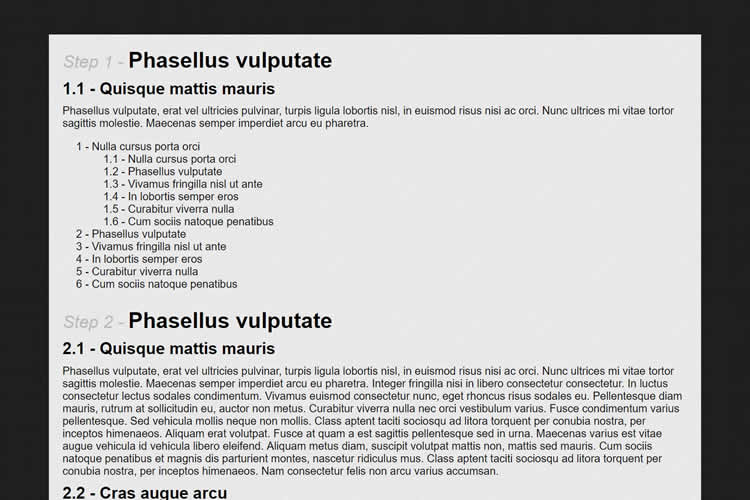
Take a look at what you will do at the end of this tutorial:

I think you should check out the demo, and download it to try out a little bit more!
Basically a counter is a “variable” that we can create with CSS but the only two possible operations that we can perform with it is to increase or to reset. For such operations we can use counter-reset or counter-increment CSS properties.
A basic usage is the first case mentioned in this post, the organized content. So let’s say you have a multi-step tutorial and want it organized automatically, what you have to do is just add this to your CSS:
body {
counter-reset: first; /* our h1's counter is zero every time we have a body tag (hope only once) */
}
h1 {
counter-increment: first; /* so, when we have one h1, our counter will increase one unit */
counter-reset: second; /* and we will reset our h2's counter */
}
h1:before { /* wow, here we will append a pretty formated Step N - Item */
content: "Step " counter(first) " - "; /* when you write counter(first) we will get its current value */
font-size: 0.8em;
font-weight: normal;
font-style: italic;
color: #bababa;
}
h2 {
counter-increment: second; /* so our h2's counter goes up.. */
counter-reset: third; /* and we reset the h3's */
}
h2:before {
content: counter(first) "." counter(second) " - "; /* we will output H1NUMBER.H2NUMBER */
}
h3 {
counter-increment: third; /* h3 goes up, up, up */
}
h3:before {
content: counter(first) "." counter(second) "." counter(third) " - "; /* and we output H1.H2.H3 */
}
As you can see its usage is quite simple. Our downside is that we rely on content: property and after (or before) pseudo-element so older browsers won’t see this. But it should work just fine in IE8+ and other browsers.
Another great thing is that you can have a “general” counter, you just have to separate multiple counters to increase with spaces. Just like this:
body {
counter-reset: general first;
}
h1 {
counter-increment: general first;
counter-reset: second;
}
h2 {
counter-increment: general second;
counter-reset: third;
}
h3 {
counter-increment: general third;
}
Using almost the same code, you can create better ordered lists, with sub-items control. So instead of just 1 – ITEM you can have 2.5.3.1 – ITEM when you have multiple nested OL’s. This is the code I’d use:
ol {
list-style: none;
counter-reset: olfirst; /* our father OL must have olfirst item reseted */
font-family: arial;
}
ol ol {
counter-reset: olsecond; /* our sub OL's reset the olsecond, third must to be olthird and so on */
}
ol li {
counter-increment: olfirst; /* when we have a item that is children of first OL, it increases first counter*/
}
ol li ol li {
counter-increment: olsecond; /* when the item is children of a OL that is children of another OL, so it is a sub OL */
}
ol li:before {
content: counter(olfirst) " - "; /* let's output our pretty number */
}
ol li ol li:before {
content: counter(olfirst) "." counter(olsecond) " - "; /* let's output our "sub-number" */
}
This is a pretty tricky attribute so you must to try it out a couple of times until you are familiar with it. But we have some tutorials at W3Schools about CSS counter reset, CSS counter increment and before / after pseudo elements that can help you a lot.
So, it is time for you to talk. Did you know about this property What do you think about it?
Get The Only Freelancer crash course you will ever need to read!
I'm a web designer and entrepreneur from Itajubá (MG), Brasil. I love writing about obscure topics and doing some cool stuff. And also I do some FREE stuff, check it out: http://www.roch.com.br/
Sunday, November 6th, 2011 16:37
Never even knew that existed, cool! :) Too bad browser support, specifically <IE8, don't support it, and so many people are still using those ancient browsers :(
Sunday, October 23rd, 2011 07:43
Thanks and Nice to see you here
Saturday, July 23rd, 2011 16:59
hi
awesome how did u do this ?
Wednesday, June 29th, 2011 09:53
Really nice tutorial. I didn’t know about this functionality.
Thx
Tuesday, June 28th, 2011 13:34
Great article! Very interesting too. I thought you were talking about a new CSS3 property, but it’s a CSS2.1 property. Never heard of it and I never seen it used by someone else in its stylesheet. Anyways great post and I can see the benefits of it.
Tuesday, June 28th, 2011 13:22
Very nice indeed.
At first i thought you want to replace the ordered list by css counters, which in my opinion is a bad idea because you loose your htmlstructure which is very important to SEO and Smartphones/tablets.
After that i saw you were just overriding them.
Very nice post! Keep up the good work
If not, then it's time to learn how to:
You can trust 1stWebDesigner to help you become a better web designer!
- Jacob Cass | Just Creative
Just enter your name and email below and click Get Updates!
Ziogas Chris
Wednesday, June 29th, 2011 09:53
Really nice tutorial. I didn’t know about this functionality.
Thx
Rochester Oliveira
Wednesday, June 29th, 2011 14:58
Hey Ziogas, thank you!
Ralph
Tuesday, June 28th, 2011 13:34
Great article! Very interesting too. I thought you were talking about a new CSS3 property, but it’s a CSS2.1 property. Never heard of it and I never seen it used by someone else in its stylesheet. Anyways great post and I can see the benefits of it.
Rochester Oliveira
Tuesday, June 28th, 2011 15:51
Hey Ralph,
Yeah, it is that kind of unknown but useful CSS properties… You just have to pay attention about :before and :after browser support!
[]‘s
Rochester Oliveira
Tuesday, June 28th, 2011 15:53
Hi Sitnik,
I’m glad you liked it :D
Thank you!
[]‘s
Brecht Billiet
Tuesday, June 28th, 2011 13:22
Very nice indeed.
At first i thought you want to replace the ordered list by css counters, which in my opinion is a bad idea because you loose your htmlstructure which is very important to SEO and Smartphones/tablets.
After that i saw you were just overriding them.
Very nice post! Keep up the good work
Rochester Oliveira
Tuesday, June 28th, 2011 15:50
Hey BB webs,
You are right, if we have an ordered content, it should be in OL’s. But as you saw we are just making them pretier here :D
Thank you!
[]‘s
Sean
Wednesday, June 29th, 2011 14:55
…prettier and much more flexible and powerful, IMHO
Rochester Oliveira
Wednesday, June 29th, 2011 16:24
Yeah Sean, this is important too :D
ravi
Saturday, July 23rd, 2011 16:59
hi
awesome how did u do this ?
Rochester Oliveira
Sunday, July 24th, 2011 04:41
Hey ravi, have you got stuck at some point of this tutorial? Anyway, tha main feature that allows us to count is the counter CSS property!
[]‘s
Mike Kennedy
Sunday, November 6th, 2011 16:37
Never even knew that existed, cool! :) Too bad browser support, specifically <IE8, don't support it, and so many people are still using those ancient browsers :(
Rochester Oliveira
Monday, January 2nd, 2012 19:24
Oh, IE is a never-ending nightmare, isn’t it Mike?
But since it’s just an enhancement, I don’t see any problems doing it via CSS :)
[]‘s
Rochester Oliveira
Friday, November 4th, 2011 14:54
thanks Laxmikant, keep coming :)
we’ll have more on this soon!
[]‘s
jessica
Sunday, October 23rd, 2011 07:43
Thanks and Nice to see you here
Rochester Oliveira
Tuesday, October 25th, 2011 13:35
Hi jessica,
I’m glad you liked, hope to see you again soon!
[]‘s
Rochester Oliveira
Tuesday, October 25th, 2011 13:35
Hey latit, thanks!
And keep coming, we have much more like this to go!
[]‘s