Front end engineering has always remained a niche skill, even with the burgeoning array of techniques and technology available.
Today, as we witness the launch of newer frameworks and tools for better web development, this domain also has undergone its own super fast makeover! But the core skills to build a solid career in front-end engineering has always been the same – passion + HTML + CSS + JS + an unrelenting desire to learn!
Your Designer Toolbox
Unlimited Downloads: 500,000+ Web Templates, Icon Sets, Themes & Design Assets

You might also like The Beginner’s Guide to Learning Sass.
What are CSS preprocessors?
A browser can only understand CSS, as the styling technique for any DOM element being rendered. CSS, as a language has its own feature set, which at times might not be enough to create a clean and reusable chunk of rules. Eg. Not being able to reuse a collection of rules in multiple selectors, unavailability of variables which may lead to ambiguous pieces of data across the stylesheet.
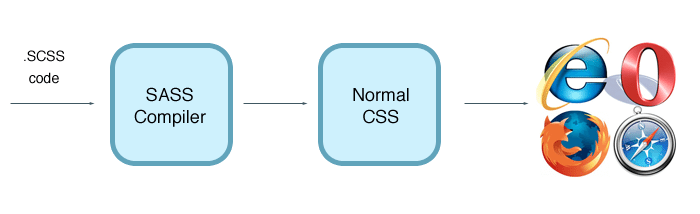
To overcome most of these limitations, the concept of a preprocessor was born – offering an advanced way of writing CSS, which extends the basic functionalities. This advanced code is later compiled as normal CSS code using respective compilers (which depends on what preprocessor you are using), which the browser will understand.
Should You use Preprocessors?
The decision of adopting preprocessors for your next project, in my opinion, should be made after much analysis and solely depending on your expertise level and most importantly the project requirement and workflow of the team as a whole. Here are some tips that might help you come to a decision:
- Not for beginners: If you are a beginner and starting to explore the fantastic world of CSS, I would suggest you get your hands dirty with normal CSS before moving into a framework or preprocessor of any sorts. It’s really important to understand and be able to use the core concepts of any language that you work with, and that’s true for CSS as much as any other programming language.
- Are you a team of front end developers? As a team of front end developers, adopting preprocessors will be a great move. But only if somebody on the team really knows how to handle huge CSS files and structure them accordingly. By making use of the powerful features offered by the language, it is important to first structure the whole CSS into reusable chunks and define a strategy for CSS organization. Eg. Are you going with multiple CSS files for typography, forms, layout, etc. Are you going for theme-able UI, where you might need to use variables extensively, etc.
- Are you willing to cross the barrier? Adopting preprocessors mean you are going to be implementing more programming concepts into your CSS coding approach. There will be a lot of concepts that are native to any basic programming language, which you might want to learn and implement, by using a preprocessor. This means, you will need to brush-up on your programming skills and might forever change the way you see a CSS code. If you are willing to cross this barrier and feel ready to embrace the change confidently, this is for you.
Which preprocessors to use?
There are a number of preprocessors available, and deciding which one to stick to depends on a lot of factors. Each of them have their own pluses and minuses, and the final word should be taken after closely considering your project requirements, the team’s ability to adapt to quick and long-term changes in coding approaches.
Listed below are few of the available preprocessors:
- LESS
- SASS
- Turbine
- Switch CSS
- CSS Cacheer
- CSS Preprocessor
- DT CSS
- Stylus
- Compass (built on top of CSS SASS)
In this article, SASS is my preprocessor of choice (since I have been using it intensively for a while, and am truly in love with the technique. In fact it has increased mine and my team’s productivity!).
How to get started?

Getting started with a preprocessor is not rocket science. As I mentioned earlier, a CSS preprocessor will have its own set of syntax, which finally gets compiled into normal CSS, which in turn, the browser will understand. So, all you need is to choose a way in which you wish the preprocessor to get converted to normal CSS, and then you are good to go!
As far as SASS is concerned, it requires Ruby to be installed in your system, because it was coded using Ruby, and most importantly install the SASS gem, by typing in the following command in your command line or terminal:
gem install sass
There are 3 ways in which a SASS file can be converted to normal CSS, like:
- Using command line
- As a standalone Ruby module (Ruby on Rails is an open source web framework, which enables millions of programmers worldwide, to create stunning web apps)
- As a plugin for Rack-enabled framework (newbie’s, please don’t hurt your brain trying to understand what this means.)
Using command line
This is the most comfortable and easiest way of using CSS SASS. Once Ruby and the SASS Gem are installed, you need to let the program know which SASS file needs to be converted to CSS, and here is the command for that:
sass input.scss output.css
This command, converts the file input.scss (by the way, .scss is the extension of your SASS based file, which stands for SASSy CSS), to output.css, which is normal stylesheet with good old CSS syntax.
But, as a front end engineer, you might not want to execute this command every time you make a change to your SCSS file, as it can become a cumbersome job to do. In that case, you can keep a watch on the SCSS file, and convert the same to normal CSS automatically, whenever there is a change to it, and here is the command for that:
sass –watch input.scss:output.css
As a standalone Ruby module and as a plugin for Rack-enabled framework
I would like to concentrate on the first method of using SASS and am not moving into the other 2 , as the scope of this article is not only confined to setting up SASS. You could refer to http://sass-lang.com/docs/yardoc/file.SASS_REFERENCE.html, for an in-depth understanding of setting up SASS, and more
With great power comes great responsibilities – the power of SASS
Now that we have decided to go with SASS, and have set it up, its time to spend some time coming up with a strategy and doing some ground work to make sure we are structuring scalable and maintainable CSS. With the powerful features that SASS has to offer, and with a sound knowledge and experience in coding large-scale CSS, we are good to go.
Here are some key features of SASS and concepts, which can get you to a flying start:
1. @import and modularize
The first thing to do while starting to code CSS is to finalize the strategy in modularizing the CSS, for example you can decide if you are going to create separate stylesheets for each basic element of the UI, like typography, forms, iconography, buttons, layout, reset etc.
Though it is recommended that you use multiple files for the sake of maintainability, it is always a front end engineers call, depending on the ability to smartly group the rules in a single file. SCSS files can be included within another, the same way as you do for CSS, with the following piece of code
“import style”, where style is the SCSS file to be included.
2. Variables for maintainability
Variables is one of the revolutionary features that SASS CSS brings to a front-end engineers armory. This feature can add a lot of value to your code, in terms of maintainability, and in cases where you are required to make app wide changes in a single go. Here is how you declare a variable using SASS: $primary-color:#ccc;.
Here primary-color is the variable name and #ccc, is the color value that is stored in it. You can assign numbers, strings of text, colors, boolean and list of values separated by commas, to a variable.
It’s important to identify exactly what needs to be converted to variables, for a maintainable SASS file. One can declare all the color values, images and font-family in variables, put all those variables in a single SCSS file, and include it in the main SCSS file. This will bring much more control over the theming of the UI, where we can quickly change the color values, iconography and other parameters which define the general look and feel of the UI.
3. Mixins improves reusability
One of the core attributes of a good CSS code is reusability. Identifying reusable patterns across the UI, and creating smart chunks of reusable rules is a skill that every CSS coder should possess. SASS supports this in a big way, through ‘mixins’.
Mixins are reusable sets of styles which can be used throughout the stylesheet. Correct usage of mixins can reduce the usage of non-semantic stray classes like border-red, no-padding etc. Here is an example SCSS code:
@mixin notification {
 padding:10px;
 border-radius:5px;
 font-size:1em;
 }
 .error{
 @include notification;
 background:red;
 color:white;
 }
Resulting CSS code:
 .error{
 padding:10px;
 border-radius:5px;
 font-size:1em;
 background:red;
 color:white;
 }
Here, the first section of code, declares a mixin named ‘notification’, which has a set of 3 rules defined inside. In the second section of code, the selector ‘.error’ reuses the mixin, along-with its own rules. ‘@include’ includes the mixin rules within a selector’s rule sets.
4. @extend reduces redundant rules
Extend is one of the most beautiful and interesting feature of SASS. This is similar to mixin, but brings a ton of other goodies with it as compared to mixin. Using @extend enables a selector to inherit the rules of another selector. Wondering how it is different from a mixin? Watch the following example closely:
.error{
border:solid 1px red;
background:#fdd;
}
.seriousError{
@extend .error;
border-width:3px;
}
The above code will be rendered as CSS, in the following form:
.error, .seriousError{
border:solid 1px red;
background:#fdd;
}
.seriousError{
border-width:3px;
}
Effective use of ‘extend’ can bring scalability and flexibility to the code, to a great extend.
5. More advanced features
SASS comes loaded with much more features like if, for loops, @debug, @warn, @while etc, which adds a lot of value and productivity to the team, as a whole and makes the stylesheet file modular, scalable and maintainable. I am planning to spend some time for a more detailed article on a step by step tutorial on building a SASS based style-sheet, and will hopefully cover all these features in detail.
Some disadvantages of Preprocessors
As with any other technology, to be able to start using a preprocessor, the first thing that one might need is just one thing – PASSION! Everything else follows. But there always is a first step … and here are some hurdles that a designer might face before embracing CSS preprocessing.
- The terminal / command-line hurdle: since SASS requires quite a little bit of command-line / terminal knowledge, designers might find it difficult to cross this barrier for the first time. But persistence always pays off. With Google and a good internet connection, it’ll be a breeze to overcome it. In this article – Musings on preprocessing, Chris Coyier has covered some tools which are of immense use for designers, to start using SASS, without the hassle of terminal and command-line
- Since most of the concepts/features are borrowed from programming languages, coding SASS will be a difficult business for designers without much programming exposure. Though it will give some starting blues, it’s not so hard to overcome.
In addition to the hurdles mentioned above, there are quite a few negatives which might affect the performance of the page. I have tried to jote down a few of them below:
- SASS generates an insanely deep grouping of selectors, if not used wisely, this can put more pressure on the browser rendering engine to try to target the tag, as per the selector mentioned. So, it’s really important to smartly organize and arrange the selectors, so that there is no deep grouping (eg. SASS can generate selectors like .header .subheader .nav.primary .listitem .active .dropdown{color:red; font-size:2em;})
- The syntax can become a little confusing for a beginner, as SASS uses a nested brace approach to segregate rules, which is much different from the normal CSS syntax (eg. .header{ .subheader{ color:red;}})
- Due to complex and deep grouping of selectors, specificity nightmares can keep you up at night if not handled sensibly.
The verdict: To SASS or not?
If you are still wondering about saying yes or no to SASS, here are some tips. Get your hands dirty …. and start coding it out, and explore the possibilities. Evaluate the pluses and minuses with your requirements and make sure the team is comfortable embracing it. The transition can be slow, but I believe it’s worth it.
In my experience as a team of front end engineers, our hard-work, in ramping up and spending countless hours getting comfortable with this new way of coding CSS, has started paying off, in the form of increased productivity and more maintainable and scalable SCSS files, which will be good for years to come and can easily transition hands seamlessly.
This post may contain affiliate links. See our disclosure about affiliate links here.