You’re probably losing out on clients just because your portfolio doesn’t give them all of the information they need. Based on what we’ve learned from running AwesomeWeb, this is what clients look for most.
In the same way that a logo represents a brand, your portfolio represents your personal brand. If you get it right, you can have clients forever.
Your Web Designer Toolbox
Unlimited Downloads: 500,000+ Web Templates, Icon Sets, Themes & Design Assets
Starting at only $16.50/month!
As a freelancer, your biggest struggle is finding good, consistent clients. But very few freelancers take the time to craft their portfolio or even consider, “what do clients want to know about me?”
Today we’re going to look at the lessons we have learned from analyzing member profiles on the AwesomeWeb job search site. We know these improvements will get more eyeballs to your project page, because we see which designers get most client inquiries and why. Let’s start and take a look at some graphic web design portfolio tips.
Oh, and stay tuned for a special announcement at the end.
Table of Contents:
- 9 Things a Good Portfolio Website Needs!
- 7 Mistakes that Force Potential Clients to Dislike Your Portfolio
- How to Rock Your Own Web Design Portfolio to Get Clients
- 10 Easy Steps On How To Create A Good Photography Portfolio
- Create a Classic-Styled Portfolio Design in Adobe Photoshop
- Outstanding Commercial WordPress Portfolio And Photoblog Themes
9 Things a Good Portfolio Website Needs!
When working on your portfolio site design, think about the elements your future client should be able to find. Many designers make the mistake of designing a creative portfolio page, but forget to answer important questions their client will have, when he considers hiring the designer.
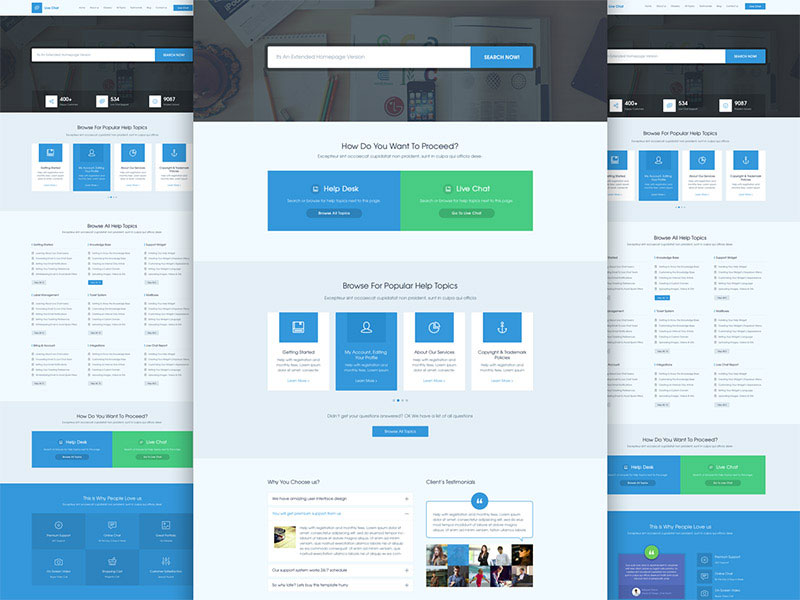
Live Chat – A Design for Help Desk & Support page by AwesomeWeb member Masum Rana
1. Make Visuals Not Only Beautiful, But Detailed
A picture says more than a thousand words. In the design world, visuals are especially important. Clients will see the visuals first and if he likes what he sees, he will continue digging for more details. Make sure you build that interest in clients with a beautiful presentation of your project.
Different designers and developers have different specialties – your task is to find a way to represent your skills the best way possible. If you are a logo designer – ensure you add a high quality picture of logo and add black and white variations. Put that logo on business cards or packaging designs to show you are a professional.
If you are a developer, find a way to showcase your expertise. If what you have built cannot be presented well in picture, make sure you explain in the page the importance for the client to check live website and keep explaining your expertise on the rest of the page.
Tip: If you are building websites, don’t just include a beautiful header with a nice image in the background. Create a high quality snapshot of the whole website, so client can immediately see the details. Only header snapshot doesn’t give enough information about your design skills to the client.
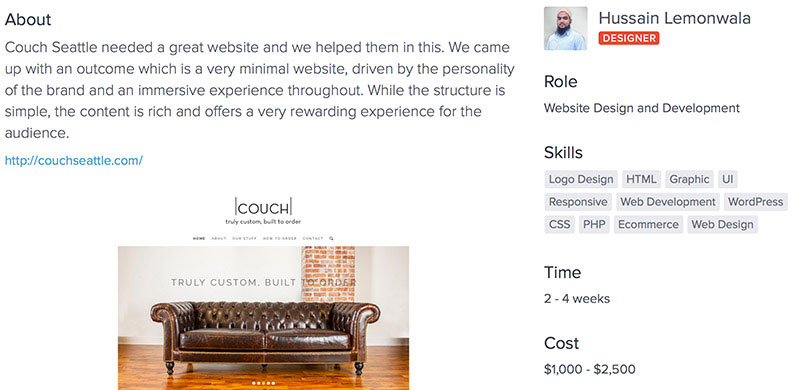
These are the details you should have under each project. Example by AwesomeWeb member Hussain Lemonwala
2. How Much Time It Took To Finish a Project?
Clients want to know how quickly you will be able to finish the work for them, they want to know exactly what to expect. Most designers and developers don’t even give approximate completion time, because they say it always depends on the project.
But you need to look from the client’s perspective – your client wants to know approximate details as fast as possible. Maybe he needs to sell his project idea to his partners or his boss. Your client needs to know how much time it will take and how much it will cost. You must compromise and give estimates very early, because your client wants everything done yesterday.
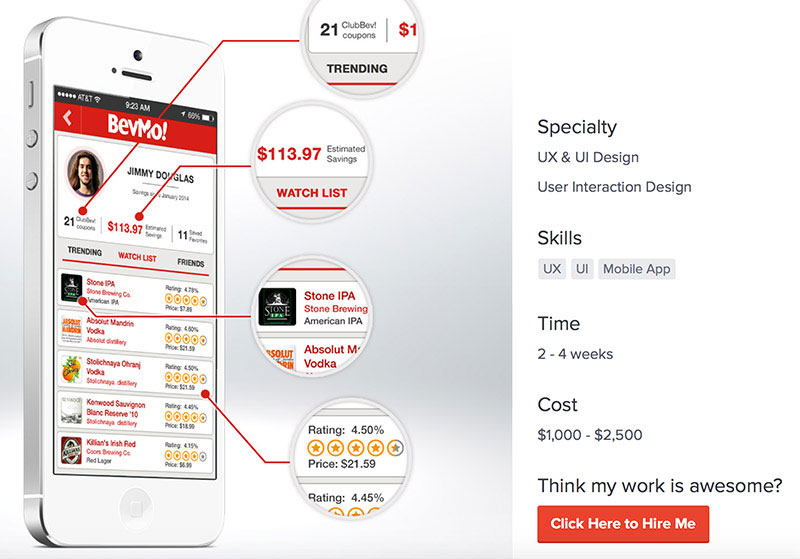
Club BevMo Mobile App project page by AwesomeWeb member Larry Sawyer is a great example how to present your work and include useful details.
3. How Much Project You Created Cost?
I would say that your client’s main criteria will be these three points. Do they like what they see, how much time it will take and how much will it cost? It’s up to you how you price your services, there are different clients for different designers, but be clear about your pricing.
Clients want to know the answers to these three questions as fast as they can and you will do a great service to them if you do that clearly. This way you will attract the perfect client and will not waste time compromising or answering the same questions over and over again.
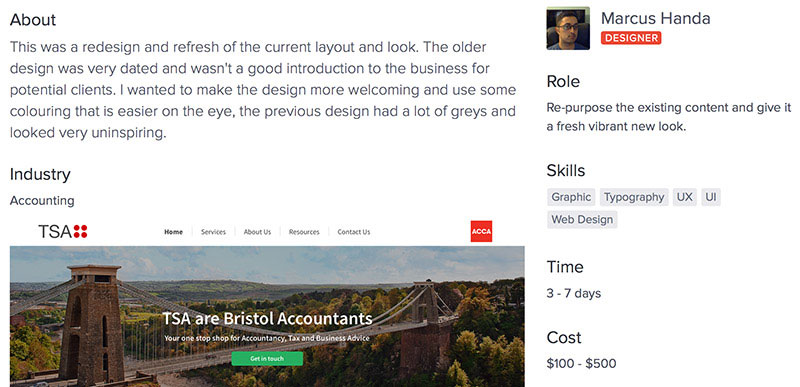
Marcus Handa shares some details about the project when doing the redesign.
4. What Are Some Challenges You Solved? What Did You Improve?
Okay, so the first three points were cake, everything else is the icing on the cake. And we all know how much we enjoy the icing, but it’s still not the cake. Before you move on, make sure you answer these three questions very well on your portfolio page.
Now, when the client has got the answers to his most immediate questions, he will want to dig deeper and get more details.
Explain what were the biggest challenges you solved in the project? What was the process you went through to come up with the finished result? When you share your ideas, you show your expertise (or lack of it) and build trust.
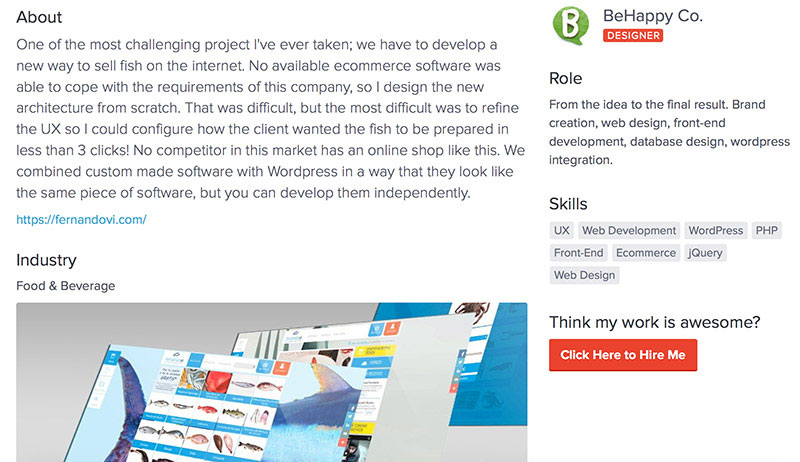
BeHappy Co. links to the finished website as everybody should on his portfolio page.
5. Give A Link To A Finished, Live Website
Why, oh, why so many creatives don’t share a link to a live website – a place where your work is used? If you cannot show the live example, the client will think in his head – “Is this a real project?”.
Just do it – if you are a logo designer, include a link to website where logo is used, if you are icon designer – include a link where your icons are used.
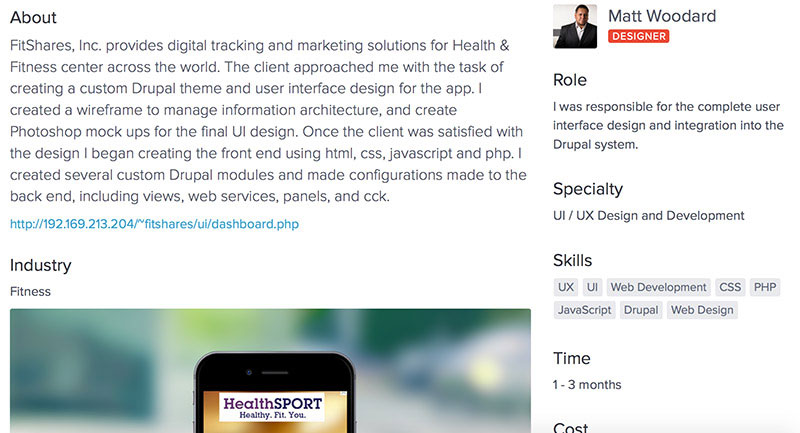
Matt Woodart shares how his client approached him and what steps he followed to finish the project. Writeup doesnt need to be fancy!
6. Do A Creative Writeup About Each Project
Share the history how this project came to life. Maybe you have an interesting story to share how many revisions you did, how the client found you, how you worked for several nights and days for a project just to get it out on time. Give more details, share short, fun stories and show your personality. Clients are humans with emotions, they will relate to you better if you open up first.
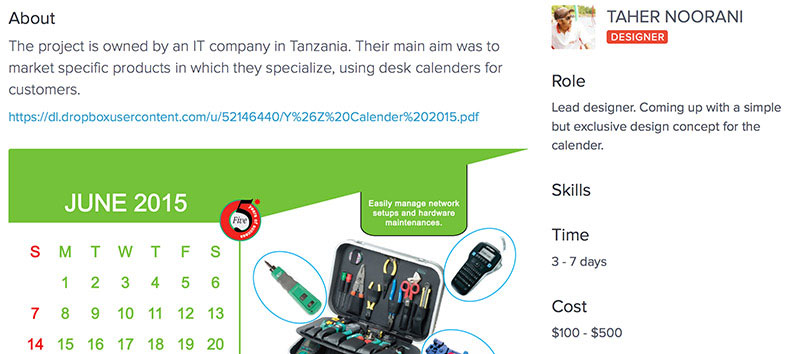
Taher Noorani clearly explains his role in the project – lead designer.
7. What Exactly Was Your Role In The Project?
If you didn’t complete the whole project on your own, explain what it is exactly you did. When you add the role, you allow your client to understand if it’s possible for him to find one person, who will complete the whole project or he needs to hire somebody else as well.
Clients will have more trust in a designer, who knows his strengths and weaknesses. Less is more.
If you were partnering up with another developer to complete a project, share that as well. You might both get hired.
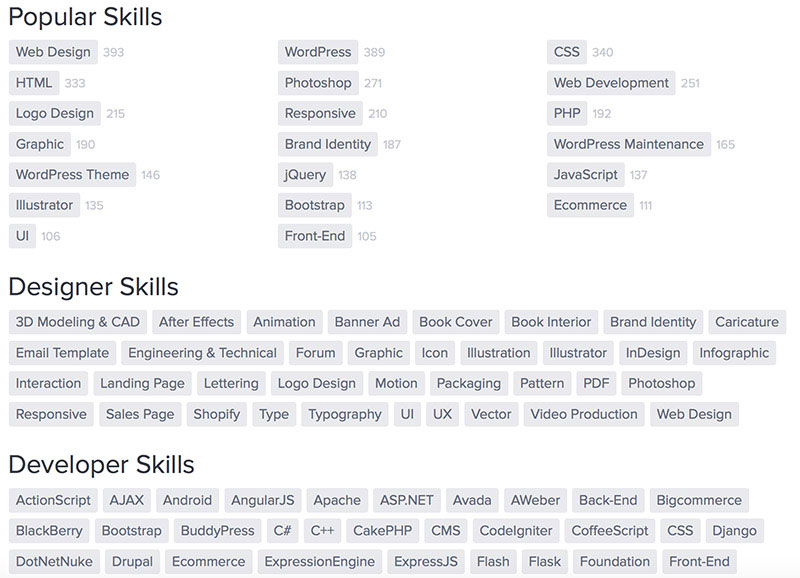
Make it easy for clients to find you by sharing the skills you have. Check AwesomeWeb skills directory.
8. What Skills Did You Use When Working On The Project? What Industry Was It?
This is where you can share more technical terms for tech savvy clients, who know that they need to find a Ruby on Rails developer or a UI expert. Explain what programming languages or software you used on the project.
As a side note, include what industry the project you completed was involved in. Your client is more likely to hire you if you have already done a similar kind of work for another client in the same industry. They will know then, that you understand more about the industry than any other designer the client would hire.
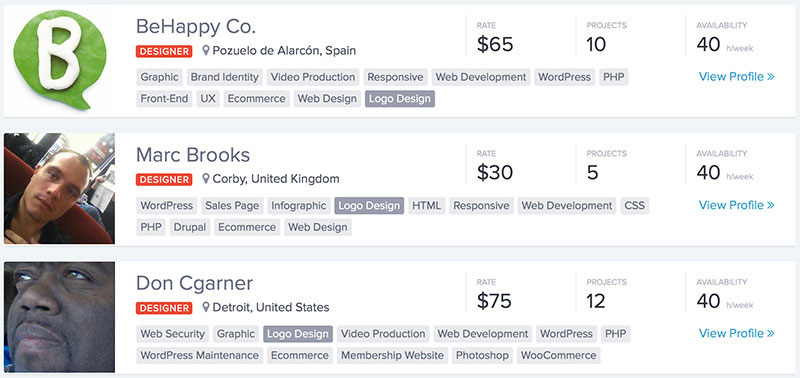
AwesomeWeb drives traffic to your profile allowing you to focus on what you do best.
9. Lastly..Do You Drive Traffic To Your Portfolio Page?
I congratulate you if you have taken into consideration all of these things in your portfolio page! You are definitely standing out from the crowd right now (if your work is good)! But why so many brilliant designers and developers still aren’t getting enough clients?
There is no way clients can hire you, if they cannot find you!
There is no point of having a great portfolio page if nobody is going to visit it. You must drive traffic to it and that’s where AwesomeWeb comes in place. On AwesomeWeb we work hard to make sure we help designers and developers to improve their member profile pages so they show up on search results, for clients who are most likely to hire them.
We are responsible for driving traffic to your member profile as you are responsible for answering possible questions the client might have when he finds you. Driving traffic to your portfolio site is a time consuming task and that’s why we suggest you to join AwesomeWeb. You are a great designer or developer, we are great in marketing. We connect great clients with great designers.
Portfolio Search is Here!
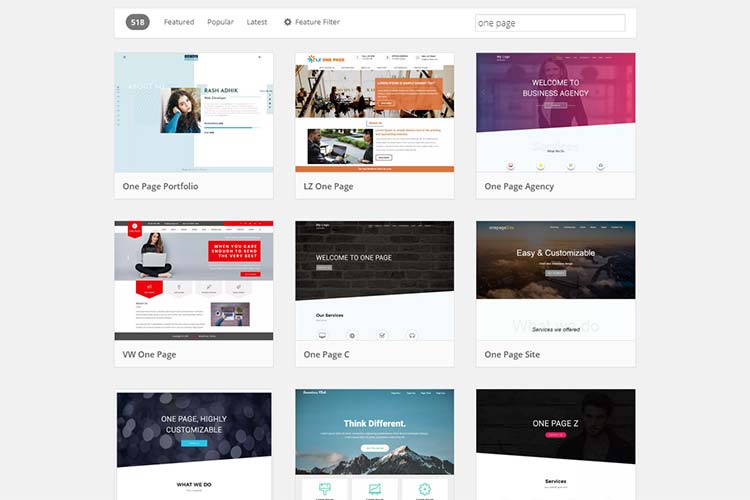
At the beginning of the article, I told you we have a special announcement from AwesomeWeb. Today we are releasing portfolio search, which will help clients find you even better. If you have great visuals – if you are a graphical, web designer you will love portfolio search.
This is how it looks:
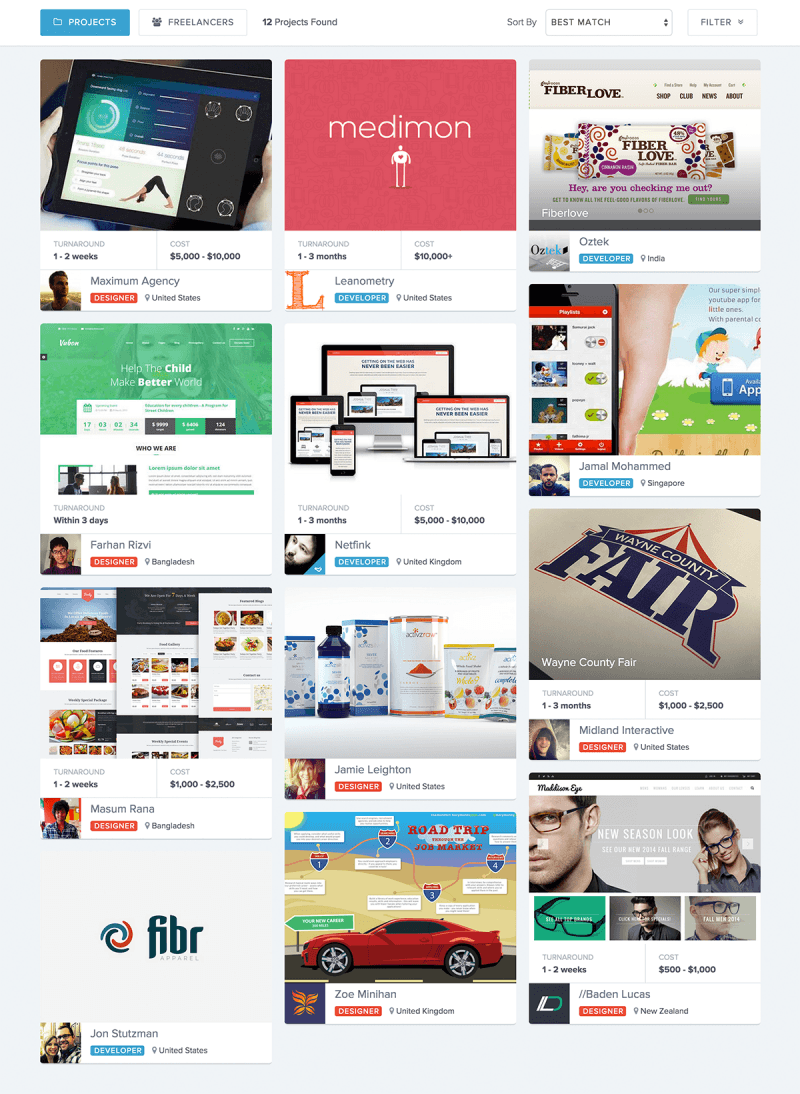
But hey, go ahead and check it for yourself! Get some inspiration or do some competitive analysis!
As a freelancer, portfolio search will also be a great source of inspiration.
See what other great freelancers are charging and how much time it took to complete. Find these 9 questions answered on all project pages. This is great for freelancers who struggle to get clients and price their services.
Go ahead – try portfolio search right now! Learn more about other freelancers and tell me what you think!
Now let’s look at some mistakes that can prevent clients from deciding to hire you.
7 Mistakes that Force Potential Clients to Dislike Your Portfolio
A portfolio is a collection of documents, works, progresses and basically everything you’ve done and want to show off. The point of a portfolio is to assist you in the process of presenting your skills, knowledge and experience. A portfolio has the aim of showing who you are in a short but detailed form. It’s important to always have a portfolio as you never know what kind of job opportunities you may have in any unexpected moment. That doesn’t mean you have to create one and carry 5 copies of it with you — instead, you can always keep it online!
Anyone can create a portfolio but online portfolios are mostly used by IT workers, such as designers and developers. This group represents the biggest part of portfolio-owners on the internet. In this article we will try to explain the key points of any successful portfolio and analyze the mistakes made which really drive clients from your online portfolio.
Your Domain Name

This is the most basic mistake which can be made. If you consider yourself a professional, you must keep the domain name professional as well. The best idea would be using your name and surname as the domain name as it’s neither too personal nor crazy or strange. It will only say that it is your personal page, and that’s exactly what you want to achieve. The bad part may be the unavailability of the domain name.
In 2011, 300 million websites were created and each of them used a unique domain name. If finding suitable domain name is an issue then you should think about other possibilities as well. You may reduce your name or surname to one letter only, or, you may use a common word like “studio”. While no-one will judge you for using any extra word in your domain, it’s not a good practice to use a word like “studio” in your domain name if you actually don’t own a studio and work by yourself. It may make clients think that you are trying to portray yourself as bigger than you are. You may also use words which represent you or anything that may come to mind, but be sure not to let your imagination invent some strange and creepy names!
Bad Domain Pick
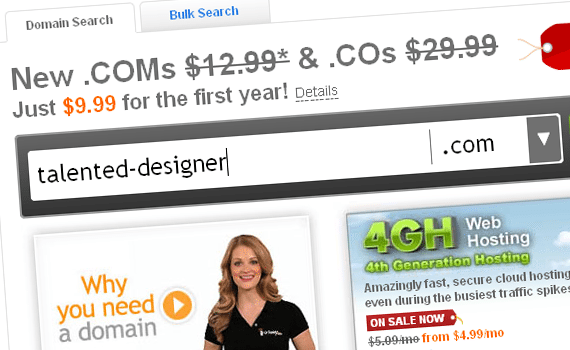
It is a very bad practice to use adjectives in your domain name, especially the ones which would describe yourself. It is the client’s job to decide whether your designs are really amazing and you are a “talented designer” or you aren’t. You shouldn’t think for your clients and impose your ideas to them.
Good Domain Pick
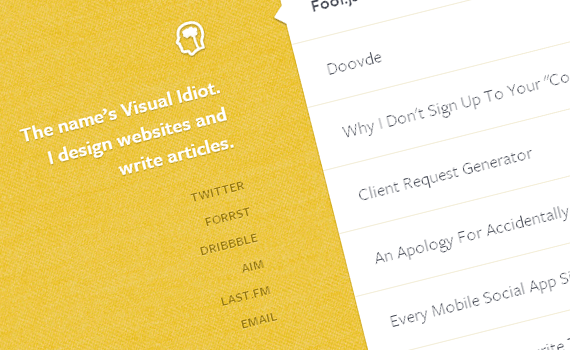
While we already said that using adjectives in domain names isn’t a good idea, I should admit that Visual Idiot has done an amazing job choosing a domain name. It’s actually his nickname which makes him popular in the design community. It would be strange using the word idiot in any domain name, but, you’ll immediately forget about it as the site loads. The stunning work VI has done will make you admire him and his skills. I can actually say that his domain pick is perfect and it doesn’t make him appear in a negative space at all.
Suggested Reading – 6 Must Read Tips Before Registering A Domain Name
Layout
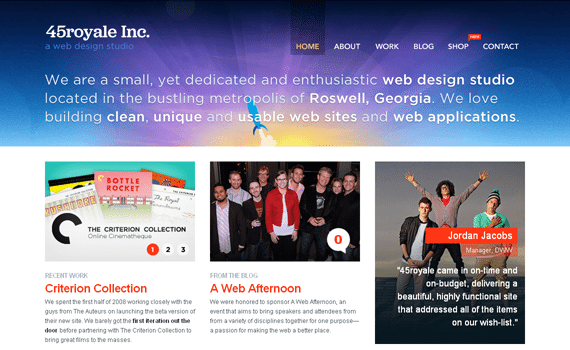
Another key element which makes a big difference is the quality of your portfolio layout. The first impression matters much, that is why you should always try impressing your clients from their first moments being on the website. Your layout must be the one which will impress your potential clients. You can’t convince someone that your work is amazing and they should hire you if your own website lacks quality. A visitor won’t ask or seek for the prices you offer, or your portfolio if your website won’t have at least a decent look. Minimalism is totally accepted in your designs but you shouldn’t confuse minimalism and simplicity. You don’t want your site to look poorly designed and lack basic functionality. Your website’s quality should never be second rate to your work.
About Yourself
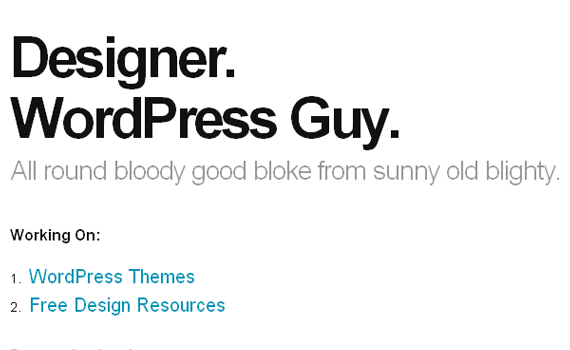
People like to know as much as they can about someone they may hire for a job. Before it goes deep into communication and several mails, it is very good to let your visitors know you from the beginning. This doesn’t mean you must post everything from your medical cart to parking fines.
You shouldn’t go too deep into personal life stories, but you should at least provide your name, and details about your professional studies and experience. Obviously this information shouldn’t be located in random places and the best location for it would be an “About” page. There have been several discussions on how to create great About pages so that your visitors won’t leave, at least not because of a poorly written About page.
Two More “Obvious” Mistakes
- Live-Chat – These services were invented with the purpose of helping customers on e-commerce websites where instant help is needed. In theory, live-chat widgets can be present on your website, it’s actually an unnecessary element, but it depends on the specifics of your website. A team, or a medium-large design studio could implement live chat if they have the right person and time to answer all the questions which may occur, however, if you are a lone freelancer there is no point implementing this time-consuming feature as all the questions could be asked by using the contact form and your job is not answering live chat questions.
- Inefficient Use – Another mistake you may be doing is using your portfolio inefficiently. I do not want to say that you should squeeze juice out of your portfolio — what I want to state is that you shouldn’t confuse it with a blog or other personal website. Everything has it’s aim and you shouldn’t mix two different things into one. Your thoughts about Joe’s shoes shouldn’t be near your work examples and your CV. You can always set up a blog on your website, but it should be a different page/category. While this is admissible, you shouldn’t talk about Joe’s shoes on it either. Why? Because most of your eventual clients are not interested why Joe has chosen sneakers instead of boat shoes. I can say that having a blog on your portfolio website won’t hurt you if the discussion and posts are work related.
Conclusion
To sum up, a great portfolio consists of 4 basic parts: domain name, layout, information about yourself and the structure of your page. Each part of it must be well thought out and planned. You don’t want to miss something which you may regret later. Every small detail should be taken into consideration because your portfolio is how you present yourself to strangers. These strangers may want to hire you, and the ultimate goal of a portfolio is to showcase your work, and get more work. In case you need someone to have a look at your design and give you some feedback, you can always ask for some on Dribbble, Forrst or ConceptFeedback!
We have covered a lot already, but we are still going strong. In the next section Wes Macdowell will give you some great tips for building your web design portfolio.
How to Rock Your Own Web Design Portfolio to Get Clients
[firstwebdesigner_subscribe]
How Important is Your Portfolio?
Your portfolio is a dynamic, ever-changing collection of your works, skills, accomplishments, and experiences. It puts a spotlight on your best works and achievements as well as your values and experiences.
Every information you include in your portfolio is critical because it will not only reflect your capabilities but will also serve as a marketing tool to attract potential clients.
So how do you create a portfolio that rocks and attracts potential clients?
Today’s episode of the 1WD Show features Wes McDowell, the Creative Director of The Deep End, a digital and branding agency, and he will share how to create a portfolio that does just like that – attract potential clients.
Wes pointed out that most of the time, web design professionals indeed create a portfolio but never really give careful thought that they can do more about it than just showcasing who they are and what they know. He added that your portfolio shouldn’t look like it’s just an afterthought, but you can make it to actually look like a 24/7 ambassador that represents your brand.
1. Videos
When you look at the websites of most creatives, they’re nowhere to be found. You can see the projects and accomplishments they have done, but the website remains faceless and impersonal. Bear in mind that companies hire people. They want to see who they’re going to be working with and before that, they want to see if you are a good fit for the company.
You can utilize videos to work for you in this way, making your website more human and giving it more personality. Placing your photo or image in your web site is good, but placing a video ups your game because they can see a real talking and thinking human being.
But what do you put in your video?
Your video should serve as a welcome greeting; therefore, it should have a welcoming vibe to it making visitors and potential clients feel welcome. Just like when you’re greeting someone face to face, you should also express how happy you are to see them visit your site. Introduce yourself briefly and give them an overview of what you do.
Never sell your product or services on the video. Rather, it should just be enough to pique their interest to make them know more about you and what you offer.
2. Case Studies
Putting all your successful projects in your portfolio is good, but creating a case study from them is even better. Case studies don’t just show your proficiency, but it also shows your understanding of various design principles that you have used in your projects. In addition, it shows people the process the project has undergone and the challenges you have faced to complete the project. Most importantly, though, case studies build confidence in your potential clients that you can do and finish the project.
What should you include in your case studies?
Your case studies should help other people see your creative process and, at the same time, gain knowledge from it. It’s true that all of us have their creative side, but not everybody uses their creative energy in the same way. Thus, your visitors are always curious how you do it.
Your case studies don’t just have to be the projects you did for others, but it should also include projects you did for yourself. Furthermore, it also shows potential clients other skills you might have. For example, most of your projects might focus on web design, but a fun project you did focuses on creating mobile apps.
Some necessary elements that you should include are:
- Overview of the project
- Services you provided and tools you used
- Client testimonials (a video testimonial is much better)
- Dedicated page
- Screenshots
3. Separate Pages for Each Project
Another mistake most creatives make is thinking that their client can find every project they have made. You have to understand that visitors to your website will not play the “treasure hunt” game and find all your projects one by one. Like a good host, you have to make it easy for your visitors to find them.
The best way to do this is by creating thumbnails for your projects on the landing page of your portfolio. Each thumbnail should be clickable, leading to that individual project’s own page. Then, each page should have a heading specific to each project or industry you have designed for. This serves as an opportunity to create long-tailed keywords for each of these projects so that it will be easier for potential clients to see them when they search it on the Internet.
4. Call to Action
Your call to action will be the deciding factor whether visitors will decide to become clients. You don’t just want people to look at your work rather, you want them to call you and, eventually, hire you. Wes suggested, as what he does, that your call to action should have a quote which funnels them to a page with a contact form.
That page should include specific questions that would give you more information regarding what the client wants or needs, so you can call or email them back with a quote. Don’t go for general CTAs. Instead, make it crystal-clear and laser-focused because you want to get hired.
Conclusion
Don’t expect projects to just fall into your lap just because you have a portfolio. Make all the elements inside it purposeful. All of them should lead to the fulfillment of that one single goal – YOU GETTING HIRED.
This Episode’s Sponsor
 WebdesignerNews.com is this episode’s sponsor. It’s a single location to discover the latest and most significant stories on the Web.
Now lets take a look at how to create an awesome Photography portfolio.
10 Easy Steps On How To Create A Good Photography Portfolio
Creating a showcase of photographs is not an easy task and most of the time the photographers have basic or no knowledge of design at all. Moreover, creating such a portfolio in which the images have to be in focus is a tricky task and even the more experienced designers might fail providing a good layout, therefore I thought of sharing with you a list of tips for designing photography portfolios.
The difference between a web design portfolio and a photography showcase is huge. The focus has to be on pictures, not on content, while the normal way of designing, with the header, content box, sidebar and footer changes totally from a layout to another. The more inspired and original you can be, the better your design will be. When you are a photographer, it is very important to have a platform where you can show clients your work – this has the same importance as for a web designer.
Most of the time the photography portfolios are heavily reduced to a showcase – which can be the home page, a contact section and maybe an “about me” page. It sounds simple, but there are still many things to figure out before being able to design properly such a layout.
1. Think of your target
Yes, you’ve heard this before so many times – and I know it annoys you. It is so simple to just overlook it and why not do it? In the end all of us want as many clients as possible and don’t want to make our audience narrow. Well, I tend not to agree with you, and I would suggest you to think seriously about who you want to work with.
A good example is a wedding photographer – this page would be totally different from the one of a roadshow photographer. It will probably be white, including many circles (which suggest continuity), will have maybe floral arrangements and might be full of happiness and sunshine. If you are a roadshow photographer, you might want to design with a darker color, keeping a balance between organized and chaotic (although do not get too close to organized) and so on. Think of what kind of clients you want to attract and then design for them. It is so important!
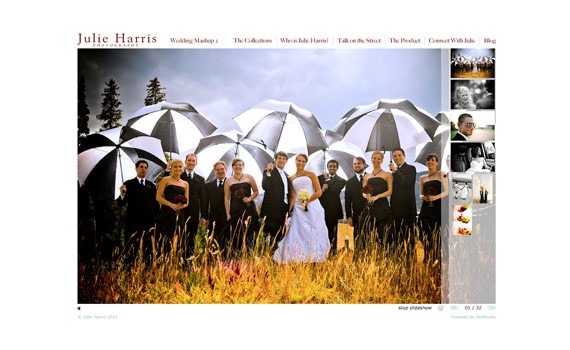
White and clean – wedding photographer portfolio
2. Think of the number of images
You have to do this because most of the layouts look good with a small number of pictures uploaded, but how will it look when you will have an odd number of pictures to show? There needs to be a balance between the number of pictures on the page and the negative space you leave between or around them. If you have many pictures, consider using pagination or categories to separate them – and do it for the sake of the user. Don’t forget that they never saw you pictures before and if you are really interested in them, it takes a lot of effort for the human eye to analyze them. Don’t make it even more difficult for the visitors.
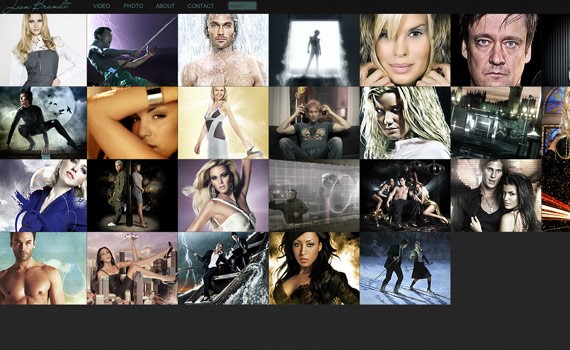
This page is a good examples of how to present your work.
3. Make the images stand out
When I say this, I usually mean keeping a high contrast between the pictures and the background; and I usually recommend having black as background, because there is most of the time more contrast than when viewing the showcase on white. This tip is good for bringing out the contrast of the photos and it is also a good idea to try to look at the pictures on different backgrounds, so that you make the best out of them.
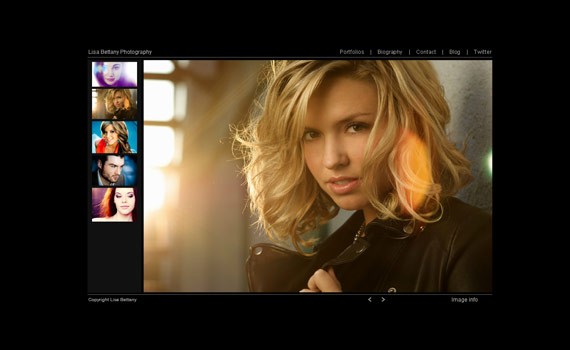
Good example of contrast between background and picture
4. Consider the quality
When I visit a photography portfolio or even a showcase, I expect all the time to be able to see the pictures in full size if I click on them – and it would better be huge. I want the pictures to look good and fit my screen if I would like to have it as a desktop background. And not only about this – but if I want to see all the details, I can’t do it properly on a small picture.
To avoid keeping the visitors wait too much, have two versions of each picture (you can resize them with a JavaScript too). This way if somebody is interested in seeing one of your pictures larger, he knows that this comes with the price of loading time.
5. Be flexible
According to official statistics, less than 1% of the internet users have 800×600 displays. However, this does not mean 800×600 is the smallest resolution you have to design for – think of mobile devices as well. It is not highly probable that a potential client will want to use his bandwidth with your pictures, but what if they are on a wireless connection? This means you have to think about all the possible resolutions.
You can do this by making you pictures be 100% of the width of the div which displays them, and the height can be set to auto. This will make the pictures resize according to the screen. It is not difficult to do and is very useful, so why not spend few more seconds to customize this?
6. Show only the best work
This is also for the web designers, not only for photographers. It is always good to make a point fast and then let the visitor make a decision – the World is moving fast and we don’t have time to view all the crap work people have done. Therefore only show the top-notch work and let the potential client move on, if he wants to. Don’t keep him tight – he will leave without seeing every piece of your work anyway.
Is is also a good idea to order your pictures. Even if you select your best work, some of your pictures simply have to stand out. Put them first and leave the other good ones for the second page.
7. Describe the photos
When potential clients look at pictures, they want to know who it is they are looking at. They might also want to hire one of the models, which is not a bad thing either. Write short notes about each one of your pictures and let the client know what is he looking at. It is also much more important to give each picture a short description than a title. Naming the tools you’ve used for shooting and post-processing might be a good idea too.
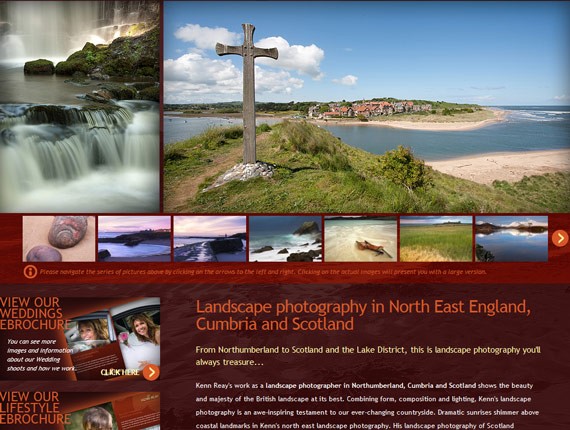
Kenn Reay talks about his pictures in the description.
8. Emphasize the contact information
Sure, the most important thing is to show your work, but how does this help if you do not get clients? It is important to lead the visitor to your contact page if possible, otherwise always make it clear that he can contact you right away. Having the e-mail address in the footer might work too, but it depends a lot on your layout. It is entirely your decision which information you give out, but I would also show them I am present and active on social media.
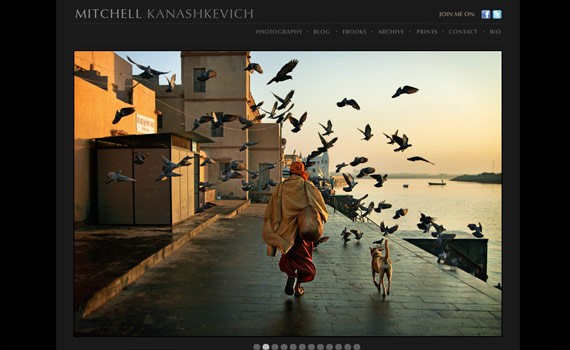
By having a normal navigation, the contact link does not have to be emphasized, because it is where the user knows it should be.
9. Ask for feedback
I never release a website before asking for feedback – it is just in the manual. Always ask the others – experts or not – about their opinion on how your site looks. It is really important to know what the others think, especially because after hours and hours of looking and analyzing your portfolio, you do not notice the small details anymore – and this is crucial. Never release a website before asking people for opinions.
10. Keep it dynamic
By this I mean that you have to keep your portfolio updated. It is not difficult to do this anymore thanks to the bunch of tools we have at our disposal. Nobody wants to see a good photographer not uploading his latest work and potential clients do not enjoy this for sure. Never replace old strong images with bad ones. Don’t forget about tip #6, showing only the best work.
Conclusion
Having to design a photography portfolio is not an easy task, as said in the beginning, not even for an experienced designer. There are many small tips you have to take into consideration and I hope this list helps all of you in designing better for our fellow photographers out there. With this is mind, I share with you a list of good links on the same topic.
8 Tips for a Great Photography Portfolio on I Shoot Shows
Great Photography Portfolios for Your Inspiration on The Photo Argus
10 Cool Photo Portfolios and Gallery WordPress Themes on Inspired M
Top Five Photography Portfolio Tips on All Art Schools
Five Tips for Building Your Photography Portfolio on Digital Photography School
In the next section a great tutorial awaits you in which we will show you how to create a classic portfolio page.
Create a Classic-Styled Portfolio Design in Adobe Photoshop
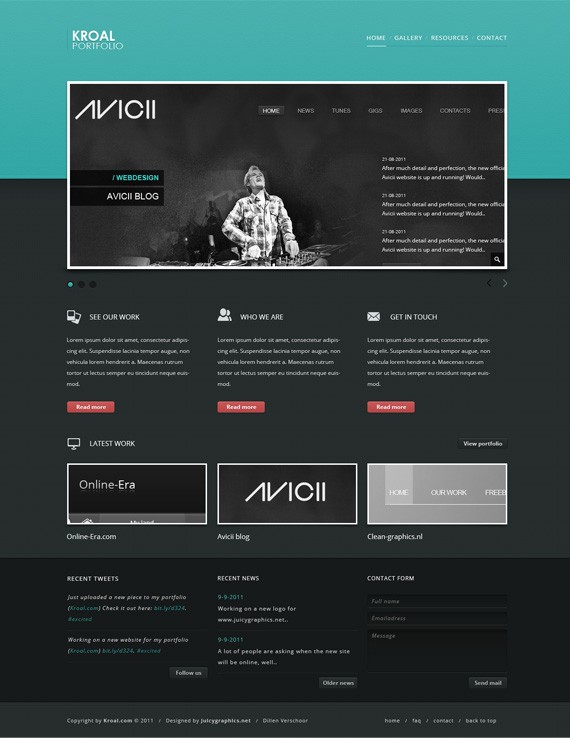
Howdy, today we will be creating a nice design for your online portfolio. What we will learn here is how you can use a combination of textures and patterns to create a nice old-school look and how to use guides in a smart way.
Here is what we will be making:
Resources for this tutorial
- Icons from Iconsweets
- Sample images for the center image
- PSD Download – but really, you should follow the tutorial first!
Step 1: Setting up the Document
- Start by creating a 1600px x 1600px document in Photoshop.
- Ruler Tool is very useful for this tutorial make sure that rulers and guides is turned on.
- Rulers: Ctrl + R
- Guides: Ctrl + ; or Ctrl + H
- The total width of our content will be 960px. Our canvas is 1600px width. So what you have to do is go to View – New Guide. Set the value to 320 px. Repeat the step but now change the value to 1280 px, this will make a total of 960 px to the center of our canvas.
- Because this design will have a 3 column set up, you will need 2 more guides. 960 / 3 = 320 px.
- So repeat the step again twice, but now with the value of: 640px and 960px.
- So what you now should have, is an empty canvas with 4 lines. Which represent the alignment we will be using. You can hide these guides by Ctrl + H
- Fill the background with: #272e2e.
Step 2: Working on Base Background for Header and Slider

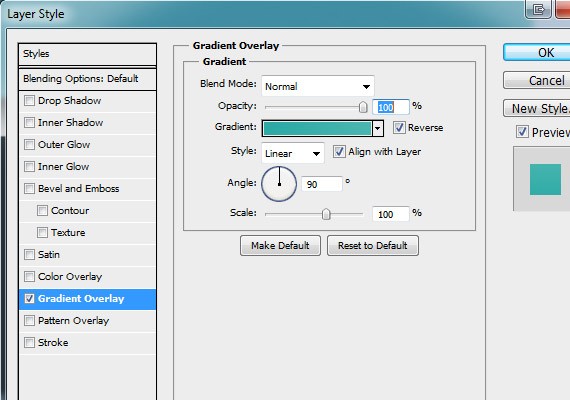
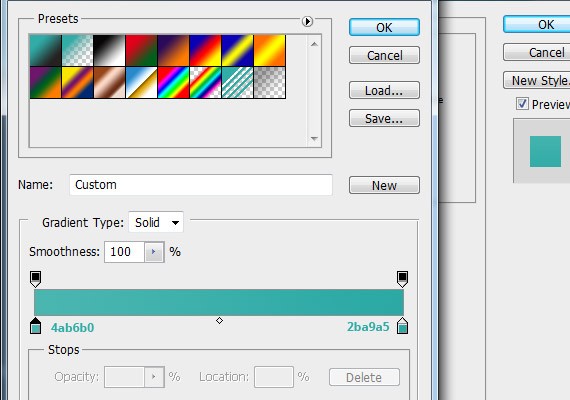
We are going to give this header background a nice old-school look. We will use a texture and a pattern for this. Combining these with the right colour should give the style we are aiming for. Start by selecting the rectangular marquee tool (M), create a 100% by 390px shape, color #2daaa5. Go to Blending Options on this layer and select Gradient Overlay. Below are my settings:
Next, we have to add the texture. You can use the one below or download your own. 
- I used the one above at 20% opacity.
- Now, for the Pattern. What I did was make a new document, 5 x 5 px and background Transparent In here we will make the pattern.
- Zoom in all the way (1600%), select the Rectangular tool (M) and make a cross in the document.
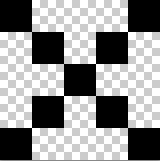
Like this:
- Go to Edit -> Define Pattern. Here you’ll save the pattern which you can use in every other .psd file.
- Back to our work file, Ctrl + left mouse click the blue layer. This will load the selection of the layer. Now, at the bottom of the layer panel select the black/white icon and choose Pattern Fill. It should automatically show your pattern but if not, select the arrow next to the thumbnail of the selected pattern. You’ll see a selection of patterns which should include your defined pattern.
- Hit OK and there is your pattern.
- Opacity = 3%.
- Now we will make a nice line at the bottom of the header background. There’s actually 2, 1px lines. the upper one is #26938e, and the one below is #44c6c1.
- To make these lines it’s easy to use the (horizontal) Single Row Marquee Tool.
Should look close like this:

So far for the header background. Of course you can experiment with colours and different textures/patterns.
Step 3: Filling The Header With Logo/Nav & Slider
So, we made the document and we have a nice background for the header. Now it’s time to fill it up with content. First step, making a logo. What I did was quite easy.

The font I used is Century Gothic. The settings can be found here: Kroal
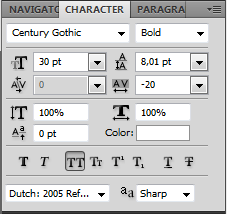
Portfolio
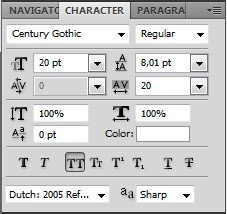
Kroal: Color overlay is white.
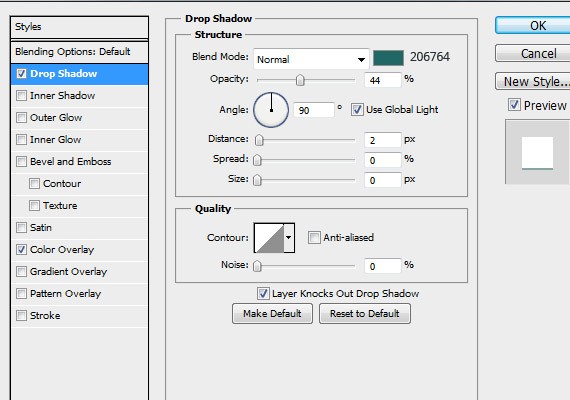
Portfolio:
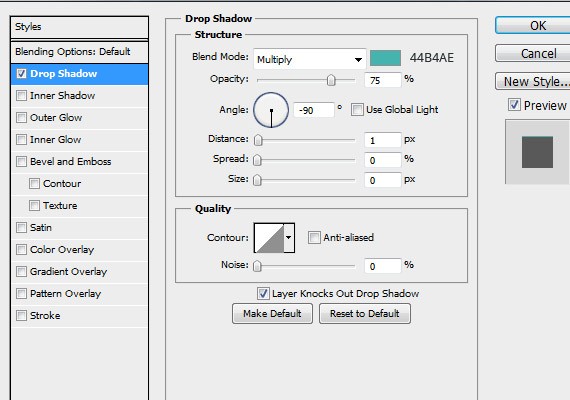
The last part of the logo is a vertical line which should be on your guide. Like this: 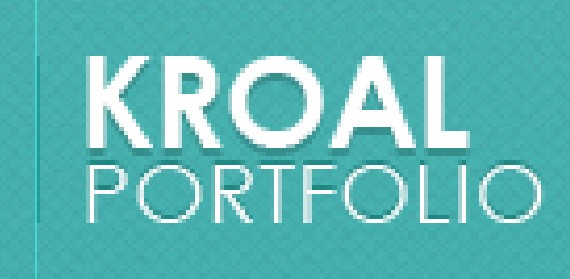
I made that line with the Rectangular Marque tool. color: #289a96. Second step, the navigation.

The navigation is just some simple text fields with 13px Open Sans font. The slashes in between are the same font but 10px and 37% opacity. The BlendingOptions for the nav text are:
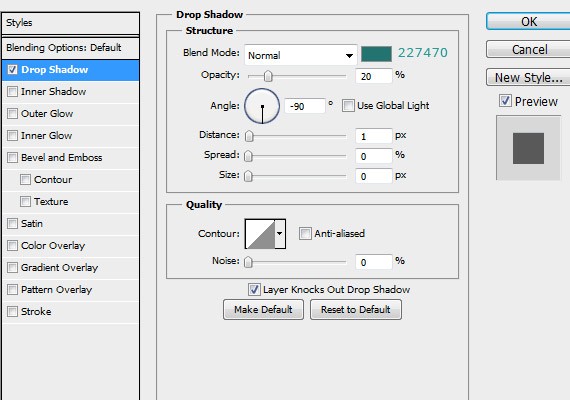
The lines beneath the text are 2 layers, made with Rectangular Marquee Tool. Colours are: #289a96 and just white for the active line. Third is the slide show, mine is 960px by 410px. Of course you can choose any size. Use the Rectangular Marquee Tool to create the shape. I recommend to switch to Fixed Size style-mode.

I used Drop Shadow and Stroke, settings below.
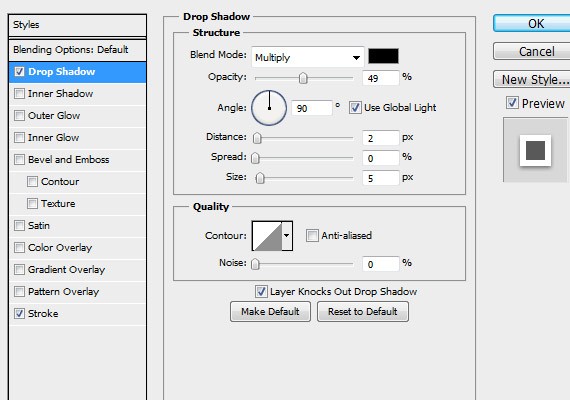
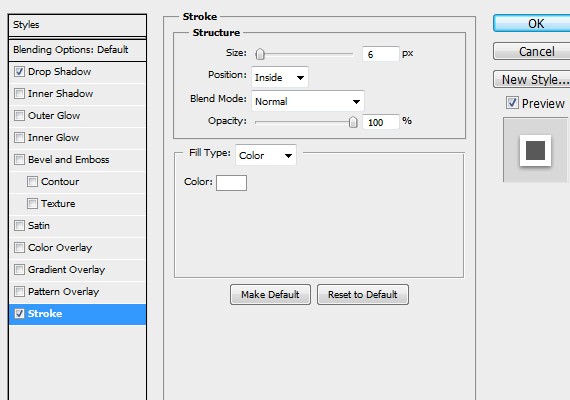
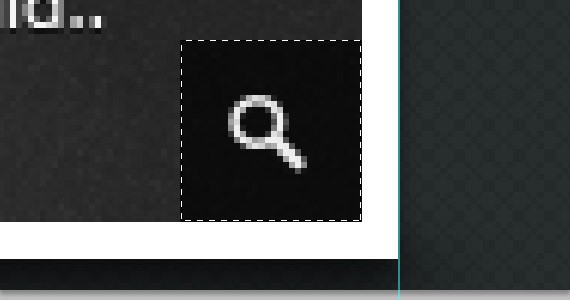
Use the Rectangular Marquee Tool again to make the little zoom icon caption. Hold shift while making this square. This will keep the dimensions right. The icon can be found in the Iconsweets pack.
Also the caption to the right of the slider is made with the rectangular marquee tool.
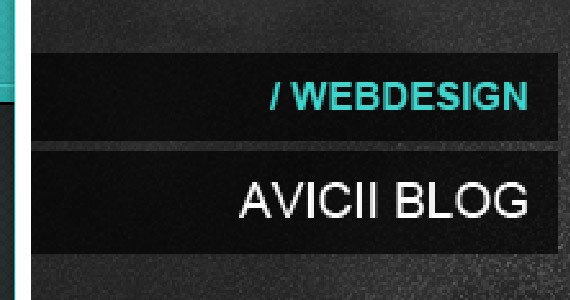
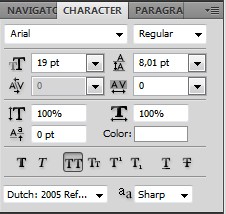
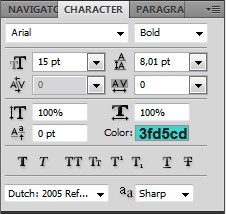
The text settings are below: /WEBDESIGN: AVICII BLOG
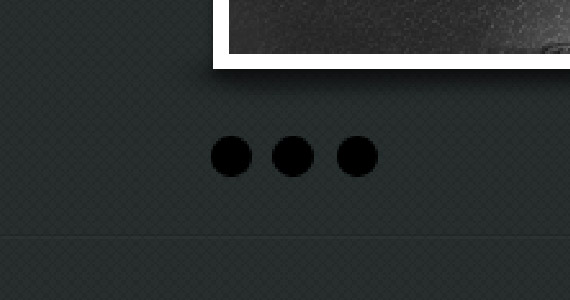
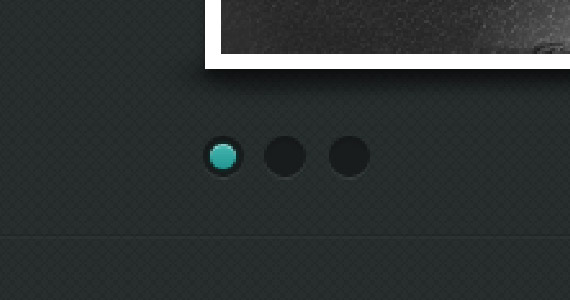
The next part we will make are the small dots beneath the slider which show on what slide you are right now. I recommend making them with the Ellipse Tool (U). What you have to do is make 3 circles of about 15×15 pixels.
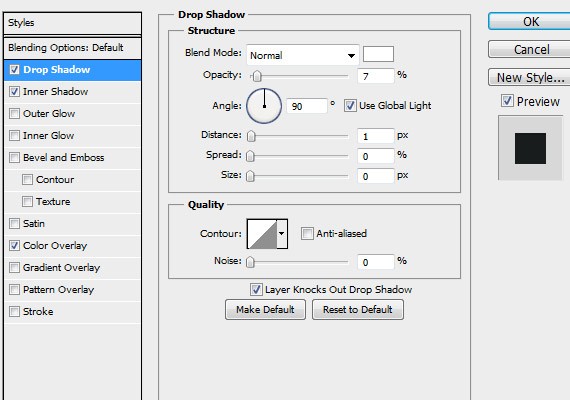
The layer styles for these layers can be found here: Drop Shadow
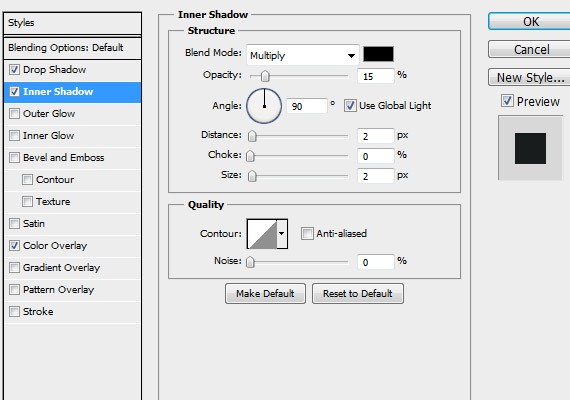
Inner shadow
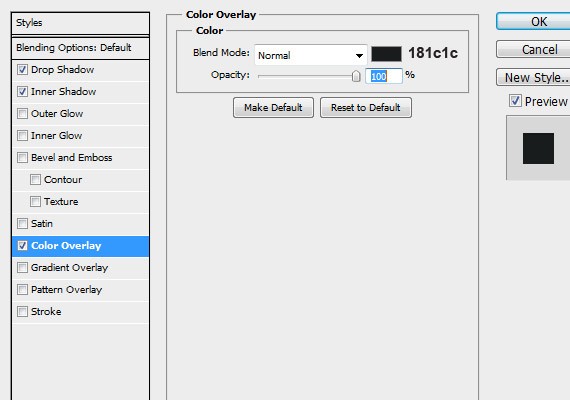
Color Overlay
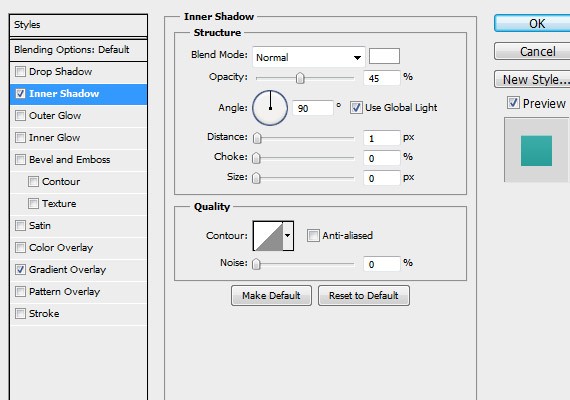
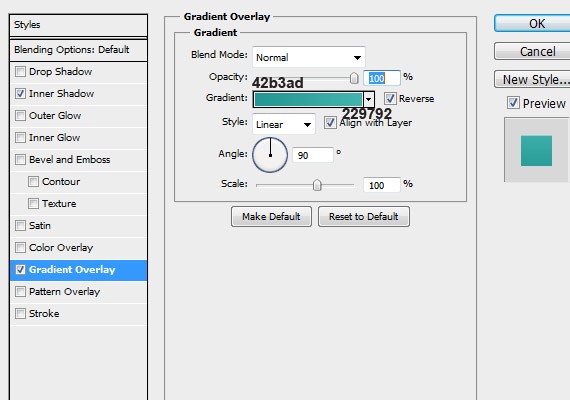
One of the dots needs to be the active one. Make this circle again with the Ellipse Tool (U).
Blending options: Inner Shadow
Gradient Overlay
You may have noticed there’s a shadow beneath the slider. Let’s make that! The shadow was made with the Pen tool (P). Try to make a shape like this:
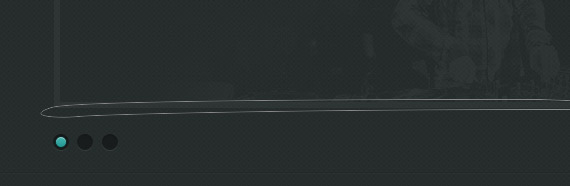
- Next, fill the shape with black, and go to filter > Blur > Gaussian blur. Choose a radius which fits you best. Mine was about 4 px.
- For the content background. It’s kind of the same as the header. But now you’ll just use the pattern and not the texture. Fill the background with #272e2e.
- Add another pattern overlay with the same pattern.
- Opacity is about 15%.
Then the arrows beneath the slide show.

You can make them with the pen tool or just use a standard icon. Blending options left arrow: Drop Shadow 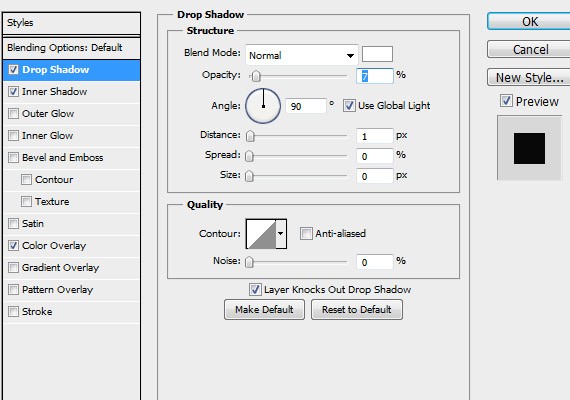
Inner Shadow
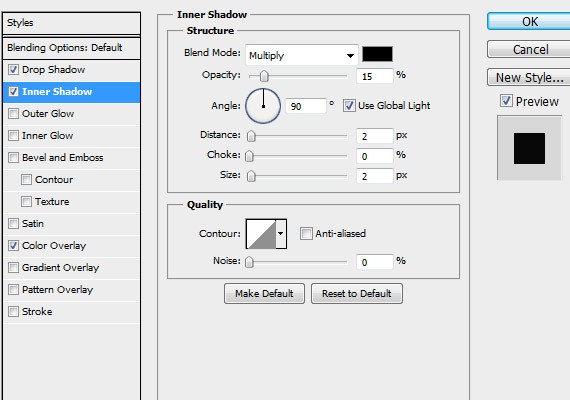
Color Overlay
- Just a solid black #000000
- Blending options right arrow.
Drop Shadow
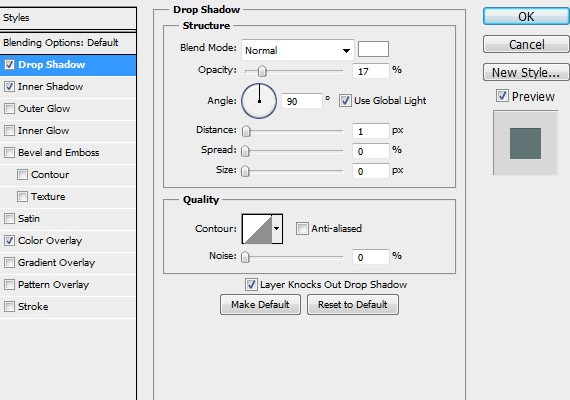
Inner Shadow
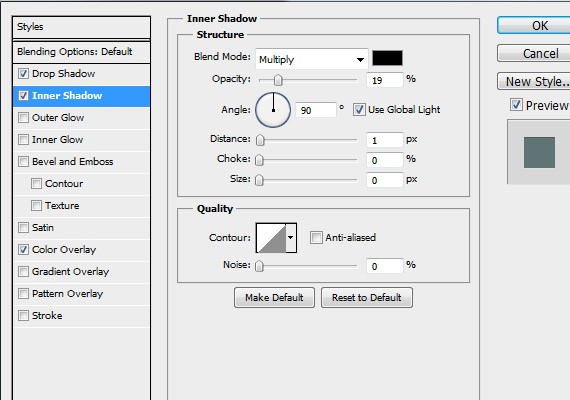
Color Overlay Color: #607474 You may have noticed there is a line to separate the slider from the content below. These are 2 1px lines 100% width. Upper one is #1f2626, lower one is #2b3232. made with Single Row Marquee tool.
Step 4: Filling In The Content
- The content starts with a 3 column showcase of text about your website.
- If you don’t see your guides you made at the start hit Ctrl-H. This should make them pop-up ;).
- I like to have some icons to give some information about what the content includes. So search for icons which fit what you would like the visitors to see. It should fit the reading content. Mine are from the Iconsweets pack.
- Next to the icons is a single header title. Font is Open Sans, it’s all capital 15px and the colour is just plain white.
- The lorem text also is open sans, but now it´s 12px.
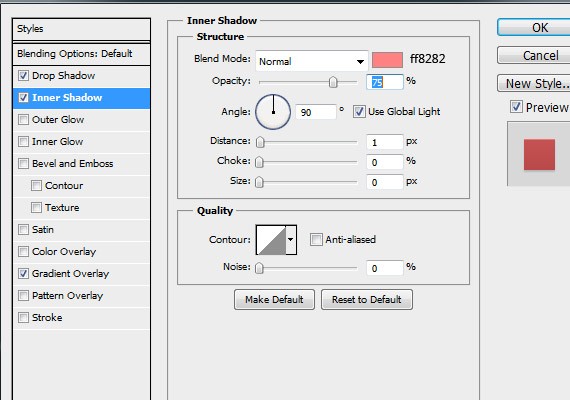
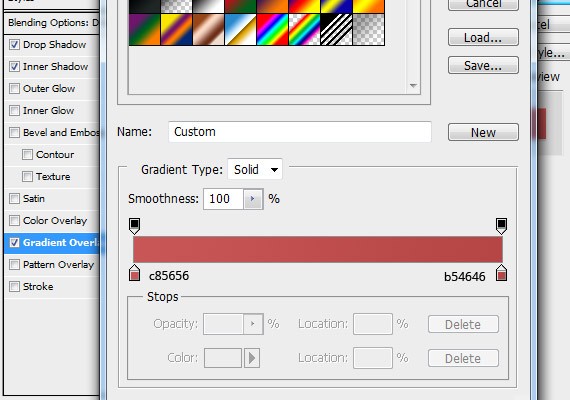
- Next, the read more button. Select the Rounded Rectangle Tool (U). Make it 3px radius and make yourself a nice sized button.
Blending options below: Drop Shadow:
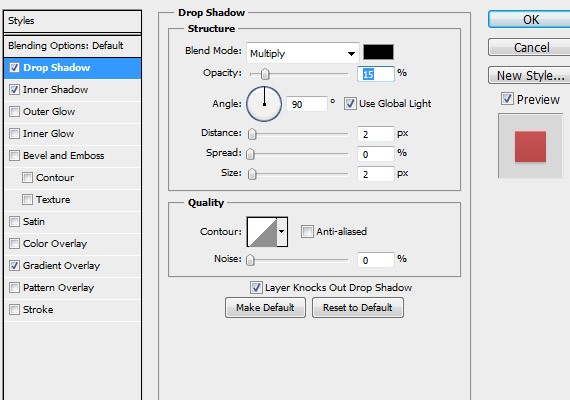
Inner Shadow
Gradient Overlay
There’s another line beneath these 3 columns. You can just duplicate the ones you made before.
- Next is another 3 columns, but now it’s a showcase of the last 3 portfolio items.
- Another icon + title as a header. And all the way too the left is a button to the portfolio. It has same dimensions as the buttons before but different styling.
Drop Shadow
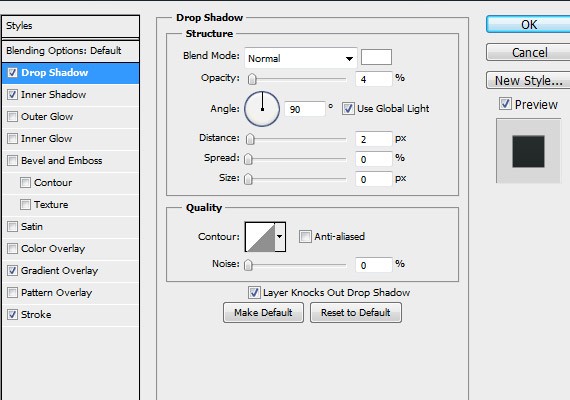
Inner Shadow
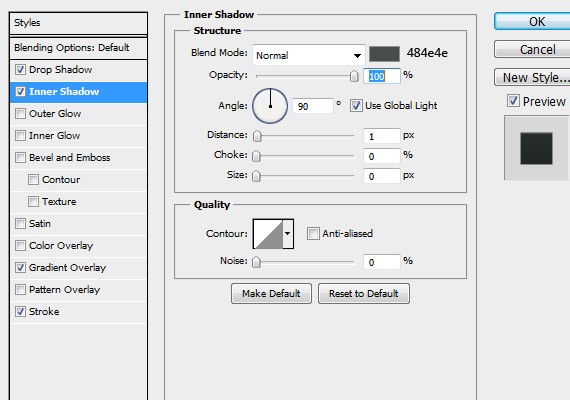
Gradient Overlay
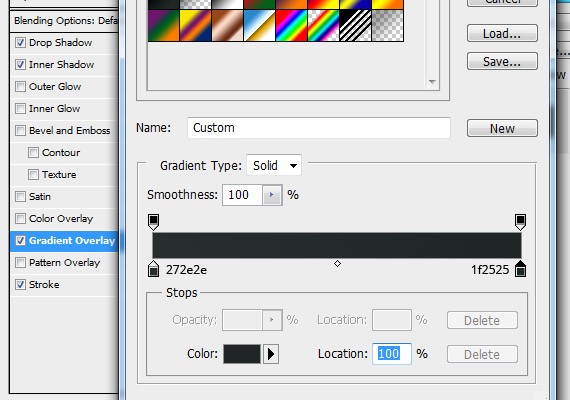
Stroke
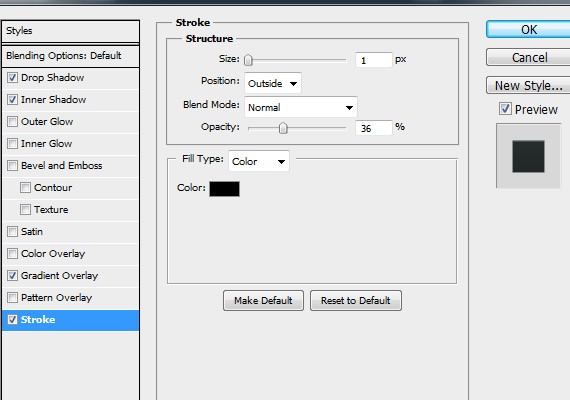
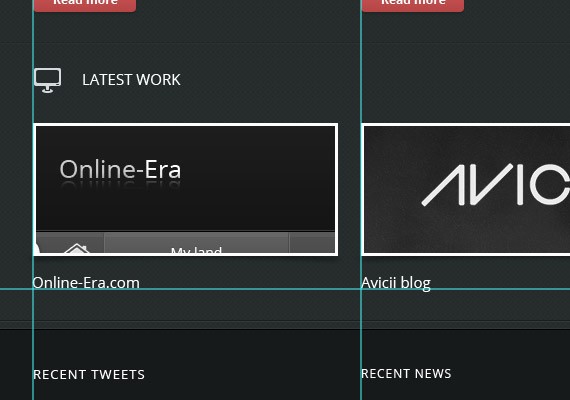
Then, the images. The thumbnails are 306px by 135px. Make an inner stroke that is 3 px plain white. and put an image on clipping mask. The shadow beneath the thumbs are made the same way as for the slideshow.
Step 4: Let’s Make A Footer
First we have to make some sort of separation between our content and the footer we’re about to make. You can see in the image above that there are 4 1px lines. Make them again with the Single Row Marquee Tool. Play around with color and opacity until it feels natural. The background colour of the footer is #161a1a. I made the field with the Rectangular Marquee Tool. The footer again contains the 3 column build-up. Recent Tweets, Recent News & Contact form. I think the text is pretty easy to create with what I explained earlier. The buttons have the same blending options as the View Portfolio button. The only new thing is the contact form.
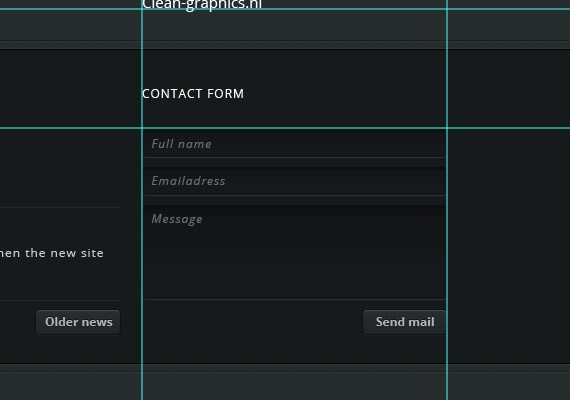
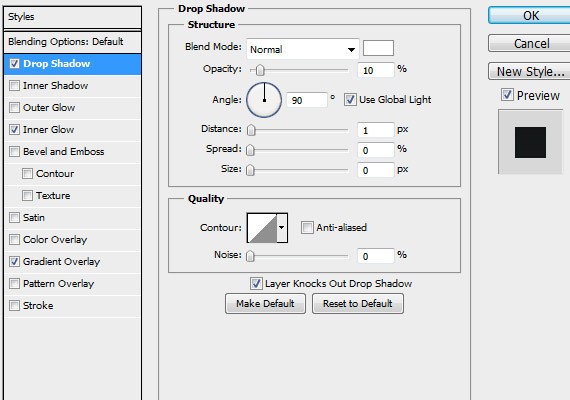
I pulled out the Rounded Rectangle Tool (U) and created 3 shapes with 3px radius. The blending options are the same for all the 3 fields. Drop Shadow
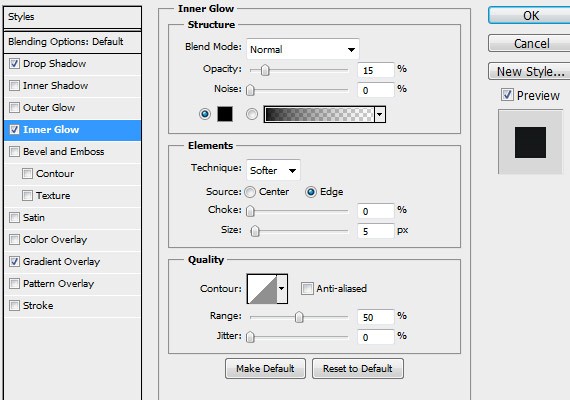
Inner Glow
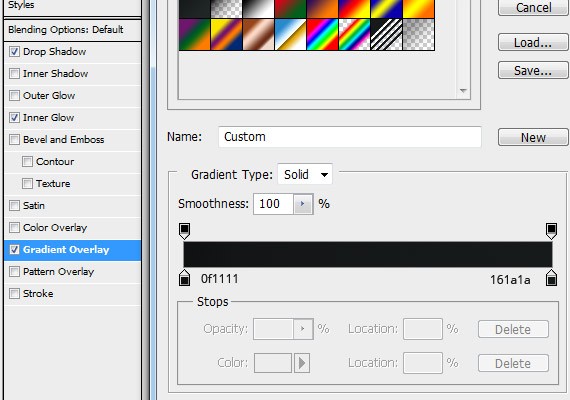
Gradient Overlay
So, we’re almost there. Only one thing left to do. Make the copyright bar at the bottom. It has the same background as the content so that’s easy. The lines can be copied from the top of the footer and the text is just open sans again. This time the color is #c4c4c4.
That’s it for this tutorial, I hoped you guys learned some new techniques. Still got some questions? Just leave a comment below.
If you don’t feel like designing your own portfolio, maybe the themes below can help you to create a great portfolio website for your work.
Outstanding Commercial WordPress Portfolio And Photoblog Themes
If you need to complete quick project and you are ready to spend some money for it, this premium WordPress portfolio theme showcase will definitely interest you!
You can check out some great portfolio themes by going to our other article. – 40 Premium WordPress Portfolio Themes.
I think it’s okay to spend few bucks for great theme with full support and many features for fast projects. I just bought one as well, just because I needed to set up site rapidly fast, but I had specific requirements for that blog. I visited several premium theme sites and found good looking theme I was happy with in 30 minutes.
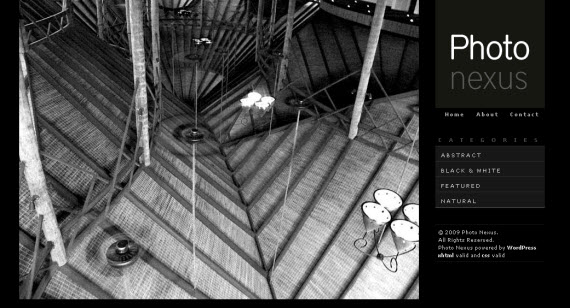
1. Photo Nexus WordPress Gallery Theme (27$)
Photo Nexus wordpress gallery is a 2 column , 2 color variation ( Bright and Dark) theme.
This theme is great for those who need a convenient way to publish and showcase a self managed Gallery of Photos, Artworks or Designs. The theme features modern yet minimalistic style so that your work will be guaranteed to be on focus. The theme comes added with Admin theme options so you won’t need to manually edit the files to get it running.
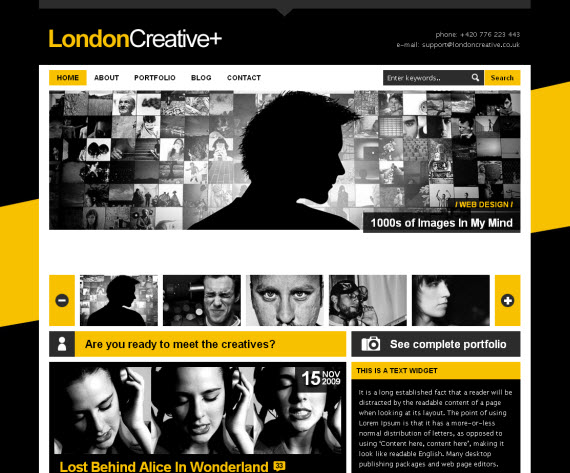
3. London Creative (32$)
London Creative + comes with fully working contact form, awesome slider for your featured images, nasty spinning slider buttons (never saw them anywhere else, so you can call it unique), 2 message buttons under the slider and PrettyPhoto plugin (better clone of Lightbox).
You will also have user-friendly dropdown navigation with infinite dropdown levels where you can style every even list item via Jquery, so no more hassle, it’s automatic, you can just add posts and you are ready to go!
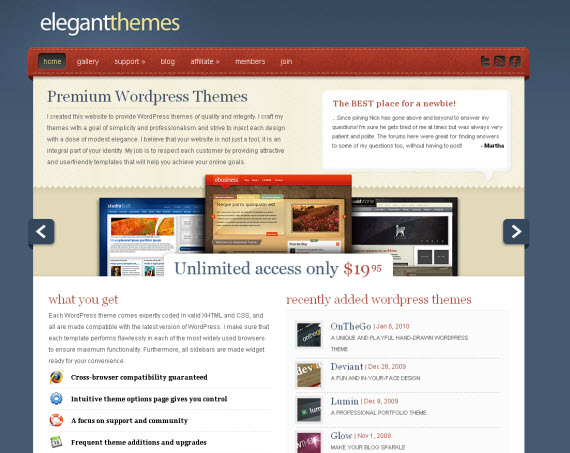
ElegantThemes Theme Website
This is an excellent site also offering some nifty premium WordPress themes, where you can pay 19.95$ and get access to all of their commercial themes for one year. Here I also find my own pick for personal project, so I am saying from personal experience, that I was positively surprised about their great admin panel with big list of modifiying features, so I didn’t even had a need to touch the code at first.
Okay, let me finish here and also share your opinions – do you need this type of commercial articles, at least I don’t think anymore that the best stuff is for free, I don’t mind paying for quality and this article definitely proves it! If you buy something please use this site affiliate links to help us improve 1stwebdesigner blog quality! Thank you!
This post may contain affiliate links. See our disclosure about affiliate links here.