Join over 55,891 Subscribers Today! FREE UPDATES!
Get The Only Freelancer crash course you will ever need to read!
As a beginner who wants to become a better graphic designer or web designer we all start learning on our own by reading tutorials around the web. We search things that we like to learn, such as a button effect tutorial, typography, web layouts, illustration, and a lot more. Along the way we end up hopeless, thinking that we can’t be as good as already established designers and then just stop there. Have you been there? I’ve been at that point. And I’m telling you, don’t look down on your skills because every person who strives hard will eventually reach success.
Striving for success without hard work is like looking for fruit in places that you didn’t plant seeds! Useless!
-Rev Run

So you were probably searching the web and came across a great and well-designed website and you were like, “oh, wow! What a lovely design!” Then you probably asked your self these questions:
I am always doing that which I cannot do, in order that I may learn how to do it.
- Pablo Picasso
First, I’ll assume that you know the basics of Photoshop. Here’s the thing you need to do. Don’t look for a tutorial out of it first, because you probably will end up searching the wrong effect you want to achieve, but instead, open up Photoshop and try to copy the effect of the button.
Sounds hard, right? Since you don’t know how to replicate the technique yet. But what’s good about this is that you will explore the Blending Options Panel and while playing with it, you will probably come across with other bunch of effects until you achieve the effect. I know, I know it will not be a 100% accurate imitation, but the good thing is that you will learn something while playing.
Second, you are curious of what color scheme they used? Well, it’s easy to find out how. Take a screenshot of the website and paste it on Photoshop, then use the Eye Dropper Tool(I) to inspect and find out the color.
For a quicker process, here are some browser extensions:
Finally, here’s how to know the width of the website. It’s basically the same process on how to pick a color, but this time using the Ruler Tool(U).
Browser extensions:
Here is a simple challenge for you to figure out yourself.
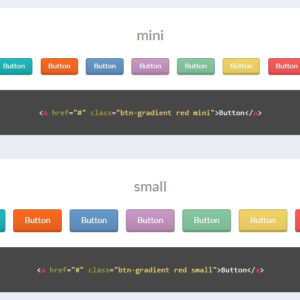
Using Blending Options and find out how to make the following buttons as shown in the screenshot bellow without using Stroke.

Post your answer on the comments section and also your thoughts about this article.
By doing so you are learning on your own and that is great, it will boost up your knowledge and creativity in Photoshop.

We all know that not everyone is used to learning and discover something by themselves. Every beginner needs a step by step guide to accomplish certain task that they want to achieve using Photoshop.
The solution for this is to read tons of tutorials that are available on the web. Start with the simple ones.
Here are some great tutorials to improve your Photoshop skills.
If you already know the basics of creating web layouts, banners, and business cards, instead of looking for tutorials look for Quick Tips , this will boost your workflow, make it much faster and much easier.

So now that you know the basics and techniques it’s time to experiment a design. I call this Freestyle, you have the freedom to do anything, think creatively based on the knowledge you have learned.
There ain’t no rules around here. We’re trying to accomplish something.
- Thomas Edison
So here is an example:
If you want to apply some Stitches to your design, based on your knowledge in Photoshop you will think that you can do this by doing the following steps using:
Line Tool(U)

You might think, “hmm.. I think I can do this using Line Tool(U), Adjust the Options and decrease the Opacity in the layer options panel.”
Type Tool(T)

This time there is a part on the layout where you can apply a Stitch on an Ellipse Logo. Then you might say, “I can’t do this using Line Tool,” then start thinking of other alternative of doing so.
Then you might think, “hmm.. I think I can do this by using Text Tool(T), because Text Tool works on Shapes Path. I’ll try to create an Ellipse of about 20px less than the actual width of the base shape, adjust the text spacing in Character Panel, and finally decrease the Opacity.”
Great! You just achieved what you wanted to do based on your knowledge using two tools. It feels like you are a pro now. I know that feel, bro. :)
But seriously, what I’m trying to say is don’t just limit yourself on tutorials, try to think creatively, believe that you can do something in a different way where it can be much easier.

After all the hard work of practicing and experimenting you may have created a masterpiece. Now you are looking for a place to showcase your design. I suggest joining deviantART, this is a great design community for starters.
Here is my first Web Interface that I uploaded on deviantART.
Design community alternatives:
Why you need to join a Design Community?
Some designers create things to show you what they did. I design things to tell you what I solved.
- Brian Yerkes

During the time I was in college I was lucky enough to be chosen to participate in a design contest in school where top designers from each class were required to join. After that I asked my self, “are there design contests on the web?” and gladly there are. I found out from my friend on deviantART.
During that time, I was on the stage and I have already showcased tons of my designs but still I haven’t got any client and I wanted some cash from all of my hard work. For me, the best solution that time was to join a design contest.
So how do Design Contests work?
Buyers or contest holders run a design contest based on a category like web, print, or logo. Everyone can participate on the design contest and can win.
Where to Join?
Note when joining a contest:
By doing so, you are letting your client think that you are really interested and he/she will probably choose your work. Then you will be rewarded with a pot of dollars.
Pros
Cons
Way back in 2010 I participated on tons of contests from the websites that I mentioned. I wasn’t selected as a winner and that made me really hopeless indeed. But still I participated actively. Then finally the day arrived and I won.
My Winning Entry

One day I read something about Spec Work (Speculative Work). After reading I realized the time and effort that I put in joining design contests that went to nothing. This made me stop joining design contests and thought of other solutions where I can earn money.

Here is a great article to understand what is Spec Work.
I thought I will never join a design contest again but last May 2012 I experienced a down time where I really needed to find money aside from my Job. So what I did was I participated on a design contest again and it really helped me solve my problem during that time.
Here is a good article for you to read.

When I realized that joining design contests is not good for me, I asked my self ,”what if I’ll share my knowledge about designing in Photoshop? The same with the tutorials I read before by great authors.”
That is when I decided to write a tutorial. What I did, I contacted a bunch of web design blogs and asked them if I can write a step by step website template tutorial for them. Most responded negatively. They didn’t think that my level of creativity will suit their website. But there is this one blog that accepted me to write about the said tutorial. Guess what blog? Yeah, it’s 1stWebDesigner. Which really placed a big smile on my face and I felt really motivated that I will soon provide the blog a great detailed tutorial.
Here is my very first tutorial.
I suggest that you should do it too. Don’t be afraid to write and share your ideas by Guest Posting. I assure you that you will enjoy, earn money and learn more.
Here is a guide for Guest Posting:
Also, there are lots of benefits while you are guest posting about Graphic/Web Design. Which is mentioned in Rakhita’s Article:
If you are just starting to learn web/graphic design I suggest that you follow through the things that I mentioned. Strive hard to be good on your preferred niche, that’s a guarantee that you will achieve your goal to become a good web/graphic designer someday. Just don’t forget to keep on learning and listen to other designers’ feedback because this will really help to improve your skills.
Get The Only Freelancer crash course you will ever need to read!
Michael is a Web & Graphic designer based in Philippines. He started designing during his teenage years and most of his skills and knowledge are self taught. He's dating with Photoshop for about 4 years now and been flirting with HTML & CSS from 2011 to present. Other than that he loves Coffee and his Girl.
Monday, May 13th, 2013 04:34
i really like this tut bro
Thursday, May 9th, 2013 18:47
Hi Michael. Thank you for such a motivational post. I am learning graphic designing by myself and will be using your insights to get the best out of myself in the coming days.
Monday, March 11th, 2013 11:42
Tutorial posts(Dark Web layout) you mentioned in this post are awesome. I really like the approach you have explained here. Got some idea to design UI for my standalone application. Nice post keep up dude.
Tuesday, February 26th, 2013 06:29
Every person thinks differently. When you see a beautiful web page, don’t just copy it and think you’re successful. Instead first try to duplicate it, and then add your creativity to it. Remember the results your brain can create will always be unique and amazing.
Monday, February 25th, 2013 05:20
Live Experiment is the most important part in order to be a successful Graphic designer.
One thing that i would like to mention is that you might need to work many times on a single page before its final version so patience is very important in this job.
Saturday, February 23rd, 2013 17:15
“Striving for success without hard work is like looking for fruit in places that you didn’t plant seeds! Useless!”
This quote is really not well thought out. First of all, just because YOU didn’t plant the seeds, doesn’t me they are not there to begin with. Plants can grow anywhere, even when people aren’t around. You can take that both literally and metaphorically.
Second, there are plenty of people that do not work hard and yet are successful. Some of them are mobile app developers. Others are former presidents of the United States. I won’t name any names here.
Friday, February 22nd, 2013 07:29
Design communities like deviant art and dribbble are good source of inspiration. I have done few contests too and learned a lot about competition and the amount of effort that requires to win them or how much level of knowledge it requires to be in the market. Some good tips in this post. Kudos.
Thursday, February 21st, 2013 01:54
Makes me feel bad for not doing these things during the last two years of college. Where would I have been in terms of my skills
Tuesday, February 19th, 2013 11:59
Nice read, picked up a few things here. And your challenge – Inner glow (outer glow is an option too) set to 25% opacity white with 1px size and 100% choke is the answer. At least I hope it is.
Tuesday, February 19th, 2013 09:20
I did freelance work for a while before I found my first full time design gig. I hated it. I found myself putting it off because I didn’t care about the projects. They felt like work, on top of a job I already had (although not a design job, which is why I took them) and I had a really difficult time getting around to working on them.
Rather than doing spec work or paid freelance work, I would recommend finding people that are just getting started with things that you’re interested in. See if you can lend these people a hand on the design front, for free. This way, you be doing the work not for money, but for a cause you believe in. This type of work will help you grow much more quickly than work that you don’t care about. If it means moving back in with your parents, and they’re ok with it, than I say go for it. Hopefully you’ll be able to focus on putting together interesting projects for your portfolio, which will in turn lead to a steady job in the future.
A few examples of possible projects:
A friend of yours is in a band that you like? They may need help putting together a consistent online presence.
Small non-profit organization trying to do big things but with a table website that looks like it was made before CSS gained acceptance?
The downside is that you probably won’t get paid. The upside is that you’ll probably have greater creative freedom, and you can happily fire the client if things aren’t working out, rather than feeling obligated to do unfulfilling work just to earn a paycheck.
The other advice I would give is to go to school for design if it’s something you’re truly interested in. Design is much bigger than bevel effects on a button (just look at the recent metro movement). While it’s important to learn how to use design software, what’s more important is knowing what to create with that software and why. You’ll find mentors at a school that will get you there.
Tuesday, February 19th, 2013 05:31
Hey Michael, great tutorial! Didn’t know about the line tool. Looks like it’s used for ribbons, right? Cool, I’ll try it.
Tuesday, February 19th, 2013 04:17
Is there any alternative for photoshop, a bit pricey graphic software, in my opinion? I’ve tried paint shop pro which is affordable and found GIMP a bit complicated.
Tuesday, February 19th, 2013 05:10
Yeah there certainly is GIMP and its 90% similar to PhotoShop. Although if its vectors you’re after, I’d suggest you tried inkscape.
Tuesday, February 19th, 2013 01:29
Hey Michael, Thanks for inspiring upcoming designers,
Challenge Solved:
Style – Inner glow
Blend mode – Overlay
Opacity – 100%
Color – default with gradient
Technique – Precise
Source – edge
Choke – 50%
Size – 2px
Monday, February 18th, 2013 19:49
I love the Guest Post idea since I love to write and share too. The idea is simple. I just share what I found on that day with others. Keep it in good frequency and wait a bunch of collections soon. So my designer friends, start to write too. :)
Monday, February 18th, 2013 14:19
Thank you for this. Sometimes I fell overwhelmed by all the great work I see. Your post helps me realize we all have to start somewhere and to not be intimidated. I appreciate it.
Monday, February 18th, 2013 11:34
stock photos? and how old is the first picture … nice monitor … ;-)
first rule of Design Fight Club: if at all possible, don’t use stock photos
second rule of Design Fight Club: keep the images relevant and remember rule #1
Monday, February 18th, 2013 10:25
Your are knowledge pack !!!
Monday, February 18th, 2013 10:11
Hi Michael,
To answer your challenge; You would use the Inner Glow, set at 1px, bring your choke to 100%, Source set on Edge, Technique set at Precise and pick your color.
As a self taught web/graphic designer myself, I know the importance of reading/watching tutorials. I learned almost everything I know from other peoples tutorials. You can basically find out how to do anything you want to, if you know the terminology to use. My advice would be to learn Photoshop terminology, so when you are searching for tuts, you can find exactly what you want. And of course lots of trial and error.
Keep designing!
Ian Belanger from imGraphicDesigns
Monday, February 18th, 2013 11:42
The shape must be the color you want at the end, then Gradient overlay fill the shape from black to white (play with the blend mode, until you get what yo want) and inner glow to 1px.
Monday, February 18th, 2013 10:00
Challenge: Outer Glow:
Blend Mode-Normal
Opacity-50%
Color-White
Spread-48%
Size-3px..
Easy…
Monday, February 18th, 2013 09:33
I love this tutorial..has really opened my eyes..East Africa Down on my knees now :)
Monday, February 18th, 2013 09:07
It’s usefull for beginners. Thank you for publishing it.
Monday, February 18th, 2013 09:01
Thank you for the tutorial. I already bookmarked this post for fast access :)
If not, then it's time to learn how to:
You can trust 1stWebDesigner to help you become a better web designer!
- Jacob Cass | Just Creative
Just enter your name and email below and click Get Updates!
Milmon
Monday, February 18th, 2013 14:19
Thank you for this. Sometimes I fell overwhelmed by all the great work I see. Your post helps me realize we all have to start somewhere and to not be intimidated. I appreciate it.
Dainis Abols
Monday, February 18th, 2013 09:01
Thank you for the tutorial. I already bookmarked this post for fast access :)
Michael John Burns
Monday, February 18th, 2013 09:17
Hello Dainis, You’re welcome. Let me know what do you think after reading it and I hope you enjoy it.
Jack Walsh
Monday, February 18th, 2013 11:34
stock photos? and how old is the first picture … nice monitor … ;-)
first rule of Design Fight Club: if at all possible, don’t use stock photos
second rule of Design Fight Club: keep the images relevant and remember rule #1
Pitie Duncan
Monday, May 13th, 2013 04:34
i really like this tut bro
Michael John Burns
Monday, May 13th, 2013 09:40
Yow Bro Wadup? Well glad you like it homie. Keep coming back for more \m/
Judi
Monday, February 18th, 2013 10:25
Your are knowledge pack !!!
Ian Belanger
Monday, February 18th, 2013 10:11
Hi Michael,
To answer your challenge; You would use the Inner Glow, set at 1px, bring your choke to 100%, Source set on Edge, Technique set at Precise and pick your color.
As a self taught web/graphic designer myself, I know the importance of reading/watching tutorials. I learned almost everything I know from other peoples tutorials. You can basically find out how to do anything you want to, if you know the terminology to use. My advice would be to learn Photoshop terminology, so when you are searching for tuts, you can find exactly what you want. And of course lots of trial and error.
Keep designing!
Ian Belanger from imGraphicDesigns
Alvaro Flores
Monday, February 18th, 2013 11:42
The shape must be the color you want at the end, then Gradient overlay fill the shape from black to white (play with the blend mode, until you get what yo want) and inner glow to 1px.
Michael John Burns
Monday, February 18th, 2013 10:35
Hello Ian, Thanks for answering and sharing your advice this will really help the beginner out there who just started learning.
To the challenge; Yep you got it Right! Also we can do it with Inner Shadow, Outer Glow with the same procedure. I know you know it. I hope you get my point here. Because if you are a beginner you probably think you can achieve this by applying by stroke only.
You too Keep designing!
Alvaro Flores
Monday, February 18th, 2013 09:07
It’s usefull for beginners. Thank you for publishing it.
Michael John Burns
Monday, February 18th, 2013 09:17
Hello Alvaro, You’re welcome.
Would you mind to take a time answer the Challenge?
Roger Berges
Monday, February 18th, 2013 10:00
Challenge: Outer Glow:
Blend Mode-Normal
Opacity-50%
Color-White
Spread-48%
Size-3px..
Easy…
Michael John Burns
Monday, February 18th, 2013 10:28
Hello Roger, Thanks for taking time answering the challenge.
I’m sorry but you got it wrong on the Spread and Size. Looking forward for your second try.
Bryan Kimani
Monday, February 18th, 2013 09:33
I love this tutorial..has really opened my eyes..East Africa Down on my knees now :)
Michael John Burns
Monday, February 18th, 2013 09:38
Hello Bryan, Stand Up! and start learning :P
Sandeep pattanaik
Monday, February 18th, 2013 08:53
Hello Michael, awesome article.
Michael John Burns
Monday, February 18th, 2013 09:31
Thank me also Sandeep :) Hope this will help you.
I bet you read the challenge part. Would you mind to take time and comment your answer here?
Sandeep pattanaik
Monday, February 18th, 2013 12:54
Hello Michael, this is the great part. I always use the blending option like gradient, stroke etc & the addons for crome. Simple best. Thumbs up
Cheers.
Sandeep pattanaik
Tuesday, February 19th, 2013 00:01
A challenge you mention in the article, we can done it using Inner glow. :P
Uday Kumar
Tuesday, February 19th, 2013 01:29
Hey Michael, Thanks for inspiring upcoming designers,
Challenge Solved:
Style – Inner glow
Blend mode – Overlay
Opacity – 100%
Color – default with gradient
Technique – Precise
Source – edge
Choke – 50%
Size – 2px
escort madrid
Monday, February 25th, 2013 05:20
Live Experiment is the most important part in order to be a successful Graphic designer.
One thing that i would like to mention is that you might need to work many times on a single page before its final version so patience is very important in this job.
Tim
Saturday, February 23rd, 2013 17:15
“Striving for success without hard work is like looking for fruit in places that you didn’t plant seeds! Useless!”
This quote is really not well thought out. First of all, just because YOU didn’t plant the seeds, doesn’t me they are not there to begin with. Plants can grow anywhere, even when people aren’t around. You can take that both literally and metaphorically.
Second, there are plenty of people that do not work hard and yet are successful. Some of them are mobile app developers. Others are former presidents of the United States. I won’t name any names here.
Praveen Bhardwaj
Tuesday, February 26th, 2013 06:29
Every person thinks differently. When you see a beautiful web page, don’t just copy it and think you’re successful. Instead first try to duplicate it, and then add your creativity to it. Remember the results your brain can create will always be unique and amazing.
Michael John Burns
Tuesday, February 26th, 2013 23:14
Hello Praveen,
Got your point there. I used to do that also gather some inspiration and apply my creativity out of them.
But for the beginners as I remember before once I seen a great button or something I like in the web site
I used to copy it to know that certain effect. Hope you got my point!
Have a great day Praveen!
yogesh
Thursday, May 9th, 2013 18:47
Hi Michael. Thank you for such a motivational post. I am learning graphic designing by myself and will be using your insights to get the best out of myself in the coming days.
abhi
Monday, March 11th, 2013 11:42
Tutorial posts(Dark Web layout) you mentioned in this post are awesome. I really like the approach you have explained here. Got some idea to design UI for my standalone application. Nice post keep up dude.
Mahesh
Friday, February 22nd, 2013 07:29
Design communities like deviant art and dribbble are good source of inspiration. I have done few contests too and learned a lot about competition and the amount of effort that requires to win them or how much level of knowledge it requires to be in the market. Some good tips in this post. Kudos.
albert
Thursday, February 21st, 2013 01:54
Makes me feel bad for not doing these things during the last two years of college. Where would I have been in terms of my skills
punrun
Tuesday, February 19th, 2013 04:17
Is there any alternative for photoshop, a bit pricey graphic software, in my opinion? I’ve tried paint shop pro which is affordable and found GIMP a bit complicated.
Michael John Burns
Tuesday, February 19th, 2013 09:12
Hello Punrun are you a Windows user?
Gimp will be a best alternative for Photoshop. It’s a bit complicated on the first try that’s why you need to practice and along the way you will get familiarized to it and it will become easy as 1+1.
Bravo.I
Tuesday, February 19th, 2013 05:10
Yeah there certainly is GIMP and its 90% similar to PhotoShop. Although if its vectors you’re after, I’d suggest you tried inkscape.
Phan Mem
Tuesday, February 19th, 2013 05:31
Hey Michael, great tutorial! Didn’t know about the line tool. Looks like it’s used for ribbons, right? Cool, I’ll try it.
Michael John Burns
Tuesday, February 19th, 2013 09:12
Stitched effect and anything you can think of :)
LEx
Tuesday, February 19th, 2013 11:59
Nice read, picked up a few things here. And your challenge – Inner glow (outer glow is an option too) set to 25% opacity white with 1px size and 100% choke is the answer. At least I hope it is.
James Ferrell
Tuesday, February 19th, 2013 09:20
I did freelance work for a while before I found my first full time design gig. I hated it. I found myself putting it off because I didn’t care about the projects. They felt like work, on top of a job I already had (although not a design job, which is why I took them) and I had a really difficult time getting around to working on them.
Rather than doing spec work or paid freelance work, I would recommend finding people that are just getting started with things that you’re interested in. See if you can lend these people a hand on the design front, for free. This way, you be doing the work not for money, but for a cause you believe in. This type of work will help you grow much more quickly than work that you don’t care about. If it means moving back in with your parents, and they’re ok with it, than I say go for it. Hopefully you’ll be able to focus on putting together interesting projects for your portfolio, which will in turn lead to a steady job in the future.
A few examples of possible projects:
A friend of yours is in a band that you like? They may need help putting together a consistent online presence.
Small non-profit organization trying to do big things but with a table website that looks like it was made before CSS gained acceptance?
The downside is that you probably won’t get paid. The upside is that you’ll probably have greater creative freedom, and you can happily fire the client if things aren’t working out, rather than feeling obligated to do unfulfilling work just to earn a paycheck.
The other advice I would give is to go to school for design if it’s something you’re truly interested in. Design is much bigger than bevel effects on a button (just look at the recent metro movement). While it’s important to learn how to use design software, what’s more important is knowing what to create with that software and why. You’ll find mentors at a school that will get you there.
Michael John Burns
Tuesday, February 26th, 2013 23:23
Hello James,
I really appreciate your comment and advice.
Yeah! I got your point there. Sometimes it’s too painful that you just follow what they assigned you to do. Your getting stuck and you don’t have a freedom to do what’s best more than that since you are meeting deadlines. Am I right? Also what’s bad is your following their taste and you can’t apply what you really like to turn out that design WOW! Right?
That’s why sometimes I rather to practice designing and stop doing any paid works just to improve my skills. I read new tips, tricks, and look for latest design trends just to catch up with the latest design in the industry.
Zulhilmi Zainudin
Monday, February 18th, 2013 19:49
I love the Guest Post idea since I love to write and share too. The idea is simple. I just share what I found on that day with others. Keep it in good frequency and wait a bunch of collections soon. So my designer friends, start to write too. :)