Join over 55,891 Subscribers Today! FREE UPDATES!
Get The Only Freelancer crash course you will ever need to read!
Are you familiar with the extensions after your images? There are so many image formats that it’s so easy to get confused! File extensions like .jpeg, .bmp, .gif, and more can be seen after an image’s file name. Most of us disregard it, thinking there is no significance regarding these image formats.
These are all different and incompatible, though. These image formats have their own pros and cons. They were created for specific, yet different, purposes. What’s the difference, and when is each format appropriate to use?
Let us tackle the five most common image formats for the web and computer graphics: JPEG, GIF, BMP, TIFF and PNG.
JPEG is short for Joint Photographic Experts Group, and is the most popular among the image formats used on the web. JPEG files are very ‘lossy’, meaning so much information is lost from the original image when you save it in JPEG file. This is because JPEG discards most of the information to keep the image file size small; which means some degree of quality is also lost.
Original File:

JPEG Medium Compressed File:

As shown above, image compression is not that evident at first glance. But if you take a closer look, the JPEG image is not as sharp as the original image. The colors are paler and the lines are less defined and the picture is noisier. If you zoom in there are JPEG artifacts like any other JPEG files.
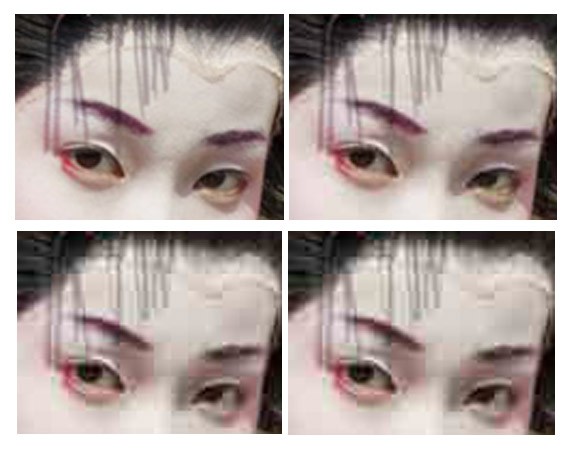
JPEG compression of varying levels, from highest to lowest.
Almost every digital camera can shoot and save in the JPEG format. JPEG is very web friendly because the file is smaller, which means it takes up less room, and requires less time to transfer to a sites. Moreover it is less grainy then GIF, the old king of the internet roost. Since 1994, JPEG has been considered the standard.
Pros of JPEG:
Cons of JPEG:
GIF, short for Graphics Interchange Format, is limited to the 8 bit palette with only 256 colors. GIF is still a popular image format on the internet because image size is relatively small compared to other image compression types.
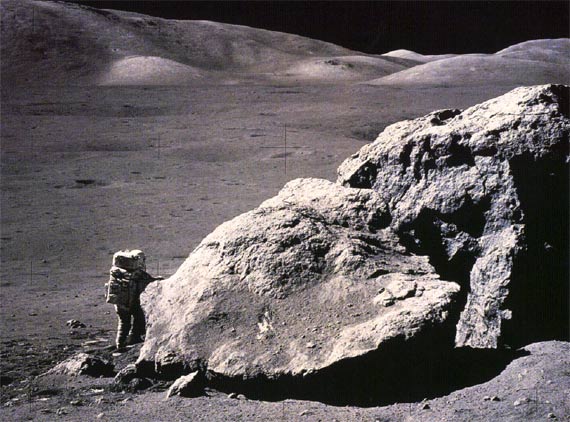
GIF compresses images in two ways: first, by reducing the number of colors in rich color images, thus reducing the number of bits per pixel. Second, GIF replaces multiple occurring patterns (large patterns) into one. So instead of storing five kinds of blue, it stores only one blue.

GIF is most suitable for graphics, diagrams, cartoons and logos with relatively few colors. GIF is still the chosen format for animation effects.
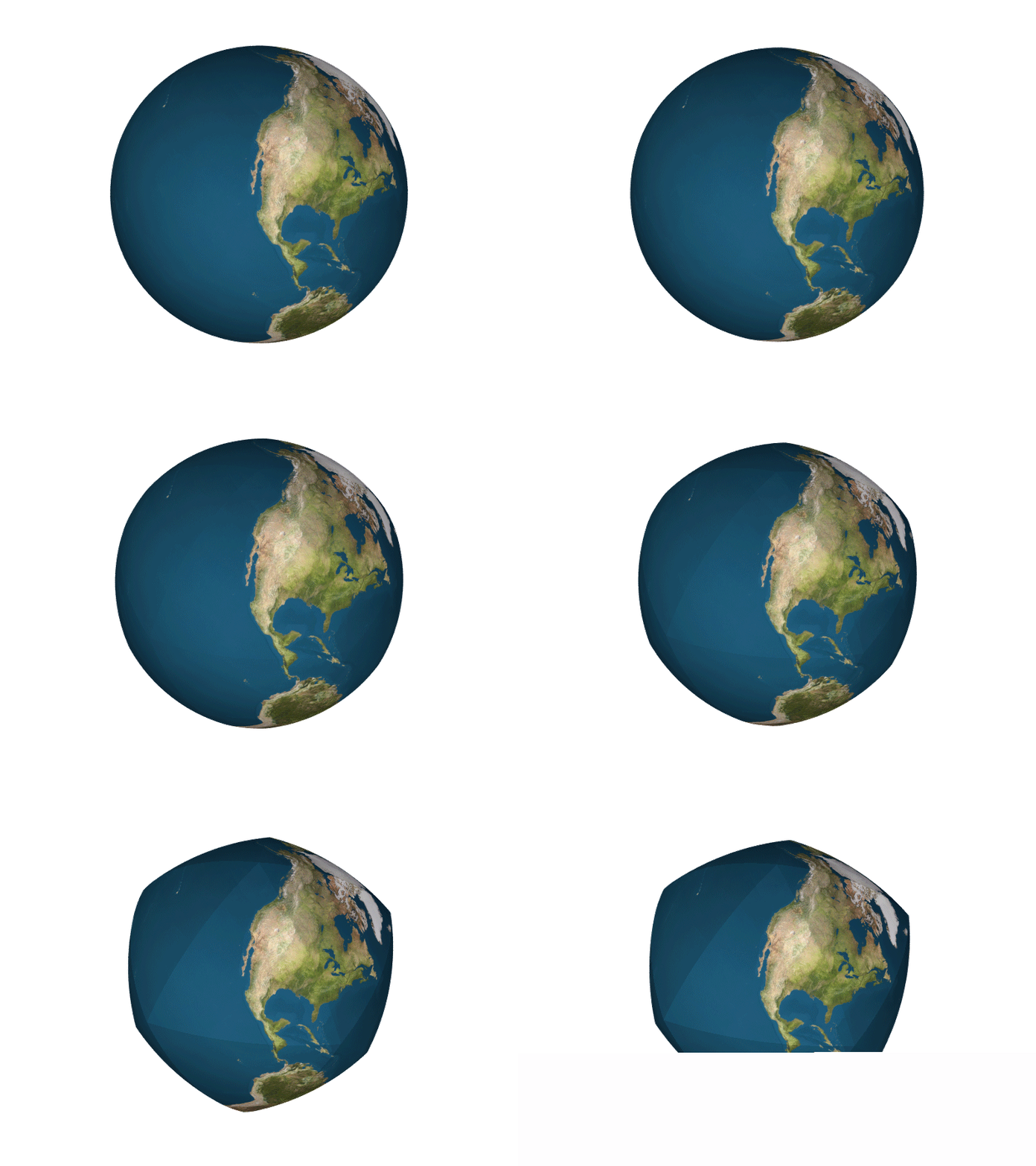
Compared to JPEG, it is lossless and thus more effective with compressing images with a single color, but pales in detailed or dithered pictures. In other words, GIF is lossless for images with 256 colors and below. So for a full color image, it may lose up to 99.998% of its colors.
One edge of the GIF image format is the interlacing feature, giving the illusion of fast loading graphics. When it loads in a browser, the GIF first appears to be blurry and fuzzy, but as soon as more data is downloaded, the image becomes more defined until all the date has been downloaded.
Pros of GIF:
Cons of GIF:
BMP
The Windows Bitmap or BMP files are image files within the Microsoft Windows operating system. In fact, it was at one point one of the few image formats. These files are large and uncompressed, but the images are rich in color, high in quality, simple and compatible in all Windows OS and programs. BMP files are also called raster or paint images.
BMP files are made of millions and millions of dots called ‘pixels’, with different colors and arrangements to come up with an image or pattern. It might an 8-bit, 16-bit or 24-bit image. Thus when you make a BMP image larger or smaller, you are making the individual pixels larger, and thus making the shapes look fuzzy and jagged.
BMP files are not great and not very popular. Being oversized, bitmap files are not what you call ‘web friendly’, nor are they compatible in all platforms and they do not scale well.
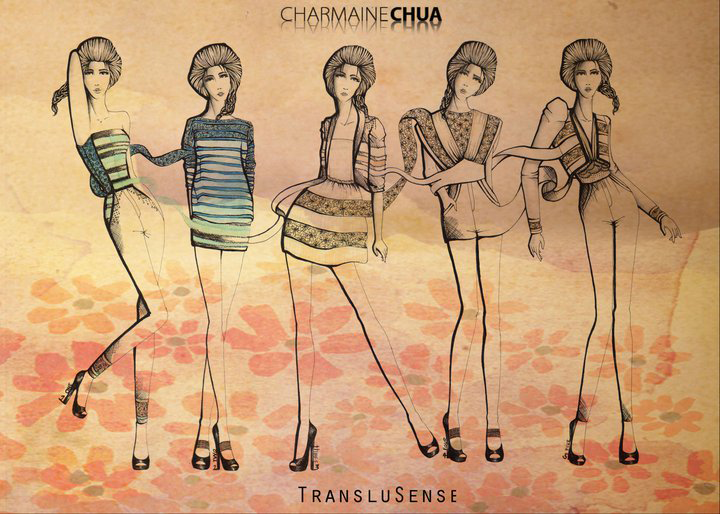
Pros of BMP:
Cons of BMP:
TIFF was created by Aldus for ‘desktop publishing’, and by 2009 it was transferred to the control of Adobe Systems. TIFF is popular among common users, but has gained recognition in the graphic design, publishing and photography industry. It is also popular among Apple users.

Above is a screenshot of how a TIFF image looks like–TIFF is not compatible for all systems; so to be sure, I uploaded a screenshot in JPEG of a TIFF image preview instead of uploading the original TIFF image here. Notice the crisp quality and rich colors of the photo.
The TIFF image format is easy to use with software that deasl with page layout, publishing and photo manipulation via fax, scanning, word processing, etc. TIFF is very flexible, it can be lossy or lossless. TIFF is a rich format and supported by many imaging programs. It is capable of recording halftone image data with different pixel intensities, thus is the perfect format for graphic storage, processing and printing. This makes TIFF the superior raster image format.
Pros of TIFF:
Cons of TIFF:
PNG or (Portable Network Graphics) is a recently introduced format, so not everyone familiar with it. But PNG has been approved as a standard since 1996. It is an image format specifically designed for the web. PNG is, in all aspects, the superior version of the GIF. Just like the GIF format, the PNG is saved with 256 colors maximum but it saves the color information more efficiently. It also supports an 8 bit transparency.
PNG was actually created for the intent to replace the GIF as an image format that doesn’t require a patent license. PNG can support 24 bit RGB color images, grayscale images, both with and without alpha channels. RGB cannot support CMYK color spaces, and is not designed for print graphics.
Pros of PNG:
Cons of PNG:
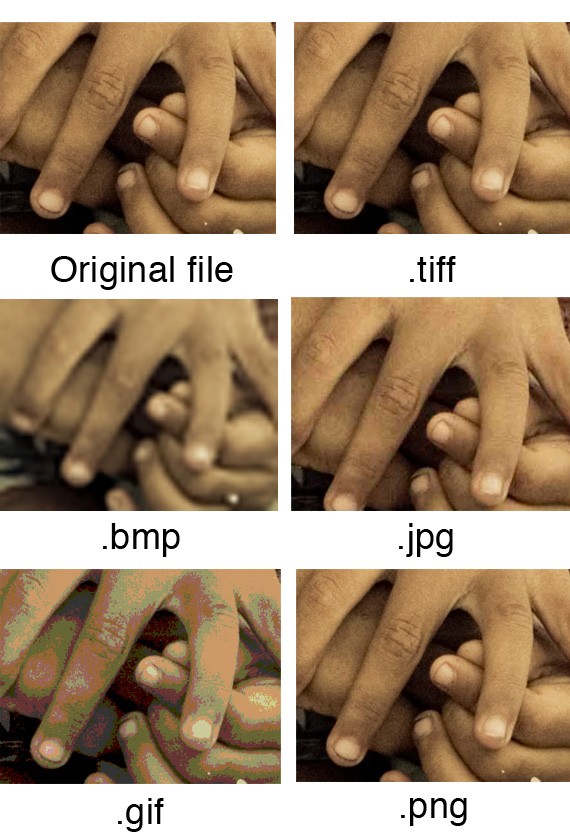
There is no universal image format that is best for all scenarios. Every type of image format has their own advantages and disadvantages. Here is a summation of each image format, their pros and cons, as well as when and where it’s best to use them.
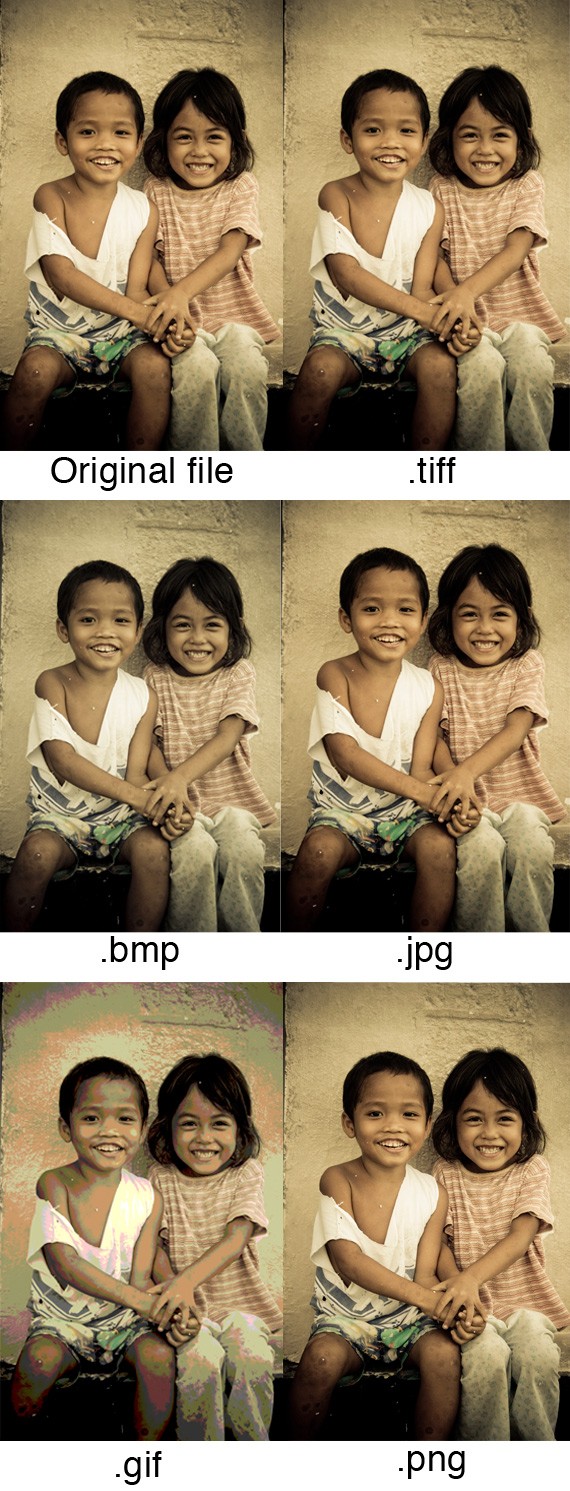
Print Graphics: TIFF is the best and only choice for professionals when images are intended for print. Its ability to read CMYK and YcbCr color, plus its ability to store such high pixel intensity makes it the only choice for designers, photographers and publishers.
Web Graphics: PNG, JPEG and GIF are the most web friendly image formats there is. JPEG is great for images when you need to keep the size small, such as when you need to upload it online. If you don’t mind compromising the quality of the image a bit, use JPEG. If you want to keep the size small, but still retain the image quality, use PNG. GIF is the worst choice, although file sizes are very small, and they load very fast. Plus, if you want to add animation effects, use GIF.
PC & Mac Compatibility: If you are using Mac or PC, or constantly shifting from one to another, JPEG is the best image format for PC and Mac Compatibility.
Logos & Line Art: JPEG is the worst choice, it tends to add artifacts and blur the text, line and edges. JPEG also cannot support transparency, which is often a need for logos or icons. GIF is a good choice, but it pales in comparison to TIFF and PNG. Both of the latter image formats are lossless, store as much image information, and are not limited to 256 colors, unlike GIF. They also don’t add artifacts (the downfall of JPEG) and keep the logo or line art sharp and concise.
Clip Art: GIF is the best image for clipart and drawn graphics that only use few colors and precise lines & shapes.
Get The Only Freelancer crash course you will ever need to read!
Rachel Arandilla is a curious subject -- she appreciates things that are quirky & clever. She loves spontaneity and adventure. She is a carefree soul, has a deep love for travel, culture and languages. And she's beginning to wonder she keeps on referring to herself in third person perspective.
Thursday, November 3rd, 2011 17:11
Nice post really.
Jpeg & png formats are more friendly for me. But thanx for letting know characteristics & use of each.
Thursday, June 2nd, 2011 20:34
Great article. Thanks Gofromiel for giving a different look… some are valid points. For web development, I believe GIF and JPEG still rules, tho PNG is making it’s way. When it comes to file format, it really depends on what you are doing.
Saturday, May 7th, 2011 23:26
It’s good article. Just find another detailed information from mebaze.com.
Sunday, April 3rd, 2011 23:51
WHAT ?! This article is just horrible !
- “Moreover [JPEG] it is less grainy then GIF” : Less grainy ? It’s not about grain, it’s about color reduction and noise dithering. Because GIF only works with indexed colors (called a “palette”), pictures with more than 256 colors are remapped to a reduced set of colors by your application when they are saved in GIF, a dithering filter is also apply on the image to trick the eye making it look better. This also apply to pictures saved in PNG8. If you save a picture with only two colors in them, do you think GIF would be grainier ?
- “Compatible in most OS (Mac, PC, Linux)” : Mac, PC are not OS, they are machines. File formats are not “compatible”, they are just file formats that applications can read or not. Would you say that Ogg Vorbis is not compatible with MacOS just because iTunes doesn’t support it ?
- “So for a full color image, it may lose up to 99.998% of its colors”. How come ? Where did you get that number ?
- “Can support transparency”. I would have added “on a single color”, which is VERY important when comparing to PNG which supports the same feature, and also supports a 8bit opacity mask.
ABOUT BMP
- “but the images are rich in color, high in quality”. BMP is limited to 24bit colors whereas PNG is limited to 48bit and TIFF 64bit. All three being non destructive, BMP has nothing special in color or quality.
- “BMP files are made of millions and millions of dots called ‘pixels’” Isn’t it the same for GIF, PNG and TIFF ?
ABOUT TIFF
- “I uploaded a screenshot in JPEG of a TIFF image preview”. A screenshot ? Don’t you use Photoshop or a similar application to resize your images and save them is another format ?
- “Notice the crisp quality and rich colors of the photo.” How can I notice anything, this is a JPEG image and you don’t provide the original TIFF.
ABOUT PNG
The illustration you chose to demonstrate the transparency support is really bad because it can be done with GIF too. What PNG brings is a 8bit transparency mask. Using the following picture would have been smarter:
http://upload.wikimedia.org/wikipedia/commons/9/9a/PNG_transparency_demonstration_2.png
because it demonstrates the variable levels of transparency of the image.
- “RGB cannot support CMYK color spaces”: It’s not about RGB not supporting CMYK, its about how well one color space can reproduce the other. Your statement is completely wrong because RGB provides richer greens and blues, but doesn’t cover all the CMYK space, as the CMYK space doesn’t cover the RGB space: http://dx.sheridan.com/advisor/cmyk_color.html
Well… I’ll stop there. Your article made me sad. Please educate yourself, for you and your readers.
Monday, August 1st, 2011 17:34
Ok well then stop complaining and write an article and provide a link to what you would refer to as educated material. I hate when people bash someone even if they provode the correct info and then have nothing good to say which tells me the reader is disgruntled!
Tuesday, October 4th, 2011 04:46
Actually, I agree with the “bashing.” Of course some information is true, but sometimes, the author is flat out lying because the reader will never know! I think it is fair, and necessary to let people say what they feel. The author will become a stronger writer in the end. But, you are right, he should post his own article, or link to the correct information!
Tuesday, March 13th, 2012 16:51
I think they may have meant ‘*PNG* cannot support CMYK color spaces,’ and wrote RGB on accident. I mean, there’s enough other typos for me to believe that.
Also- PNG is a ‘recently introduced’ file format, even though it was ‘standard’ in 1996? So that means… it’s not recent. Not even close.
Monday, March 28th, 2011 19:21
Great article, I use only two PNG and JPG formats, always good to read such articles to have deeper understanding of the circumstances under which they must use these image formats.
Wednesday, March 23rd, 2011 01:50
Good article.
I am often confused choose image format, and I was lucky to find a solution here.
Thank you .. :D
Sunday, March 20th, 2011 19:08
IE 6′s issues with PNGs goes beyond how well (or badly) it displays them, but there are also bugs in its handling of certain layout issues when PNGs are present. For example, if you’re using a transparent PNG as a background image for an element and you find that links within that element don’t seem to work, the culprit may be the PNG.
Saturday, March 19th, 2011 02:52
Nicely written. For web usage I definitely prefer JPG to GIF. Maybe the smaller GIF file offered some benefits to web designers during the dial-up era. Today high res JPGs really fly. I’ve even gotten to the point where I am using less compression on them before. A high speed connection still brings it in lightning fast.
Wednesday, March 16th, 2011 05:26
Perfect timing!
Was just looking for an article that explained all the formats. Saved me a ton of time. Thanks Rachael.
Tuesday, March 15th, 2011 21:56
one note for clarity — animated pngs do exist, but the standards body for png has voted it down, and its browser support is spotty.
Tuesday, March 15th, 2011 19:01
I tend to use PNG’s for small images and JPG’s more for the larger. I must admit I have learned something. I did not know that PNG’s are not recognised by all browsers. Great article!
Tuesday, March 15th, 2011 16:45
Thanks for the article. Sometimes I get confuse what format I need to save. This article explain well and help me clear about the image format.
Tuesday, March 15th, 2011 22:24
A very complete list explaining every single image file. I actually haven’t understood until now the difference and the pros ans cons of each image file. The tiff format is very new for me.
I only can say thank you for sharing this information with us.
Tuesday, March 15th, 2011 14:02
Very nice summary of how the format affects the look; I learned quite a few things I didn’t know before.
Tuesday, March 15th, 2011 13:31
I just use JPGs or PNGs based on the requirements. More formats means more confusion.
Tuesday, March 15th, 2011 16:58
PNG can actually be animated to
(downside is that not all web browsers will show animation)
http://en.wikipedia.org/wiki/APNG
should at least work in firefox
Tuesday, March 15th, 2011 16:18
Great article, PNGs are cool but as you said “Not all web browsers can support PNG.” so jpgs will still be the most used ones on the web,
Tuesday, March 15th, 2011 18:51
By not all browsers that’s not all browsers made 10 years ago support PNG. About the only browser that can have issues nowadays is IE6 and A) that’s really old but unfortunately still around and B) it mostly deals with PNGs anyway just sometimes having issues.
Tuesday, March 15th, 2011 16:12
PNG is typically my choice file, followed by JPG… But your article clearly highlights when to use the correct file type.
Thanks,
PR
If not, then it's time to learn how to:
You can trust 1stWebDesigner to help you become a better web designer!
- Jacob Cass | Just Creative
Just enter your name and email below and click Get Updates!
Gofromiel
Sunday, April 3rd, 2011 23:51
WHAT ?! This article is just horrible !
- “Moreover [JPEG] it is less grainy then GIF” : Less grainy ? It’s not about grain, it’s about color reduction and noise dithering. Because GIF only works with indexed colors (called a “palette”), pictures with more than 256 colors are remapped to a reduced set of colors by your application when they are saved in GIF, a dithering filter is also apply on the image to trick the eye making it look better. This also apply to pictures saved in PNG8. If you save a picture with only two colors in them, do you think GIF would be grainier ?
- “Compatible in most OS (Mac, PC, Linux)” : Mac, PC are not OS, they are machines. File formats are not “compatible”, they are just file formats that applications can read or not. Would you say that Ogg Vorbis is not compatible with MacOS just because iTunes doesn’t support it ?
- “So for a full color image, it may lose up to 99.998% of its colors”. How come ? Where did you get that number ?
- “Can support transparency”. I would have added “on a single color”, which is VERY important when comparing to PNG which supports the same feature, and also supports a 8bit opacity mask.
ABOUT BMP
- “but the images are rich in color, high in quality”. BMP is limited to 24bit colors whereas PNG is limited to 48bit and TIFF 64bit. All three being non destructive, BMP has nothing special in color or quality.
- “BMP files are made of millions and millions of dots called ‘pixels’” Isn’t it the same for GIF, PNG and TIFF ?
ABOUT TIFF
- “I uploaded a screenshot in JPEG of a TIFF image preview”. A screenshot ? Don’t you use Photoshop or a similar application to resize your images and save them is another format ?
- “Notice the crisp quality and rich colors of the photo.” How can I notice anything, this is a JPEG image and you don’t provide the original TIFF.
ABOUT PNG
The illustration you chose to demonstrate the transparency support is really bad because it can be done with GIF too. What PNG brings is a 8bit transparency mask. Using the following picture would have been smarter:
http://upload.wikimedia.org/wikipedia/commons/9/9a/PNG_transparency_demonstration_2.png
because it demonstrates the variable levels of transparency of the image.
- “RGB cannot support CMYK color spaces”: It’s not about RGB not supporting CMYK, its about how well one color space can reproduce the other. Your statement is completely wrong because RGB provides richer greens and blues, but doesn’t cover all the CMYK space, as the CMYK space doesn’t cover the RGB space: http://dx.sheridan.com/advisor/cmyk_color.html
Well… I’ll stop there. Your article made me sad. Please educate yourself, for you and your readers.
ep
Monday, August 1st, 2011 17:34
Ok well then stop complaining and write an article and provide a link to what you would refer to as educated material. I hate when people bash someone even if they provode the correct info and then have nothing good to say which tells me the reader is disgruntled!
Francis
Tuesday, October 4th, 2011 04:46
Actually, I agree with the “bashing.” Of course some information is true, but sometimes, the author is flat out lying because the reader will never know! I think it is fair, and necessary to let people say what they feel. The author will become a stronger writer in the end. But, you are right, he should post his own article, or link to the correct information!
Jen
Tuesday, March 13th, 2012 16:51
I think they may have meant ‘*PNG* cannot support CMYK color spaces,’ and wrote RGB on accident. I mean, there’s enough other typos for me to believe that.
Also- PNG is a ‘recently introduced’ file format, even though it was ‘standard’ in 1996? So that means… it’s not recent. Not even close.
Paper Rocket
Tuesday, March 15th, 2011 16:12
PNG is typically my choice file, followed by JPG… But your article clearly highlights when to use the correct file type.
Thanks,
PR
Fazreen
Tuesday, March 15th, 2011 16:45
Thanks for the article. Sometimes I get confuse what format I need to save. This article explain well and help me clear about the image format.
Felix
Tuesday, March 15th, 2011 19:01
I tend to use PNG’s for small images and JPG’s more for the larger. I must admit I have learned something. I did not know that PNG’s are not recognised by all browsers. Great article!
Ben
Tuesday, March 15th, 2011 21:56
one note for clarity — animated pngs do exist, but the standards body for png has voted it down, and its browser support is spotty.
Renato Alves
Tuesday, March 15th, 2011 22:24
A very complete list explaining every single image file. I actually haven’t understood until now the difference and the pros ans cons of each image file. The tiff format is very new for me.
I only can say thank you for sharing this information with us.
Analdin
Tuesday, March 15th, 2011 14:02
Very nice summary of how the format affects the look; I learned quite a few things I didn’t know before.
Marios
Tuesday, March 15th, 2011 16:18
Great article, PNGs are cool but as you said “Not all web browsers can support PNG.” so jpgs will still be the most used ones on the web,
Simon Proctor
Tuesday, March 15th, 2011 18:51
By not all browsers that’s not all browsers made 10 years ago support PNG. About the only browser that can have issues nowadays is IE6 and A) that’s really old but unfortunately still around and B) it mostly deals with PNGs anyway just sometimes having issues.
Ørjan Kvalheim Lønningen
Tuesday, March 15th, 2011 16:58
PNG can actually be animated to
(downside is that not all web browsers will show animation)
http://en.wikipedia.org/wiki/APNG
should at least work in firefox
Freebious
Tuesday, March 15th, 2011 13:31
I just use JPGs or PNGs based on the requirements. More formats means more confusion.
Matt
Wednesday, March 16th, 2011 05:26
Perfect timing!
Was just looking for an article that explained all the formats. Saved me a ton of time. Thanks Rachael.
Dan Padavona
Saturday, March 19th, 2011 02:52
Nicely written. For web usage I definitely prefer JPG to GIF. Maybe the smaller GIF file offered some benefits to web designers during the dial-up era. Today high res JPGs really fly. I’ve even gotten to the point where I am using less compression on them before. A high speed connection still brings it in lightning fast.
Aniket
Thursday, November 3rd, 2011 17:11
Nice post really.
Jpeg & png formats are more friendly for me. But thanx for letting know characteristics & use of each.
Ki
Thursday, June 2nd, 2011 20:34
Great article. Thanks Gofromiel for giving a different look… some are valid points. For web development, I believe GIF and JPEG still rules, tho PNG is making it’s way. When it comes to file format, it really depends on what you are doing.
Eric
Sunday, March 20th, 2011 19:08
IE 6′s issues with PNGs goes beyond how well (or badly) it displays them, but there are also bugs in its handling of certain layout issues when PNGs are present. For example, if you’re using a transparent PNG as a background image for an element and you find that links within that element don’t seem to work, the culprit may be the PNG.
masyhury
Wednesday, March 23rd, 2011 01:50
Good article.
I am often confused choose image format, and I was lucky to find a solution here.
Thank you .. :D
Carlos Viloria
Monday, March 28th, 2011 19:21
Great article, I use only two PNG and JPG formats, always good to read such articles to have deeper understanding of the circumstances under which they must use these image formats.
Venkatesh
Saturday, May 7th, 2011 23:26
It’s good article. Just find another detailed information from mebaze.com.