
There are probably thousands of articles on the web talking about Google Analytics. This is all great information, especially for novice site designers and owners.
Although the “how do I analyze Google Analytics reports in order to actually make impactful changes to my website?” question does not get answered often enough, despite the amount of times it gets asked.
In this article we are going to answer that question, as well as provide you with some examples of taking data from Google Analytics, analyzing it, and then using it to make meaningful changes to your website or marketing startegy.

Tools like Google Analytics allow you to check your website traffic data as frequently as you’d like, but you should be keeping an eye on your Google Analytics reports daily, or at the very least, weekly.
With that said, we all know that checking your reports and actually taking time to analyze them are two different tasks. This is why it is recommended that every website owner take a full day each quarter to analyze their reports and implement any needed changes to their website based on what the data is showing.
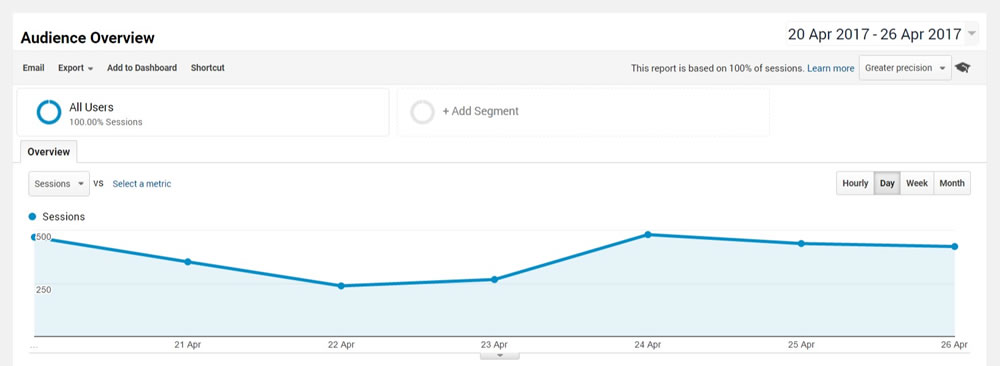
What Website Data should I be Paying Attention to?
It’s easy to get lost in Google Analytics. There is SO much data that you can analyze. Not only is there a ton of data, but the ways in which you can slice it up seem almost endless. Every website owner is going to have different reports to focus on, but there are a few main data points that all website owners should be aware of during their quarterly reviews:
- Acquisition – Keywords: Knowing which keywords are driving the most quality visitors to your website is crucial. You can begin optimizing more of your website around these keywords in order to capitalize on those searches.
- Acquisition – Referring Sites: Understanding which websites are sending the most quality traffic to your website will allow you to focus more effort and time on those sites, and less of your time on under performing websites, moving forward.
- Visitors Overview: How much of your website traffic is new visitors versus returning visitors? Knowing this might help you phrase content differently or run certain marketing programs geared towards one type of visitor versus the other.
- Content Overview – Top Pages: Having an idea of what pages are performing best will tell you what content your visitors are interested in. Produce more of that!
- Visits: What days do you have the most traffic to your website? Knowing what days visitors are coming to your website allows you to publish new content or launch promotions on those days in order to capture the most attention.
Now that we have an understanding of some of the most important reports to analyze for your website, let’s dig into each of them to provide examples on how you can use the data to make real impactful changes to your website and website marketing.
Use Keyword Reports to Optimize Your Website
Knowing which keywords to optimize your website with is crucial in attracting the right visitors. Here’s how you can utilize the Keyword reports in Google Analytics:
- Go into the Acquisition Overview section of Google Analytics
- Find your Top ten performing keywords and make a list of those keywords
- Go back through your website and begin infusing them into your website content
- Use them as anchor text for your URLs
- Name your images with your top ten keywords
- Add title tags and Alt tags to your images using your top ten keywords
- Create a list of new blog topics that you want to write about and be sure to infuse your top ten keywords into those articles
By analyzing your Acquisition – Keywords report and following the steps above you should theoretically increase your website traffic for those specific keywords.
Once you have completed this first main Keyword optimization during your quarterly review, go back through your Keyword report and sort the results by Average Time on Site.
Find five keywords that might not be driving a lot of traffic to your website right now, but the traffic that is coming to your site from those keywords tends to spend a lot of time on your site. These are your “growth keywords”. Repeat the steps above using these keywords to see if with a little more use throughout your website they can produce more traffic.
Spend more Time on the Websites that Refer the most Traffic to Your Website
Knowing which websites (or social media channels) around the web that are referring the most traffic to your website is critical. As a website owner you only have so much time in the day to market your site. It’s best to use that time wisely. Follow these steps in order to analyze your traffic sources and make impactful changes to your website marketing:
- Go into your Acquisition report and review the Top Referring Sites data
- Ask yourself, are these the websites that I assumed would be near the top? Are these the websites I’m spending the most time using in order to drive traffic to my website?
- Start trying to figure out why some sites are near the top of this list, while others are near the bottom. Perhaps one of the websites near the top is a site that you recently wrote a guest blog article for. Contact the owner of that site and see if you can write another article for them.
- Is LinkedIn outperforming Facebook? If so, you may want to tweak the amount of time you spend on both social media sites, with more time being devoted to LinkedIn next quarter instead of Facebook. This strategy can be repeated for all social media sites that you use.
- Is Banner Ad ‘A’ outperforming Banner Ad ‘B’? If so, perhaps you want to cancel Banner Ad ‘B’ and ask for more space on the website that’s hosting Banner Ad ‘A’.
- Is there a website that you don’t recognize that’s currently sending a lot of traffic to your website? Reach out to the owner of that website and see if you can partner with them in some way in order to capitalize even more on all of the traffic they are sending your way.
Using the Referral Sources report in Google Analytics will help you become more efficient with your marketing time and more effective at driving traffic to your website.
Run a Contest for New Visitors, Say ‘Thank You’ to Returning Visitors
Analyzing your Visitor Profile through the Visitors Overview report in Google Analytics will let you know how much of your traffic is composed of ‘New Visitors‘ and how much of your traffic is composed of ‘Repeat Visitors‘.
You want to encourage new visitors to become return visitors, as well as, continue to attract even more new visitors. Here are a few ways that you can take your data from the Visitors Overview report and actually use it to improve your website:
- Post some sort of a ‘Thank You’ message somewhere prominent on your website for returning visitors or send out a periodic ‘Thank You’ email to your email list just letting your supporters know you appreciate them.
- Do you have an eCommerce website? Give repeat customers a discount on their next purchase.
- Create a ‘FAQ‘ page to help new visitors quickly understand your website and how to use it
- Make the ‘Contact Us’ page as prevalent as possible in case new visitors have questions and need to contact you
- Run a contest to encourage new customers to get engaged with your website/brand
Produce More of the Content Your Visitors Like
Understanding what content is resonating with your visitors will help you come up with new content topics for the next quarter.
- Go into the Content Overview section and navigate to the Top Pages report
- Find the top 5-6 pages visited over the past 3-6 months
- Think about what information is displayed on each of those pages and determine what information the majority of your visitors are looking for
- Develop a content plan for the next quarter, comprised of topics that you think are most relevant based on your findings above. A few ideas might be:
- Write blog articles around popular topics
- Focus social media efforts in promoting those top pages or discussing those top topics
- Write an eBook expanding on some of those topics that your visitors are finding valuable
- Shoot YouTube videos around those topics and embed them into your Top Pages
Producing more of the content that your visitors are finding valuable will keep them coming back, get them to share your website with their friends, and attract new visitors.
Publish New Content, Contests, and General Website Updates on High Traffic Days
Are the weekends a popular time for your website or do most people visit your website during the week? Knowing what days are high traffic days for your website and what days are low traffic days for your website allows you to be much more strategic in regards to publishing new updates to your website.
By analyzing the Visits report in Google Analytics you can see which days seem to generate the most traffic. Make a list of your high traffic days and then start taking advantage of those high traffic days in the following ways:
- Publish blog articles on those days
- Begin and end contests on high traffic days
- Spend time on social media during those days
- Publish events to your website
- Make architecture or functionality updates on low traffic days
Knowing when, and when not to, publish new information to your website can drastically alter the number of views your new updates receive. Be smart about when you publish new content, news, events, etc. Use the Visits report in Google Analytics as your guide.
Turn Google Analytics Reports Into Impactful Changes for Your Website
Google Analytics is great. The website data provided by Google Analytics can help website owners learn a ton about their website. With that said, unless website owners take the time to review and analyze their reports on a regular basis, and then take the time to use that data to make changes to their website, they are missing out on the biggest advantage that Google Analytics provides.
Google Analytics provides you with a blueprint for giving your visitors what they want when they want it. Be sure to take advantage of that!
This post may contain affiliate links. See our disclosure about affiliate links here.