Join over 55,891 Subscribers Today! FREE UPDATES!
Get The Only Freelancer crash course you will ever need to read!
Today we will be featuring calendar date pickers to let you output planners, calendars even more easier, most of these date pickers are built on jQuery and jQuery UI (User Interface).
I would consider these date pickers as frameworks with great functionality, but most of them require modifying and some styling, but I think it’s really acceptable since each project needs it’s own design and you should change style of calendar plugin too. These plugins will help you and your visitors keep track what’s happening in specific project and help to organize time!
This is tutorial how to make kind a like iPhone calendar application.
Timeline is simple JavaScript driven calendar, which is written on top of jQuery JavaScript framework. Timeline is a horizontal representation of days in month. It can be used to display unlimited number of events with their descriptions.
The DatePicker lets users easily select valid dates from a dropdown calendar. No need to worry about date formats, by picking dates it’s always correct.
Calendar is a Javascript class that adds accessible and unobtrusive date-pickers to your form elements. This class is a compilation of many date-pickers I have implemented over the years and has been completely re-written for Mootools. I have tried to include all the features that have been most useful while streamlining the class itself to keep it as small as possible. Use the links below to see what features are available in Calendar and how it might enhance the accessibility, usability and validation of form elements on your website.
jQuery Calendar Widget Plugin is a simple jQuery Calendar Widget Plugin with a month view. You can specify which month you would like to display or have it display the current month. With just 100 lines of Javascript code, this plugin is light-weight and perfect for its purpose.
Calendar Component that is very customizable and extendable.
Features:
This flexible, simple pop-up calendar is written to work across browsers. It’s fully commented and customisable for language, colours and date format. The pop-up displays a month at a time from a specified range of years.
The optional input date determines the initial month displayed. The year can be in two or four digits while the month can be digits or a month name abbreviation that can easily be set up for any language. Any date or day of the week can be disabled (and re-enabled) using JavaScript on the calling page.
This is ideal for combination with server-side technologies to produce a professional application.
Date Picker component with a lot of options and easy to fit in your web application.
Features:
Calendar System – the basic calendar.
Tigra Calendar is a free cross-browser JavaScript Calendar control, it improves the user experience by enabling a drop-down calendar for date fields in HTML forms.
One installation of plans can support many calendars. Calendars can share information with each other. Each calendar is managed independently (unique password, custom options, custom look & feel).
Multiple calendars running on the same installation of plans can be “embedded” in completely different websites. Plans uses a powerful and flexible recurring event model.
Plans supports multiple languages. Weeks can start on days other than Sunday. Plans supports arbitrary date formats (mm/dd/yy, dd/mm/yy, etc.) Plans can store data in flat files or an SQL database.
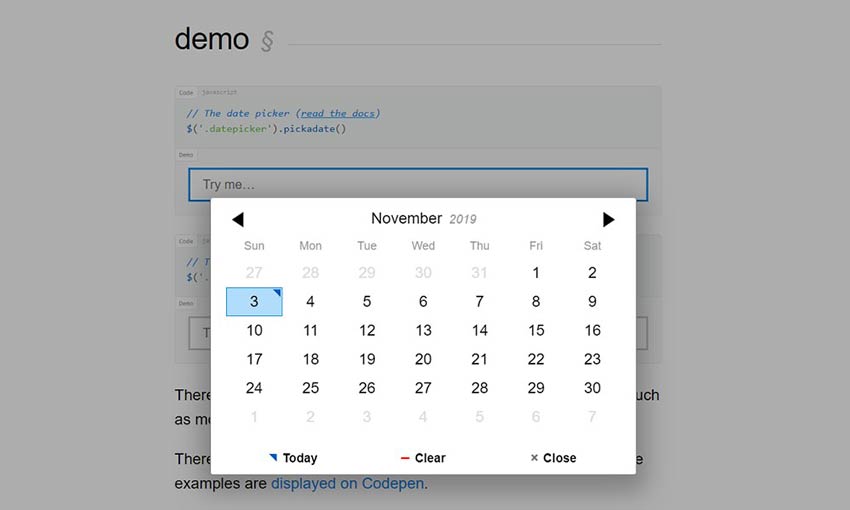
The jQuery UI Datepicker is a highly configurable plugin that adds datepicker functionality to your pages. You can customize the date format and language, restrict the selectable date ranges and add in buttons and other navigation options easily.
By default, the datepicker calendar opens in a small overlay onFocus and closes automatically onBlur or when a date is selected. For an inline calendar, simply attach the datepicker to a div or span.
You can use keyboard shortcuts to drive the datepicker:
This element enables you to pick dates with a simple slider bar. By dragging the bar over the time-line, the dates change instantly. Besides this, when the user decides to manually change the dates, the bar is automatically adjusted to the corresponding dates.
FullCalendar is a jQuery plugin that provides a full-sized, drag & drop calendar like the one below. It uses AJAX to fetch events on-the-fly for each month and is easily configured to use your own feed format (an extension is provided for Google Calendar).
It is visually customizable and exposes hooks for user-triggered events (like clicking or dragging an event).
Features:
<input type="text" ... />)This component is a light-weight calendar/date-picker.
Features:
Timeframe is open source, tested, and available for forking, pushing, and pulling at Github. It can select dates “from – to”.
Date / Time Picker is a easy date picker control. To open the calendar, click the icon at the right side of the input box.
This is another example of easy date picker. Calendar has three required dependencies: the YAHOO Global object, the Event Utility, and the DOM Collection.
PHP Event Calendar is a MySQL Database driven script that displays events on your website quickly and easily through a traditional calendar UI. It can be integrated into any existing PHP page within minutes using a simple file include.
It features a simple yet advanced Administration Panel with secure login sessions, from within this you have full control over your calendar events and gives the ability to Add Events, Search & Edit Events, Delete Events from your calendar and so forth.
This plugin wraps the jQuery UI datepicker into an interactive component specifically designed for choosing date ranges. It is an update from a former version.
jMonthCalendar is a full month calendar that supports events. You simply initialize the calendar with options and an events array and it can handle the rest. The plugin does have extension points that allow the developer to interact with the calendar when the display is about to change months, after the display has changed months and when the event bubbles are clicked on. jMonthCalendar now supports hover extension points, hover over an event and trigger an event like an alert(); By default the events would each have a URL supplied that would link to a details page.
VCalendar (Virtual Web Calendar) is an open source Web calendar application for posting and maintaining events and schedules online, in calendar format. This is an excellent and free solution for use by online Web communities and any commercial and non-commercial organizations. Unlike any other online calendars, VCalendar comes with source code in multiple programming languages: PHP, ASP and ASP.NET (C#); with potential for adding more technologies in the future.
All day and month names are automatically generated specific to your locale. Allows you to choose what day your weeks start on.
Multiday Calendar Datepicker JQuery Plugin is a nicely animated calendar datepicker for multi-day selection with multi-month display. Allows for a sequence of months to reside side by side and for the user to select a number of consecutive days. This is great for lodging reservation systems, ticket purchasing systems, etc.
Download Now: JS file and CSS file | View Example
The Easy PHP Calendar is a powerful PHP calendar script that is easily integrated into web sites and is simple to customize. This attractive, full-featured calendar is suitable for display on a calendar of events page, home page, or any other page that needs a calendar.
Date Input is a no frills date picker plugin for jQuery. It is lightweight, fast and pretty by default.
jQuery DatePicker is an clean, unobtrusive plugin for jQuery which allows you to easily add date inputing functionality to your web forms and pages. Designed from the ground up to be flexible and extensible, the date picker can be used in unlimited ways to allow you to add calendar widgets to your pages.
This jQuery plugin makes it easy to add date and time selection to textfield inputs. This supports date and time, and renders the value to a single field in a configurable format.
The jquery-week-calendar plugin provides a simple and flexible way of including a weekly calendar in your application. It is built on top of jquery and jquery ui and is inspired by other online weekly calendars such as google calendar.
Get The Only Freelancer crash course you will ever need to read!
Valters is 17 years old freelancer from Latvia. His experience in web-building is about 3 years - PHP, xHTML, CSS. He enjoys web-building with different languages. You can follow him on Twitter.
Friday, March 30th, 2012 15:23
Hi there, great list of calender plugin. However, i was looking for some kind of week date picker. As like we see on Facebook page availability selector. Is that possible to found ?
Wednesday, March 14th, 2012 20:45
What an innovation. Not anywhere in the entire world. Keep growing and remember, “one step at a time”
Wednesday, March 14th, 2012 20:42
Exquisite!
Monday, March 12th, 2012 13:08
I need a calendar in which only 90 days should be enabled from the today’s date. Pls help me out..
Saturday, January 7th, 2012 15:30
hi allz you can find more for this topics. i have found some special for you.
Saturday, January 7th, 2012 15:31
reply this post for feedback. and tell how to improve this blog.
Sunday, December 18th, 2011 06:34
Hi, this is very useful info, is there any option of, if i want to know the date of after 30 or 60 or 280 days, including all the days ?pls if anthing like with this option pls pls let me know
Thanks
Wednesday, October 5th, 2011 14:57
I have 3 fields that are used to setup an input form.
[day] [month] [year] (in fact 5 with [hour]:[minutes] also :-)
Are any of these datepickers compatible to input these 3 fields in 1 selection?
They all work with 1 date field, right?
Monday, September 19th, 2011 12:08
This article is very good !!!!
Wednesday, August 3rd, 2011 08:32
hi i need a date picker just like facebook any link or help please!!!
Wednesday, July 6th, 2011 18:00
If you’re developing for touchscreens try this component
http://code.google.com/p/mobiscroll/
It was specially designed for touch devices, works well on android, iOS. jQuery ThemeRoller ready!
Wednesday, April 27th, 2011 07:25
Hi,
I used ’13. FullCalendar’ , it works excellent on Fire fox and IE, but not working on Chrome ,
could any body please tell me can this problem be resolved or should i use other calender?
Thursday, March 3rd, 2011 09:54
thnxx..!! Nice work..
Monday, October 25th, 2010 18:49
i use jquery date/time picker plugin but i dont know how to call that function from input field.. if any body knows pls tell me
Monday, October 4th, 2010 09:20
Hi..How to change the database entries if we use drag and drop functionalities in Fullcalendar .
Thanks in advance
Thursday, September 9th, 2010 18:41
Thanks for these wonderful calendars. I want to use vcalendar but when I press start after successful installation, it goes back to install process. it doesn’t open the vcalender.
Monday, August 16th, 2010 07:47
We are working on a jquery based event calendar with month/week/daily view, which is call wdCalendar. It is very simple to to integrate wdCalendar with a database. You may download it at our web site:www.web-delicious.com.
Wednesday, August 18th, 2010 13:27
Hi Steven
I am using your WdCalendar , but edit event part not working . please help me to do this functionality ..
Thanks,
Ruhul
Thursday, June 17th, 2010 23:10
you have nice web site,thanks you dou your best!
Wednesday, June 16th, 2010 13:58
That’s cool , i love jquery :D
Tuesday, June 15th, 2010 14:18
I’ve used a couple of the mentioned calendars, but great resource to check out some new ones. Thanks for the share.
Monday, June 14th, 2010 18:11
I like the 21st example – The New Coolest DHTML Calendar. I am going to use this Calender Plugin for my web application.
Monday, June 14th, 2010 13:30
Nice list.
I’ve been using jQuery UI Datepicker on one of my sites for a while and it works great.
Sunday, June 13th, 2010 18:45
My favorite is the number 13 : Fullcalendar
If not, then it's time to learn how to:
You can trust 1stWebDesigner to help you become a better web designer!
- Jacob Cass | Just Creative
Just enter your name and email below and click Get Updates!
Jim White
Wednesday, March 14th, 2012 20:45
What an innovation. Not anywhere in the entire world. Keep growing and remember, “one step at a time”
Azam
Thursday, September 9th, 2010 18:41
Thanks for these wonderful calendars. I want to use vcalendar but when I press start after successful installation, it goes back to install process. it doesn’t open the vcalender.
steven
Monday, August 16th, 2010 07:47
We are working on a jquery based event calendar with month/week/daily view, which is call wdCalendar. It is very simple to to integrate wdCalendar with a database. You may download it at our web site:www.web-delicious.com.
Ruhul Amin Sarkar
Wednesday, August 18th, 2010 13:27
Hi Steven
I am using your WdCalendar , but edit event part not working . please help me to do this functionality ..
Thanks,
Ruhul
kayya
Monday, October 4th, 2010 14:26
number 26. very good.
krishna
Monday, October 4th, 2010 09:20
Hi..How to change the database entries if we use drag and drop functionalities in Fullcalendar .
Thanks in advance
Frank
Thursday, June 17th, 2010 23:10
you have nice web site,thanks you dou your best!
Akashtitans
Monday, October 25th, 2010 18:49
i use jquery date/time picker plugin but i dont know how to call that function from input field.. if any body knows pls tell me
memo
Monday, June 14th, 2010 01:13
These are quite nice widgets!
Thank you for sharing with us.
Adie
Monday, June 14th, 2010 13:30
Nice list.
I’ve been using jQuery UI Datepicker on one of my sites for a while and it works great.
Joe
Monday, June 14th, 2010 18:11
I like the 21st example – The New Coolest DHTML Calendar. I am going to use this Calender Plugin for my web application.
Duvvar
Wednesday, June 16th, 2010 13:58
That’s cool , i love jquery :D
Thomas Craig
Tuesday, June 15th, 2010 14:18
I’ve used a couple of the mentioned calendars, but great resource to check out some new ones. Thanks for the share.
Saurabh Gupta
Thursday, March 3rd, 2011 09:54
thnxx..!! Nice work..
Ferdinand AMOI
Sunday, June 13th, 2010 18:45
My favorite is the number 13 : Fullcalendar
narowal
Saturday, January 7th, 2012 15:30
hi allz you can find more for this topics. i have found some special for you.
narowal
Saturday, January 7th, 2012 15:31
reply this post for feedback. and tell how to improve this blog.
priya
Monday, March 12th, 2012 13:08
I need a calendar in which only 90 days should be enabled from the today’s date. Pls help me out..
Prince
Wednesday, March 14th, 2012 20:42
Exquisite!
Shazzad
Friday, March 30th, 2012 15:23
Hi there, great list of calender plugin. However, i was looking for some kind of week date picker. As like we see on Facebook page availability selector. Is that possible to found ?
praveen
Sunday, December 18th, 2011 06:34
Hi, this is very useful info, is there any option of, if i want to know the date of after 30 or 60 or 280 days, including all the days ?pls if anthing like with this option pls pls let me know
Thanks
esgee
Wednesday, October 5th, 2011 14:57
I have 3 fields that are used to setup an input form.
[day] [month] [year] (in fact 5 with [hour]:[minutes] also :-)
Are any of these datepickers compatible to input these 3 fields in 1 selection?
They all work with 1 date field, right?
Ketaki
Wednesday, April 27th, 2011 07:25
Hi,
I used ’13. FullCalendar’ , it works excellent on Fire fox and IE, but not working on Chrome ,
could any body please tell me can this problem be resolved or should i use other calender?
MHD
Thursday, June 23rd, 2011 09:20
you have nice web site,thanks you do your best!…
Levi
Wednesday, July 6th, 2011 18:00
If you’re developing for touchscreens try this component
http://code.google.com/p/mobiscroll/
It was specially designed for touch devices, works well on android, iOS. jQuery ThemeRoller ready!
pankaj
Monday, September 19th, 2011 12:08
This article is very good !!!!
kamran
Wednesday, August 3rd, 2011 08:32
hi i need a date picker just like facebook any link or help please!!!