
More often than not, a web design consists of a header, footer, sidebar, and the area for the main content, which seems to be the default layout.However, web designers, UI experts, and layout artists have become brave in breaking the norms and creating new web layout designs, even taking them to a new and exciting level.
The year 2015 is drawing near to its end, and here is our list of layouts that have already impacted the web design industry by providing the users a compelling and dynamic experience.
Table of Contents:
Top Web Design Layout Trends
Times have changed. Nonetheless, if you try to look back at how websites have been designed in the last 10 years, you can say that nothing much has changed despite the numerous changes on the web.
1. Split Screens
This is one of the most riveting web layout trends that you need to watch out for not only this 2015 but in the coming years. If you want your website to stand out, you should seriously consider the split screen layout. Here are some of the important reasons why the split-screens layout is a must-apply:
Provides equal importance to two primary elements. It is a common thing for websites to rank each element according to its importance, which defines the order and structure of the design. However, what would you do if two elements are of the same importance, and you can’t seem to know which one to put over the other?
This is the advantage of the split-screens layout. With a split-screen, you can give prominence to both elements and enable the user to quickly choose between them. You can easily convey dual importance. For example, if you want to convey to your website visitors that your core strengths are your digital roots and talented staff, you can simply place one on the left side, and the other on the right side.
If you are a business website, a restaurant, for instance, you can place the identity of your brand on the left, and the list of the dishes that you offer on the right. If you are operating a clothing line website, you can use one side to feature some important information about your company while showcasing the photos of the latest clothing and apparel that you sell on the other side.
On the whole, a split-screen layout can either be a single and static page. However, if a company wishes to display more information or content, the content of the dual page can be scrolled down. There are some cases, though, wherein scrolling down one side of the split screens can result to the scrolling of the other side, too.
However, split screens provide a great deal of ease to users, especially if they are potential customers, as they are provided two sections to check so that they can easily find the item they wish to purchase, or a service that they need to avail. They can do it without having to spend a lot of time, thanks to the reduced clutter on the website and its more streamlined look.
Why Go for a Split Screens Layout
The look of your website, especially if it is a business-related, plays an important role in attracting potential customers. Hence, you have to ensure that it covers what potential clients want as you display the relevant information and other elements that will engage them.
Potential clients or customers looking for important information are easily dissuaded from staying in a website if they find it hard to navigate the site. If you opt to go for the split screen type of website layout, you will not only have a website that is visually appealing but is user-friendly, too.
The Rising Popularity of the Split Screens Layout
A lot of websites that have embraced the split screen layout, thanks to its qualification as a part of the responsive design. Responsive designs, as you already know, adjust a website to the proportions of the device where a site is viewed on. This is especially important as more and more people access the Internet using their mobile devices, such as smartphones and tablets.
Split screens can preserve a website’s proportions regardless of the device where it is accessed. If you can come up with split screen design correctly, you have a masterpiece. Many people are especially attracted to the vertical split design believing that it is a fantastic tool, much more if it becomes a fully responsive design.
Furthermore, in contrast to many other websites, a split-screen layout design gives a website an edgy look – big and bold, yet oozing with simplicity and power. However, you have to exercise a great deal of precautions when working on a website that makes use of the split screen. If you are not careful, your overall design may look like a before and after photo in magazines, newspapers, or social media.
How to Do the Split Screen
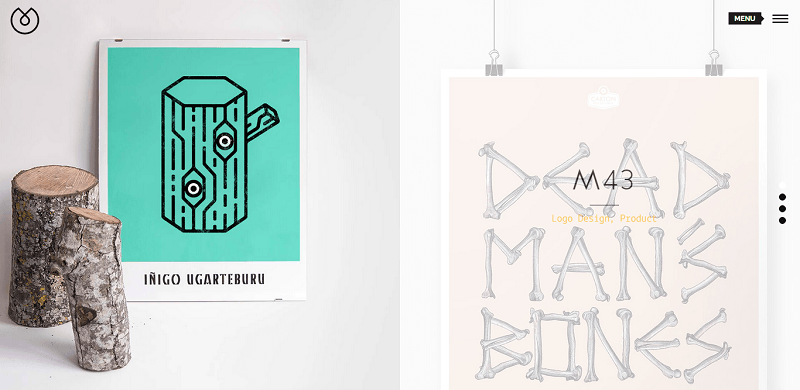
The split screen layout has become popular because of responsive design
Another great thing about the split screen web design is that you can apply it on any type of theme that you have. With the help of a page builder, you can split the screen easily. The following is a great example of split screens web layout design.
2. Container-Free/ No Chrome Layouts
One of the major elements used in web design is containing elements, such as boxes, borders, shapes and containers of all types. They are used to divide the content of a page separately. However, things have changed nowadays as more and more websites are getting rid of these extra chromes. The new trend that many websites have embraced features the removal of any graphic structure to give way to a more free and open style.
This trend shares some common traits with minimalism. The difference is that it is totally devoid of any visual packaging. The content of the website itself is placed at the center, attracting the attention towards it. On the other hand, the importance of the information is determined by the choice of color, position, or typography instead of the structures and the boxes.
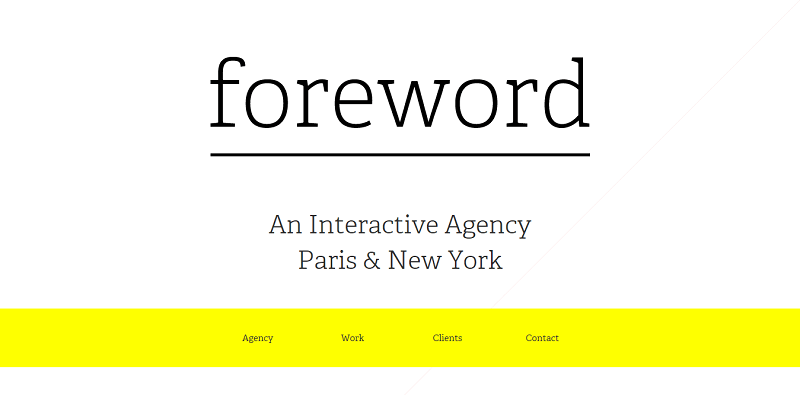
A chrome-free layout is similar to a minimalist design
Foreword
Foreword is one website that clearly makes use of the container-free/ no chrome layout. As you can see, its website has done away with the containers. With the use of colors and fonts, the attention of the users is focalized. Specifically, they bank on typography to provide the most important information about the company itself. On the other hand, the color is used to highlight the other clickable voices. There is no denying that this website is highly minimal, apart from, of course, being responsive.
There are some websites that have eliminated the use of the header and the footer at the same time. Such a move can make the website look like an interactive kiosk. In terms of hierarchy, the content can be done through a left-to-right arrangement. This can make the layout more intuitive. Obviously, there is no need for a chrome that will separate the content from navigation. As a result, the products stand out even more.
Great Way to Emphasize a Brand
If you remove the header and the footer, the brand that your website is promoting can be emphasized. The name of the company can be further highlighted and the statement on what your website does or offers can even be clearer to your visitors. Hence, your visitors are aware of your brand before they start to navigate it. It will make the overall flow of your website become more elegant.
You can easily achieve a neat and nice effect if you get rid of the distractions as you unobtrusively place the menus and links on the page that are devoid of containers. Additionally, if you have no borders, headers, and footers, the eyes will be more drawn to the subject of interest.
These days, the word chrome is no longer related to cars, but it is more identified with site and page design, particularly in reference to all of the headers, footers, containers, and borders that enclose a page. For many web designers, web layout designers, though, chromes are a distraction to the user and take away the focus from the very essence of a website, which can be the products or services that it offers, the photos and images associated with it, or the brand itself.
3. Modular or Grid Based
Each module of these designs is meant to flex based on the size of the screen. When you come to think of it, this isn’t really a new approach. However, since the introduction of responsive web design, the use of this layout design has even become more in demand, thanks to its usefulness. This suggests at the type of flexible layouts one can come up with, especially with the help of plugins like Masonry.
Websites That Have Embraced the Modular Layout
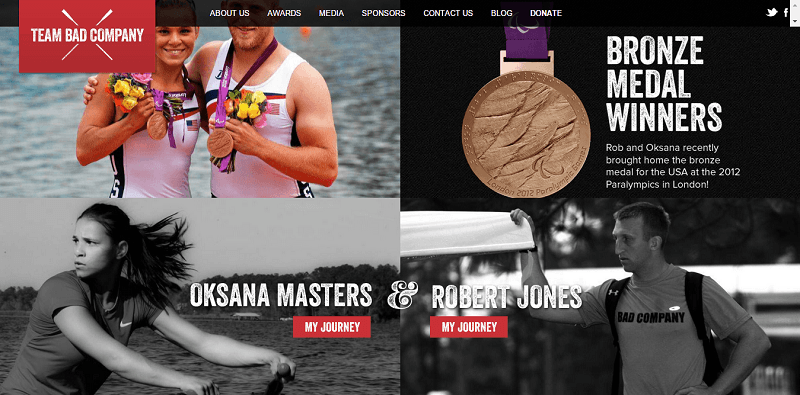
Team Bad Company is the perfect example of a modular website
1. Team Bad Company. Without question, this example perfectly exemplifies the idea as the design is totally responsive. Since space is divided evenly, the design adapts evenly, regardless of the device where it is viewed. What makes this website further interesting is that it introduces an element in larger screen sizes that disrupts the stiff barriers between the modules themselves.
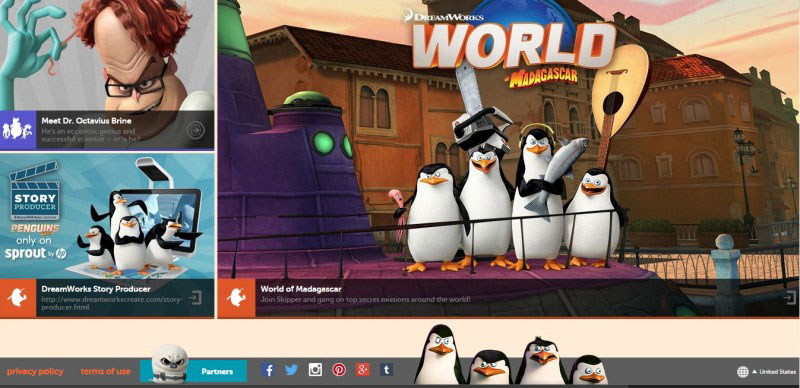
The layout modules are made of varying sizes
2. Madagascar Dreamworks. This example is a powerful description of the pattern. As compared to that of Team Bad Company, this layout features modules that are of varying sizes. You have to remember that the size of the modules is reflective of the importance and order of hierarchy. While it is true that modules of the same size have their own set of advantages, there is a risk involved in going for it, too; that is your website fails in making an emphasis to the major element.
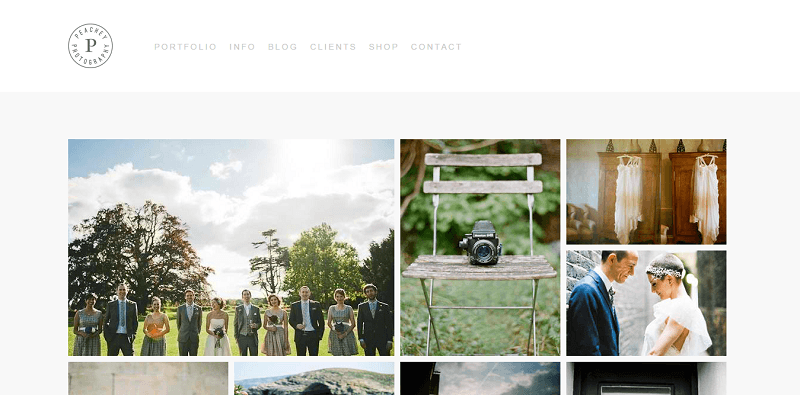
Clients can see the different amazing shots Peachey Photography can deliver
3. Peachey Photography. If your website is meant to showcase your creative works, there is no questioning that you should go for the modular type page layout. For instance, this photography website makes use of this layout. Not only does it make its potential clients aware of the many impressive shots that he had taken, it provides them the ease of navigation, too. The more you can display on one screen, the more potential clients you can entice to go for your products or services.
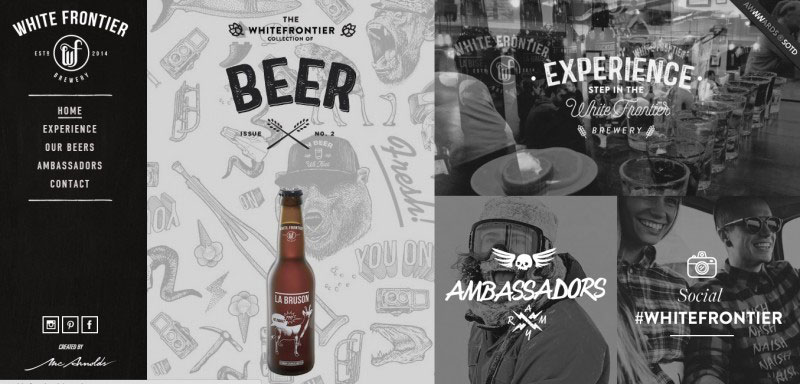
White Bear uses 5 different modules
4. White Frontier. This is another example of a website that has pulled off the use of modular layout. The page consists of 5 modules which are of different sizes. The biggest module, of course, bears the image that represents the products that they are selling. As you click on each module, you are taken to the different elements of the website.
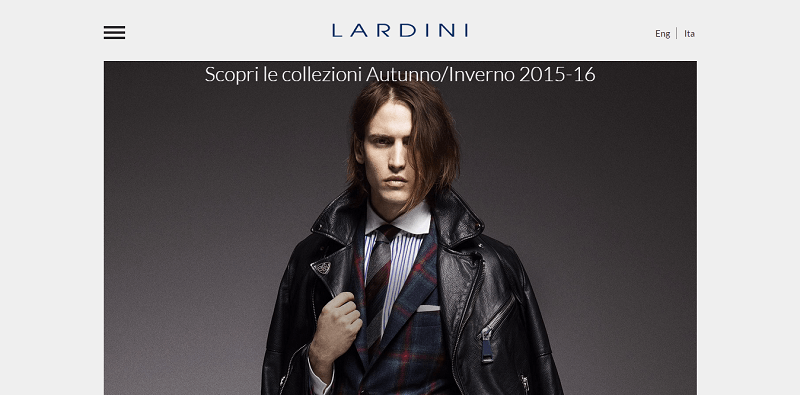
A modular layout is ideal for fashion-related websites
5. Lardini. Another website that has embraced the modular layout is Lardini. After all, it is a must for every fashion-related website to showcase groups of marvelous photos that can be easily viewed non-intrusively. Hence, the use of a modular layout is really apt.
Developers are familiar with employing a grid system as a solid foundation for their websites. Because of this, they can easily overcome the difficulties or issues that they experience when they do the prototyping. They don’t only develop it into a project, but they also get to be creative with it. Hence, they can offer interesting solutions that result to exemplary effects and trendy styles.
Modular layout, without question, is essential in maintaining harmony between the elements of a website as it effectively organizes the multimedia data. This results to a balanced structure that provides a great ease for users. Likewise, this type of layout improves the ease of use as it gives the users a simple and quick access to comprehensible pieces of information. This type of layout can help prevent chaos in presenting your content-intensive website. Although modules can sometimes be slightly disproportionate in terms of their asymmetrical balance, the modular layout is still capable of organizing and managing your documents rather effectively.
WordPress Themes for a Modular Layout
Should you decide to go for the modular or grid layout for your website, you can easily do so if you purchase the following WordPress Themes:
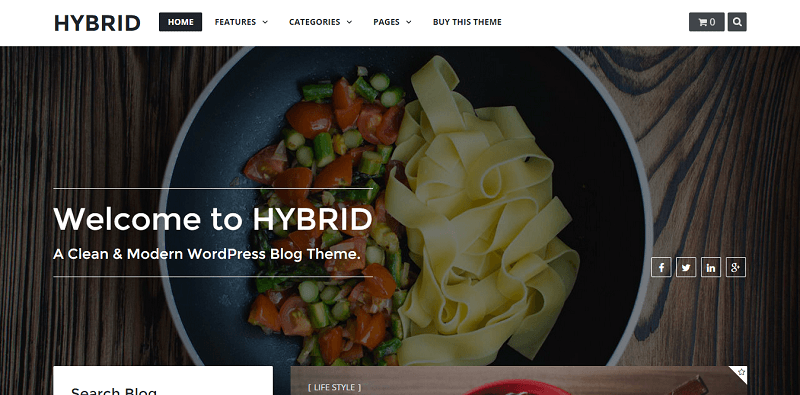
Hybrid has a clean and contemporary design
Hybrid. This is a clean & modern WordPress blog theme. Apart from being minimalistic, this theme is definitely clean and has a contemporary design. It is sure to leave your website users in awe. It is highly flexible, easy to customize, and is well-documented. This theme is perfect for blog, news, or an online shopping store. It boasts of numerous setting features, such as categories, layout, cover style, and sidebar. Furthermore, this theme is SEO-friendly.
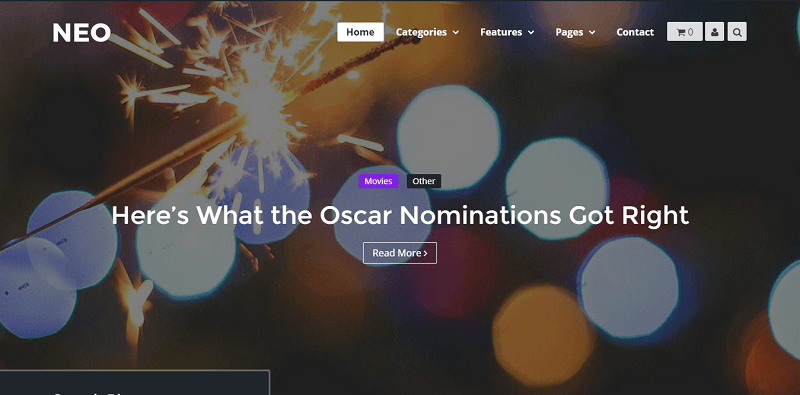
Neo supports 8 post formats
NEO. This is a modern personal WordPress Theme that will enable you to display your content in a new way. This is also readable in all devices. NEO supports 8 post formats and is equipped with the capacity to display images, videos, and audio. This is most ideal for a personal store, blog, portfolio, and journal.
4. Filling a Single Screen
This layout is a subset of the responsive design where the layout completely adheres to the screen size. This type of layout adapts to fill the whole screen, and the whole layout does not contain scroll bars. Since scrolling is not available, the focus is mainly on the content. A single screen features either an image or a video clip.
And now this question: Would you go for this filled single screen layout? Well, when you really come to think of it, since this type of layout makes use of the whole screen, the image or the video that you use will be highlighted even more. In the event that you opt to use large images, and you use a compelling one that best represents your business, those who visit your website will have a clearer idea as to what your website is all about.
The Advantages of an Image-Focused Single Screen
It is said that a picture can paint a thousand words. This adage may have been around for ages, and it still rings true even in this day of technological advances. According to psychology experts, the brain is faster by as much as 60,000 times in terms of processing images as compared to reading texts. Therefore, the probability of the potential clients to be enticed to go for the services or products that you offer is much higher if you use the filled single screen layout, whether you bank on a video clip or a large image. The more eye-catching the image or the video clip that you use, the higher the probability for you to bait in potential clients or customers.
The most interesting thing about a filled screen layout is that all the information that the users need is properly arranged. The information can be placed over a large background image, ambient video background, or full-width sliders. More often than not, websites that make use of the full-screen layout feature a burger menu or fly out.
WordPress Themes for Single Screen
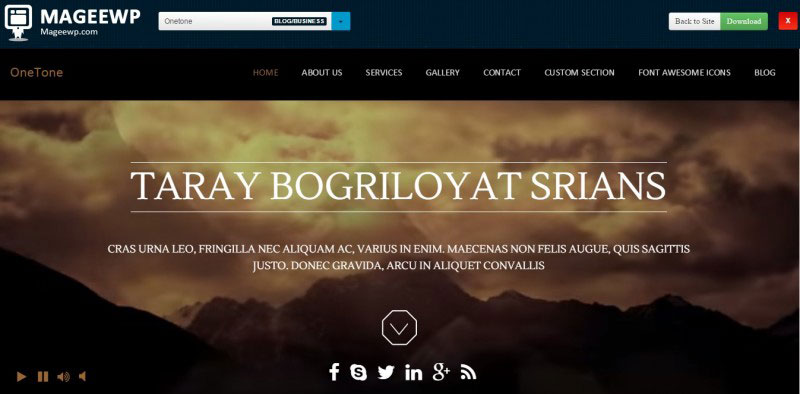
Onetone is a highly customizable business website
This WordPress theme is the most ideal for a business website. Apart from being modern, it is optimized based on CSS3 and HTML5. With this theme, your website can feature all the relevant information on a single page! You are also empowered to tweak every detail of your website. Since Onetone is highly customizable, you can apply all of your creativity to make your website even more enticing. It provides sections that you can commonly see on a professional business page such as gallery, about, clients, services, and many more. With the use of the versatile admin panel, you can add an unlimited number of additional sections, too.
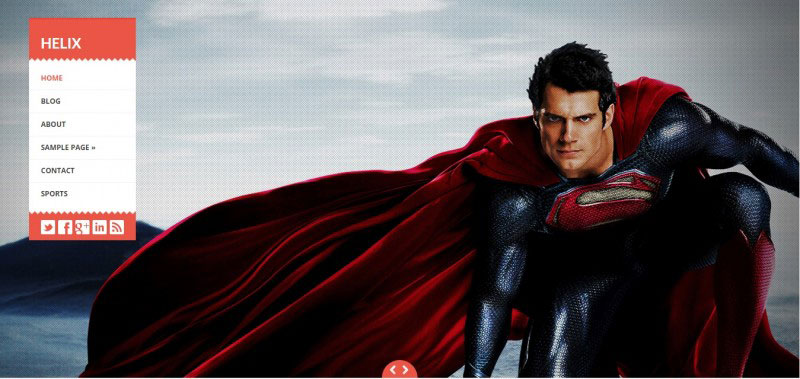
Helix is an amazing website template to build your personal portfolio
Helix is an amazing website template for building a personal portfolio style blog. Helix is a free full-screen WordPress theme with a flat style menu on its left side. Additionally, it is a WordPress 3+ ready theme that boasts of features such as custom menu, full-screen slideshow homepage, widgetized sidebar etc. Helix also comes with an intuitive options panel that makes it possible for you to adjust several settings existing on the theme. With its broad and expansive full-screen slideshow on the homepage, capturing the attention of your online visitors is, without question, highly probable.
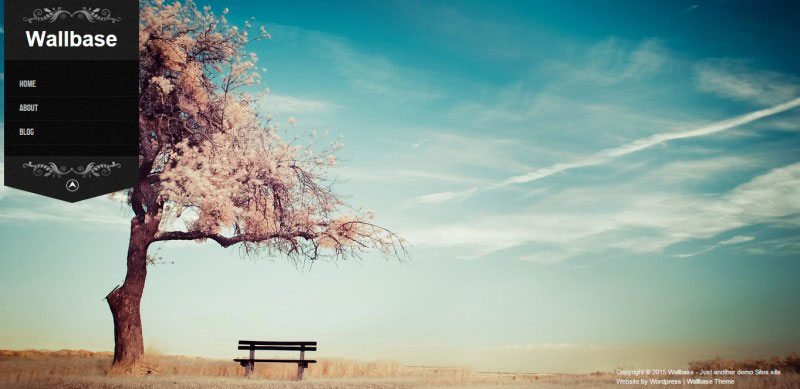
Wallbase a full-screen portfolio theme
This is a free full-screen slideshow portfolio theme that is most suitable for creating personal, photography, and wedding photography blog or website. Wallbase offers a very unique and fully functional layout that will surely make your content stand out. With its professional and modern look, your website visitors, especially your target clientele, will surely be captivated. This theme provides you an option to use a regular blog with image slideshow as the background or a full-screen slideshow. Since this theme is fully responsive, its width adjusts automatically, regardless of the device where your site is viewed. This impressive theme boasts of multiple page templates for various purposes, such as contact page, full-width page, and many more. Wallbase also comes with a custom background color, custom post types, and an ad management feature.
Conclusion
The above-discussed layouts can be likened to building blocks. Just like building blocks, they can be assembled in more ways than one. The truth of the matter is that many of the mentioned samples can be moved to other categories that have been discussed. The design layouts of 2015 are a clear demonstration of the fusion of diversity and experimentation that results to the blending of the traditional and novel ideas. Finally, gone are the days of predictable and monotonous web page layouts.
Now let’s see what are the reasons that your web design doesn’t rock.
40 Reasons Why Your Website Design Sucks
We all have or have heard about those clients from hell, those that really love pink pages with red text. Even worse, what about those people who call themselves “web designers” with expensive prices and services listed on their really messy, horrible and amateur portfolios, just because they made their uncle’s business page and they liked it. Unfortunately, many people believe that web design is all about personal style and smart IDE’s with pre-built buttons. Let me tell you something – they are wrong. I love to play football, but that doesn’t make me a professional player, and Dreamweaver does not make you a professional web developer.
Web Design and development demands knowledge, practice, daily effort to learn and study, and passion, like professional football players. (Design conventions: Necessary guidelines in order to improve a specific design.) No matter how good or bad personal style is, the truth is that everyone has one. However, when design conventions are left out of a project, the result will be a bad or uninteresting design. That is exactly what happens with those terrible clients, when they try to implement their personal style without knowing anything about design conventions.
1) Balance
Balance is a basic principle in design. It is directly connected to every element, and helps you control the design flow of your page. There are two important concepts in balance – symmetrical and asymmetrical balance. With Symmetrical Balance, elements have equal weight on both sides, leading to a formal and traditional web site, however, with asymmetrical balance, elements have a different weight which leads to a different and unique layout. I decided to include this topic because its importance is major in layout design. If incorrectly used, it can lead to the total ruin of your layout.
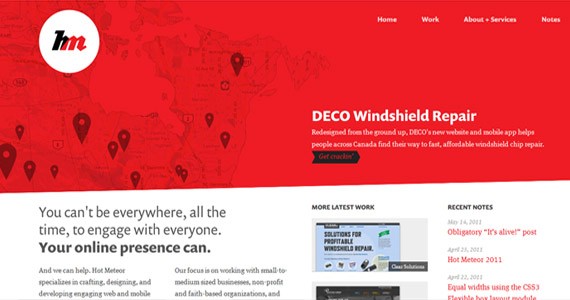
Above is a good example of asymmetrical balance. Did you notice the “DECO Windshield Repair” text on the right, and the background map image on the left? Although those elements do not have the same weight, it feels perfectly balanced. However, if you hide the text on the right, the page will lose its balance very quickly. Now take a look at the white bottom section, those three columns don’t have the same weight, but it’s perfectly balanced because the left text (“You can’t be everywhere…”) has equal weight as the top right text on the red background.
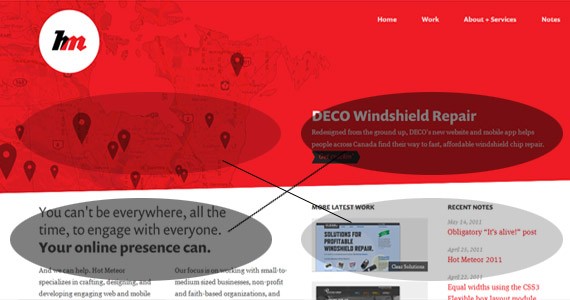
The result is a “cross balance”, meaning that the weaker and strong elements create a balance between them. I consider this to be of huge importance in asymmetric balance.
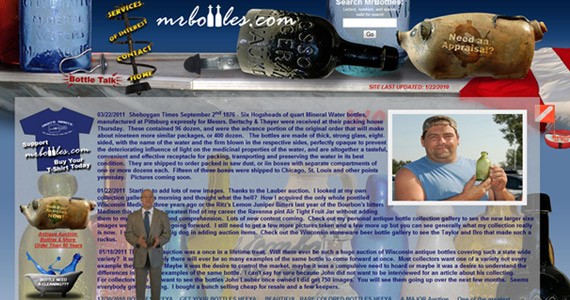
The website above fails in so many ways that I could use it as example in the remaining nine topics below, but let’s stay focused on this one. Do you feel the balance? Yes, you are correct, there is no balance. The left side has plenty of images plus a video of the person standing, which results in the left side having more weight than the image on the right.
2) Bevel and Emboss
I had to include this one. It’s really annoying to see the misuse of this layer style. For those who are starting, I understand that you think bevel and emboss is a nice effect and it should be everywhere on your page, but it’s not. Bevel effects should be used sparingly. There are plenty of tutorials on how to transform bevel and emboss into a powerful technique, but if you don’t know how to use it, don’t use it at all.
3) Distracting Backgrounds
Implementing a busy background distracts the user’s attention, hides important information, and disrespects visual hierarchy. If your background image has a higher visual impact than everything else, users won’t catch the message of your website and will leave quickly.
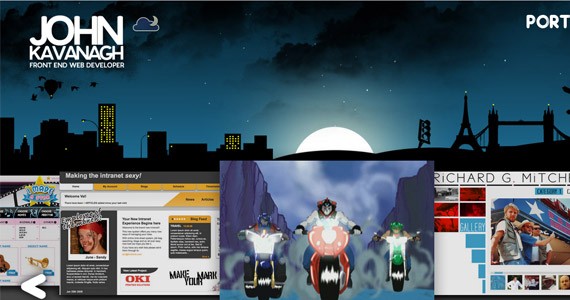
John Kavanagh’s website makes good use of background images, respecting visual hierarchy and also content information. Reading is left to right, and in this case, the user’s attention follows the buildings on the left towards the Eiffel Tower and London Bridge on the right, consequently leading to navigation (which is not visible in the image). This is a perfect example of how background can be used as a “tool” for design flow.
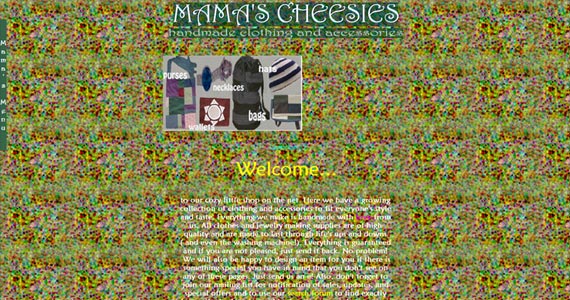
Above is a perfect example of what not to do with your background.
4) Lack of Detail
If your website sucks, it’s probably because you didn’t care about the minor things. When you think your design is complete, you need to start from the beginning and try to apply detail on every single element. As soon as you finish with detail, you need to start again and consider where it can be improved. A single stroke, light effect, or shadow makes the difference between a good and a great design.
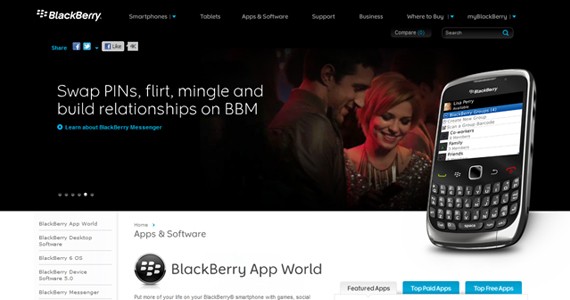
Blackberry’s website is a good example of what you can achieve by spending time with details.
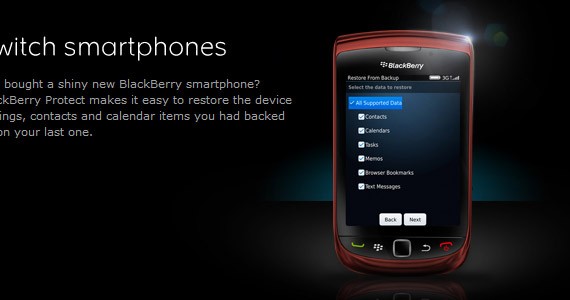
Detail, detail, detail.
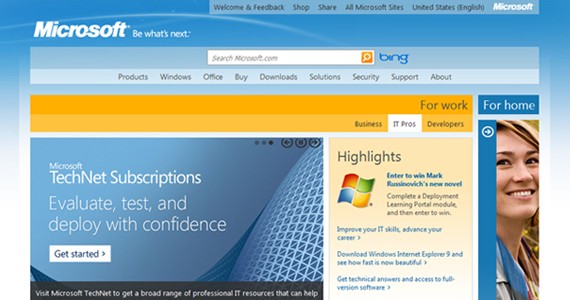
For a company with the size and impact of Microsoft, their website is far from great. It’s definitely a good example of lack of attention and detail.
5) White Space
White space refers to the space between elements, and it does have nothing to do with the color. If you don’t know what I am talking about, stop your design projects and read about this subject – How to Actually Use Negative Space As Design Element. White space defines the space/distance between your site elements, providing good readability, focus, and design flow. It also gives your website a clean and professional look.
Clean layout is not the same as minimalist, think about clean as the opposite of cluttered where content is all over the place. One other thing you should consider is to use the same height between elements, so if you have three divs vertically aligned, and the middle div is 50px from the top div, it should also be 50px from the bottom div. This is not mandatory, but helps you achieve a good balance between elements.
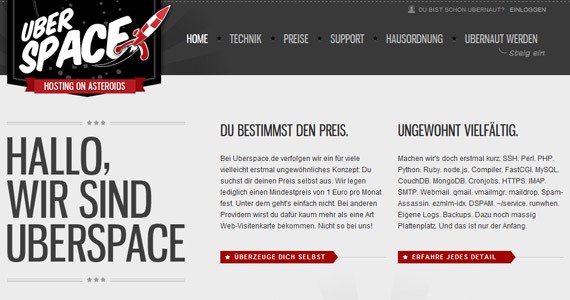
Uberspace’s website makes good use of white-space.
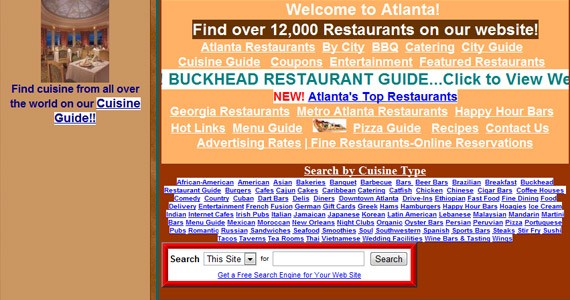
Just looking at the image above, gives me a headache. The quantity of information is overwhelming, but the way it is displayed is even worse. Cluttered information makes the user feel lost and unhappy. Avoid it!
6) Flash Intros
Once upon a time, having a flash intro in your website would make you a web design ninja. There are plenty of great intros out there, and plenty more of really bad attempts. Nowadays, most visitors want quick access to information and when you demand them to wait, they leave. If you want an intro in your website, make sure it has a point, it adds value and that it is well made.
7) Music
So I have my headphones on, I open several tabs, and suddenly I jump from the chair because irritating music starts playing. I then search for the correct tab and when I find it, I search for the mute button and guess what, there isn’t one. I don’t want to mute my speakers so I close the page and I won’t return to that loud place. Loud and boring music coming from your website is really annoying, but not having a way to shut it down, is an exit ticket from your website.
8) Tables
This is a controversial topic, some people defend the use of tables and others not so much. This topic is not meant to convince you not to use tables, but to use tables when and where you should. Personally, I do not remember the last time I’ve used tables, I simply don’t like it. However, for tabular data, tables are the best choice, since it increases readability and organization.
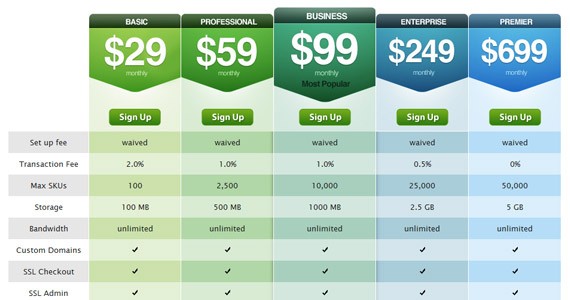
Shopify’s pricing page is a good example of how great the use of tables can be for tabular data.
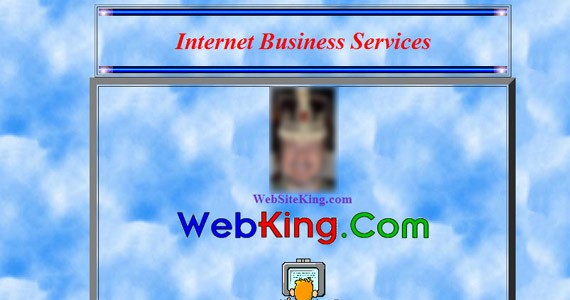
Never use tables to style your layout!
9) Colors
The wrong choice of colors can ruin an entire website. Contrast, saturation, types of colors, target audience, style, etc. There are many factors you need to consider when choosing the right colors for your website. If you don’t know where to start, Tina wrote a great article about this subject – Colors in Web Design: Choosing a right combination for your Website. Using too many bright colors, or a similar contrast for your background and foreground elements, or even warm colors along with cool colors, you are basically forcing your visitors to leave.
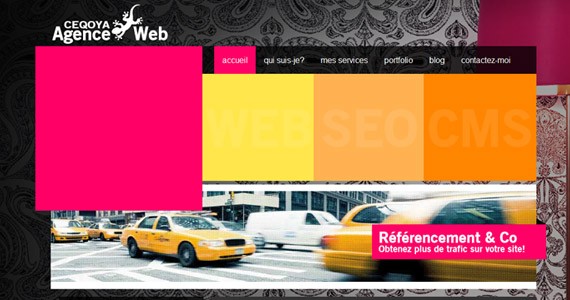
Color needs to fit perfectly, according to your target audience, style and personality.

If you enter the website above, please be sure to use sunglasses.
10) Overflow
Unless you’re building a website with horizontal layout, showing a horizontal scroll bar is a mistake and looks bad. Make sure your layout is optimized for a resolution of 1024 x 768 pixels, this way 98% of your visitors will be able to visit your website without problems. If you really want to use a bigger background image, be sure you hide the horizontal scroll bar, using the CSS property overflow-x: hidden.
11) Distracting Animations
A boring design does not bring light to your visitor’s eyes, however, having too much animation on your website brings plenty of downsides to your business. Distracting the user from the purpose of their visit ensures he doesn’t get the message and doesn’t return. If you plan to use animations on your website, make sure they are appropriate for the product you are selling or displaying. After that, make sure it is correctly balanced with your content, so in order to do that, you need to ask yourself three questions:
- What is the first thing you look at when you visit that specific page (animation or content)?
- How long it takes to view the entire animation?
- Can you read text easily while the animation is playing?
The answer to the first question will probably be the animation, if it’s not you have passed the test and your animation is not disturbing your visits. If the animation is the first thing you see, it means it has a bigger visual impact than your content, and you need to answer the second question. If the answer to the second question is “looping” or “too much”, you have a problem and the answer to the third question will be “no”.
So the rule is simple – the user can’t be distracted while he’s reading, so make sure your animation ends quickly or has a small visual impact.
12) Cross-Browsing
In a perfect world, there would be no IE, people would use the same web browser everyday, and web developers wouldn’t have headaches while coding their websites. However, in the real world, there are hundreds of web browsers and each one renders a website differently.
“Cross-browser refers to the ability for a website, web application, HTML construct or client-side script to support all the web browsers.”
When you start building your website, you simply can’t forget that it will render differently in Firefox than in Chrome or Internet Explorer. So in order to get consistent results on most popular browsers, you need to write clean code and follow the W3C standards.
13) Confusing navigation
Navigation should help the user to navigate your website. If it fails in that purpose, there is no point in calling it navigation. One thing I really hate about it is the need to search for a website’s navigation or the need to figure out how a navigation system works. If you don’t tell the user how to proceed to the next page, he leaves. Your navigation should be consistent, easy to find, and intuitive.
Another thing you should always try to do is to use text instead of symbols. Remember, never ask the user to think.
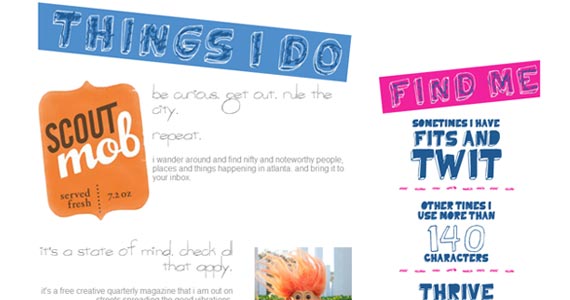
I actually like localwanderer.com’s design, however, there’s a problem with the navigation. The blue text on the right are buttons which can be tricky to identify as such. I had to move my cursor over those elements to figure out they had a little animation while the cursor is over them, telling me that those elements are indeed buttons. If you need to move your cursor over a button to confirm it’s in fact a button, it means your navigation is somehow confusing.
14) Bad use of themes
With the increasing popularity of market places, it’s possible to see more and more amazing themes with great design and functionality, and companies and individuals who buy them as soon as they see one they like. The problem appears when those themes are not suitable to the image of the company, or when they are incorrectly used. I have seen many companies turning great themes into ordinary designs. That amazing design doesn’t always fit that amazing brand, so be careful buying the best-seller theme on Theme Forest.
15) Labyrinth of information
Although this topic title may sound weird to you, it’s a really common mistake which I usually call the labyrinth effect, and in part, it’s also a problem related to usability. There are great websites out there with dramatic content problems. If the user has problems finding information, he will leave and won’t return.
Make sure your information is easily reachable. It is also extremely important to always provide your contact information on every page of your website, and to make sure the user can easily find it.
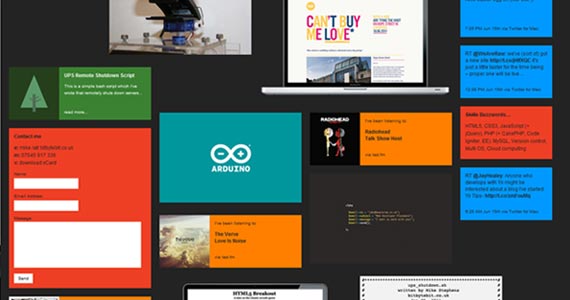
I really like bitbytebit’s design, but it clearly suffers from the labyrinth effect. Contact information is situated in the middle of the page, hidden among other information squares.
16) Image versus text
Typography is one of the most important elements in web design, and almost the only element that can be used both for aesthetics and text. However, its misuse can make your website bad for both the end-user and also for programmers and web designers. Make sure you choose a font that’s readable and suitable to your target audience, but you can’t also forget about the person who is in charge of the website maintenance. Using images to replace typography can be a huge mistake, especially in big projects or projects that won’t be updated by yourself.
17) Image Optimization
If your website takes too much time to load, you lose visits and probably profit. You already know that you simply can’t resize your image in Dreamweaver or Notepad, right? The image resolution will be smaller (or bigger) but the file size will be the same, so there is no point in resizing that way. You need to resize your image with image editing software like Photoshop or Fireworks. Resizing, however, is not enough – you also need to compress the image. Depending on the image, you should compress it as much as possible, until you start seeing image quality loss. You can compress it using JPEG, PNG or GIF format.
18) Clear Message
The crucial element of a website is the message that’s transmitted to the user which illustrates its purpose, telling the user what the website is all about. The message should be clear and immediately recognized by the user, as soon as he sees the site. One thing you should always have in mind is that the user simply doesn’t care about you or your website, they do care about fulfilling their desires and ambitions which is why they visit your site in the first place – to help the user with his mission.
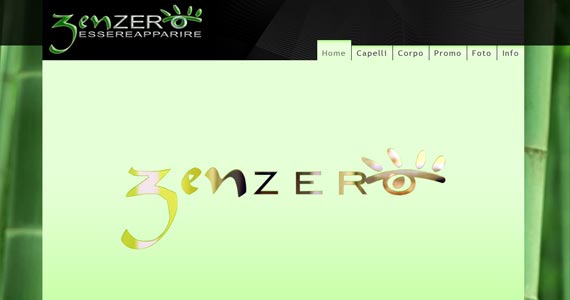
The example above fails to transmit a clear message, or any message at all. I need to click on another button to figure out what the website is about. Remember, the user doesn’t care about you, so if they find another brand with a clear message they won’t think twice to exit your website.
19) No Updates
This doesn’t really make your website suck, but it definitely helps. No one cares about a website that is extremely outdated and whose posts are from 2008. Remember that content is more important than aesthetics, so it is very important to keep your website updated as much as possible. If you have a beautiful website with no useful content, the user will leave and won’t return.
20) Full Dedication
Having a website with 20% of inactive functionalities transmits lack of confidence to the end-user. Building a website requires full dedication and attention from your end. Most of us have an “update list” for each website, where we write that during the next week, the 404 Error Page, or the widget discussed during the first meeting needs to be online. After two weeks, you realize you didn’t have the time to do it, because you are now with three more projects in hand, and you also noticed that you have yet to finish some minor details in your online portfolio.
Organization is important, but without dedication it loses its value. When you finish a website, try to also finish every item on your “update list”.
This post may contain affiliate links. See our disclosure about affiliate links here.